DD
MM
YYYY

PAGES

DD
MM
YYYY

spot_img

PAGES

Home Blog Page 3334

Free Data Recovery Software – MyRecover & Reviews

0

MyRecover is a free data recovery software that is suggested for individuals confronting data misfortune circumstances, for example, accidental deletion, disk formatting, virus infection, and so on. Memories are made as we go about our daily lives. Keep in mind that having a camera or mobile phone is not expensive. Many of us store these images on our computers for a variety of reasons, such as to save space or protect our privacy.

Albeit this might appear to be smart, yet there is generally a gamble. To accidentally delete these photos from the saved hard drive, be that as it may, it can prompt enormous issues. So, how can we get our lost photos back?

Recovering from a backup is the obvious option. However, this approach is pointless if you do not routinely create backups. Yet, there is not a glaringly obvious explanation to be apprehensive. You can likewise depend on a free data recovery software like MyRecover.

We should plunge further into this product and test it to check whether it can proficiently recover deleted photos on a Windows 10 PC.

How can MyRecover assist?

MyRecover is a dependable Windows data recovery software developed by AOMEI Tech that has a large global user base. A free Windows programming permits you to recover deleted or lost files effectively and rapidly in different misfortune circumstances, which has a high success rate.

To empower you to all the more likely figure out this product. We have compiled a list of benefits and drawbacks for your information:

Benefits

  • Offers free data recovery for files up to 500 MB. Its intuitive user interface makes it accessible to even novices.
  • Utilizes advanced scanning strategies to improves your chances of successfully locating recoverable files and recovering them without losing quality.
  • During the scanning process, it provides options for preview, search, filter, and recovery.
  • Adaptable to a wide range of storage options, including HDDs, SSDs, USB drives, SD cards, digital cameras, and more.
  • Supports more than 200 file types, such as documents, images, videos, audio, compressed files, and web pages, among others.
  • Works well with Windows 7, 8, 10, 11, and Windows Server 2012, 2016, 2019, 2022, and other Windows operating systems.

Drawbacks:

As of now just Windows systems are upheld.

Steps and outcomes of the test for MyRecover

Let’s get started with the test now. You see every one of the tests. Counting the speed capability and generally speaking recovery rate. Before we continue, we download this free recovery programming from the authority site and introduce it on our PC.

During the test, we deleted two PNG pictures utilizing the Shift + Delete keys to make the data recovery process more difficult. After that, we launch MyRecover and see a list of all available hard drives. We choose the drive to scan that contains the deleted files.
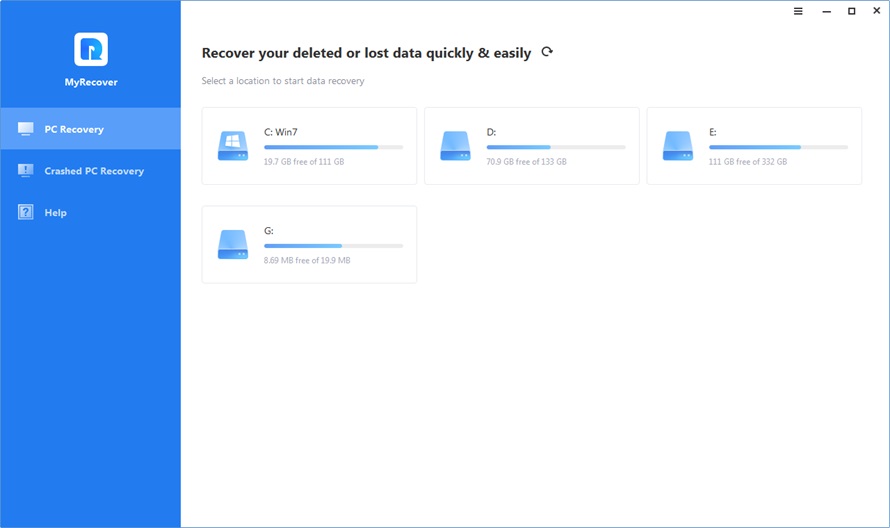
The software performs a quick scan first, then a thorough scan to locate all of the hard drive’s recoverable files. Impressive is the quickness of the scanning process, which scans approximately 100 kilobytes of data in just five minutes.

By typing “.png” into the search box and selecting the image file type from the filter options to locate deleted files quickly. We can also use the search and preview functions. We will diminish your pursuit. If we have this information, we may also specify the date modification or file size.
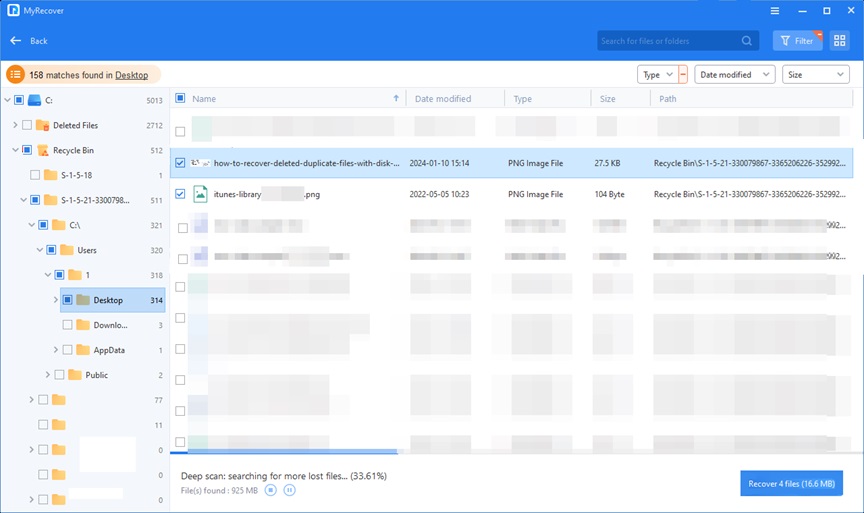
After we have affirmed the two deleted PNG pictures, we select them and snap on the “Recover” button to check in the event that MyRecover can save them or not. The software then prompts us to pick a location for the restored files.

Following a couple of moments, MyRecover shows a message that the file recovery was effective, and we confirm this by really taking a look at the recovery path. It is important to note that the software also preserves the original folder structure and guarantee that the recovered images will not lose their quality.

In End

Altogether, MyRecover found and recovered two deleted PNG pictures in practically no time. If you lose data, like photos, videos, audios, documents (e.g. recover WPS file), etc., try this software! It applies to different misfortune situations, such as accidental deletion, disk formatting, and more.
How to Recover Deleted Files from USB without Software

0

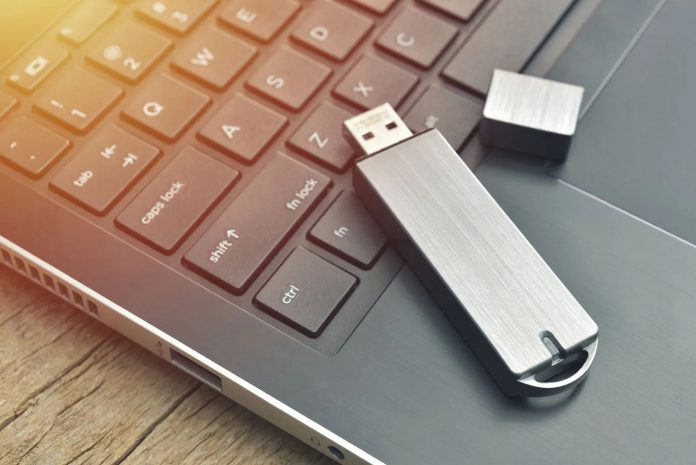
Recovering deleted files from USB without using software is a common concern for many users. We all know how valuable these files are. And losing them can be a real headache. Whether it’s because of a virus attack or accidental deletion. File loss is something we all want to avoid. Luckily, the good news is that you can recover lost files and important information.

But here’s this: You don’t always need special software to recover erroneously deleted files from USB flash drives. Contrary to common belief, there are ways to restore these files without relying on file recovery software.

Can You Recover Permanently Deleted Files from USB without Software?

Now you may wonder whether it is possible or not to recover deleted files from USB without software. The answer is, yes. When files are erased, the area they use on USB drives will be marked as new. However, delete items are not removed immediately. If you understand this concept, you can recover the delete files.

One option is to check your computer’s trash or recycling tank. If you delete files from your USB drive while it’s connected to your computer, there’s a chance that these directories may still have them. The other option is using the “previous generation” feature that exists in various operating systems. This feature allows you to recover data that’s lost from a trash or a recycled tank. Also, Windows File Recovery is a tool that can help you recover the contents of USB drives.

It is worth noting that the way these manuals have their limitations. They work best for recently deleted files as USB drives may have been overused and overwritten since then.

Now let’s get to how you can recover deleted files from USB with or without software. Here are several effective ways:

Method 1: Recover USB through the “Recover Previous Version” feature.

You can use this method without using any additional tools to recover deleted files from USB. Before trying this step, make sure the file history is set to automatically back up your files.

  • Connect the USB flash drive and turn on “This PC” from the Start Menu.
  • Right-click on the USB drive and select “Properties” from the list.
  • Go to the “Previous” tab to explore other recovery options.
  • Click “Restore” and select the previous version to recover the file.

Method 2: Use Windows File Recovery to recover deleted files from USB

Windows File Recovery is a useful application for Windows 10 version 2004 and above. It allows you to recover items you deleted from any USB drive.

  • Get Windows File Recovery from Microsoft Store
  • Messages of your USB drive before connecting to your computer
  • Open Command Prompt (CMD) in admin mode
  • Enter “winfr E: C: /extensive” (replace “E:” with the drive letter of your USB and “C:” with the drive letter of the storage device where you want to save the recovered files).
  • Windows File Recovery will start the process and try to recover lost files.

Method 3: Recover removed files from USB using WinfrGUI

WinfrGUI is a powerful data recovery freeware for Windows 10 and 11, which can recover damaged files quickly and easily.

  • Install WinfrGUI on your Windows 10/11 computer
  • Open the software and start the scan.
  • View the scanned files before proceeding.
  • Select the file you want to recover and click on “Recover”.
  • Select a location to store the received and completed process.

Method 4: Recover removed files from USB using CMD (Command Prompt) without software.

Using command line language in Windows, you can recover deleted data from USB drives. However, this method requires familiarity with command lines and may not guarantee the recovery of all delete files.

  • Connect your PC to a USB flash drive and start the program using the Win + R buttons.
  • In the dialog box, type “cmd” and click OK to open Command Prompt.
  • Execute the following commands in the specified order:
  • chkdsk X: / f (replace “X” with the assigned drive letter of your USB flash drive).
  • Properties -h-r-s G:*.* /s /d (replace “G” with the letter that represents your USB drive on the computer).
  • When the process is complete, check the recovered data on the flash drive.

It is important to note that USB drives are not designed for long-term file storage, even though they will store data for many years. In order to ensure that important information is secure. It is always a good idea to have a backup plan.

Conclusion

In conclusion, you do not need software to recover data from USB drives. By following the methods mentioned above, you can increase your chances of receiving valuable data. Do not forget to do it quickly and carefully when deleting data to increase your chance of successful recovery.

Preview and Transfer Photos from PC to iPhone Easily

0

Why Do You Want to Transfer Photos from PC to iPhone?

People often store photos on various devices such as computers, cameras, and mobile phones. You might need to transfer photos from your PC to your iPhone when you get a new device, after editing them on your computer, or when you want to transfer downloaded images from websites to your iPhone.

However, due to system limitations, moving files between an iPhone and a Windows computer can seem complicated. But don’t worry, I’ve found a very simple method that lets you selectively transfer photos from your computer to your iPhone.

Preview & Selective to Transfer Photos from PC to iPhone

I have a lot of pictures on my computer, so I want to preview and selectively transfer some of them to my iPhone. I was using iTunes or iCloud before to move files from PC to iPhone. However, these methods can be slowly and cumbersome when transferring a large number of files or I forget my Apple ID.

In such cases, FoneTool offers the simplest steps to get the job done easily. The first time I used FoneTool to transfer my iPhone photos, I was amazed by its performance. Unlike the conventional methods I had tried before, FoneTool transferred 100 high-quality photos in just 2 seconds. This rapid transfer speed was incredibly useful, especially when I was in a hurry!

Below I list more highlights of this iPhone transfer tool:

  • Preview and Selective Transfer: Allows you to preview data such as videos, contacts, photos, music, and messages before transferring them to your iPhone.
  • Transfer All Desired iPhone Photos: It can scan all photos on your computer, including those in the different local folders.
  • High Transfer Speed: Whether it’s a lot of files or large files, FoneTool helps you transfer quickly, without Apple ID restrictions.
  • Multiple Transfer Functions: Supports transfers from iPhone/iPad to computer, iPhone to iPhone/iPad, and vice versa.
  • Professional and Safe: Utilizes specialized USB network-free transmission technology to prevent privacy leaks through wireless transmission.
  • Maintain Original Photo Quality: Ensures that the photos transferred to your PC are saved without any loss of quality from your iPhone.
  • Wide Compatibility: FoneTool supports iPhones, iPads, and iPods, and is compatible with the latest iOS versions.

Simple Steps to Transfer Images from Computer to iPhone

No matter how much data you want to transfer, now you can follow the steps below to transfer files from PC to iPhone by using FoneTool. The following are simple steps for selectively transfer photos, but these steps also apply to sending other files from computer to iPhone, like transferring music from Windows 10 to iPhone.

Step 1. Use a USB cable to connect the iPhone to the PC > Install and open FoneTool.

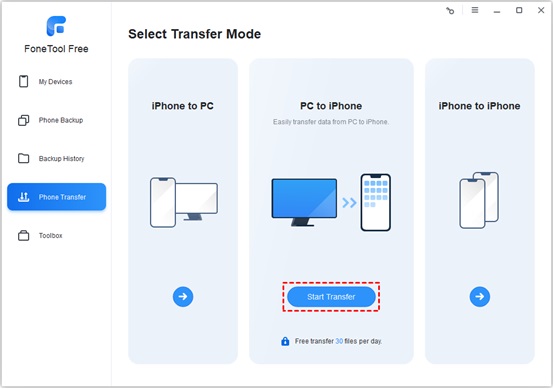
Step 2. Choose Phone Transfer on the left panel > Move the mouse to choose the PC to iPhone option > Tap Start Transfer.

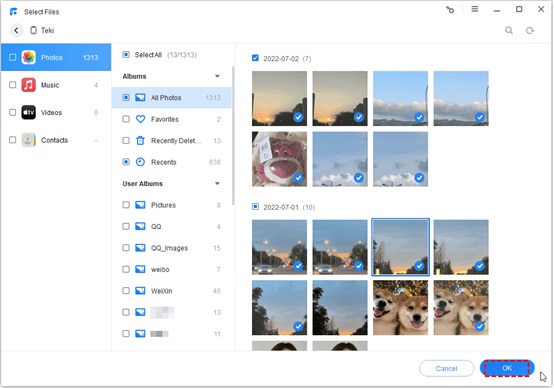
Step 3. Click the + icon to preview and select the pictures that you want to send to your iPhone (You can check Select All if you prefer to move all pictures) > Then tap OK.

Tip: In addition to the photos, you can also choose to transmit music, contacts, videos, messages, etc. Just need to click the corresponding button to easily complete the transmission task.

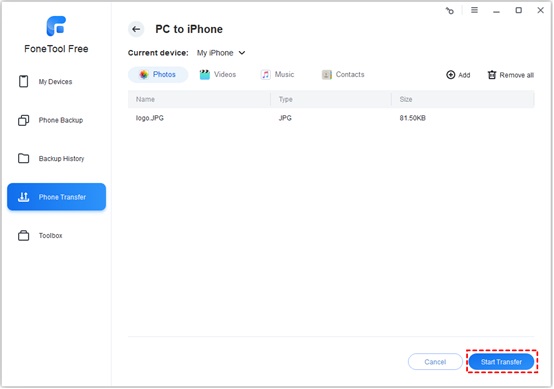
Step 4. Click Transfer Settings section > Decide a storage location to save the photos > Click the Start Transfer to begin the process.

Tip: FoneTool supports all kinds of image formats, including .jpg .png .gif .heic .jpeg .bmp .tif .tiff .crw .raf .cr2 .cr3 .kdc .mrw .ptx .pef .nef .orf .dng .arw .x3f .rw2.

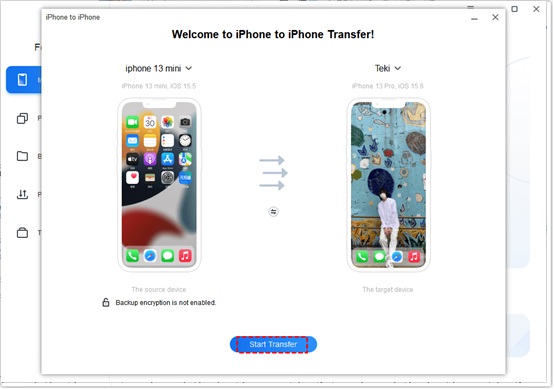
In addition, FoneTool offers an iPhone to iPhone transfer feature that allows you to send everything from your old iPhone to your new iPhone with just one click. Simply connect both iPhones to your computer > Go to Phone Transfer > Select iPhone to iPhone, and follow the on-screen instructions.

More, above all, this device will help create magical living room canvas wall art photos prints where desired.

Conclusion

That’s all about how to transfer photos from your computer to iPhone. FoneTool allows for selective photo transfers, offering a simpler and quicker way to share files between your iPhone and PC. You can preview your pictures before transferring them. Additionally, its convenient features make it easy to transfer photos from one iPhone to another.

Wave of Unsung Africapitalism Spurring in Africa

0

The African continent, with its diverse cultures and economies, is experiencing a unique wave of capitalism that is largely unsung in the global narrative. This new wave is characterized by a blend of traditional capitalist values and a deep understanding of local contexts and needs. It’s a capitalism that is not just about profit but also about creating social wealth and aligning with the continent’s development needs.

The concept of Africapitalism, coined by Nigerian banker and entrepreneur Tony Elumelu, encapsulates this movement. Africapitalism is an economic philosophy that emphasizes the private sector’s commitment to Africa’s economic transformation through investments that generate both economic prosperity and social wealth. It’s a call to action for African businesses to play a pivotal role in the development of the continent, not just for their own success but for the upliftment of the societies in which they operate.

However, the journey of capitalism in Africa has not been without its challenges. The type of capitalism introduced by colonialists was not always aligned with the needs of Africans, often being driven by external agendas focused on exploitation for profit. This has led to a call for a rethinking of capitalism in Africa, to ensure that it serves the collective interests of its people rather than just individual or foreign entities.

One of the most prominent examples of Africapitalism in action is the Tony Elumelu Foundation (TEF). Founded in 2010, the foundation has been instrumental in promoting entrepreneurship across Africa. Through its Entrepreneurship Programme, TEF has empowered thousands of entrepreneurs with training, mentorship, and funding, contributing significantly to economic development and job creation.

Another example is the Ugandan agribusiness company Good African. This company exemplifies the Africapitalism ethos by striving to create financial and social wealth for all stakeholders, not just shareholders. Good African connects local coffee farmers directly with international markets, ensuring fair prices and reinvesting profits into community development.

The feasibility of this reimagined capitalism in Africa is being explored through various studies and discussions. One such study involves a partnership between nine universities, focusing on the role of business leaders, investors, and entrepreneurs in the continent’s development, particularly in countries like Cote d’Ivoire, Kenya, Nigeria, and South Africa.

The failure of traditional capitalist models in Africa to deliver inclusive development has sparked a debate on the need for a new approach. This approach must consider the unique political, economic, and social contexts of African nations. It must foster a capitalism that is productive, sustainable, and beneficial to all, rather than the non-productive forms that have been prevalent.

Governments and legislators in African nations are encouraged to act as enablers of capitalism, supporting free market competition, private ownership, and investment while ensuring that these mechanisms contribute to the broader social good.

The wave of unsung capitalism in Africa is a testament to the resilience and innovation of its people. It represents a hope for a future where economic systems are not just imported and imposed but are homegrown and tailored to the specific needs and aspirations of the continent. It’s a future where capitalism in Africa is not just a means to an end but a driver of genuine progress and prosperity for all its inhabitants.

US Elections in 2024 To Affect Crypto Policies

0

As the 2024 United States elections approach, cryptocurrency has emerged as a pivotal policy issue, capturing the attention of voters, policymakers, and presidential candidates alike. The integration of digital assets into the political arena signifies a transformative period in both finance and governance, reflecting the growing importance of cryptocurrency in the public discourse.

The return of Carole House, a former crypto advisor, to the White House as a cybersecurity advisor underscores the administration’s focus on digital assets ahead of the elections. This move signals a recognition of the need for expertise in an area that is becoming increasingly relevant to national security and economic policy.

The crypto industry has also demonstrated its political clout, with key election primaries revealing voter interest in candidates who hold crypto-friendly views. This trend is indicative of the broader shift towards a more nuanced understanding of cryptocurrency’s role in the economy and its potential to influence legislative outcomes.

A report from POLITICO highlights the “huge moment” for the crypto industry, with recent legislative victories showcasing its growing influence in Washington. The bipartisan support for crypto-friendly legislation suggests a shift in the political landscape, with traditional party lines being redefined by the emerging digital economy.

The intersection of cryptocurrency and politics is poised to shape the next US presidential election significantly. Candidates’ stances on crypto regulation and blockchain innovation could sway voters, especially as digital currencies gain mainstream traction. The acknowledgment of cryptocurrencies by presidential campaigns reflects the inevitability of digital assets becoming a fixture in political strategy and policy formulation.

The crypto industry’s influence is evident in the political arena, with significant financial contributions to campaigns and the strategic positioning of candidates on crypto policies. Former President Donald Trump’s acceptance of campaign contributions in crypto and his efforts to align with the industry reflect a broader trend of politicians recognizing the potential of digital assets.

On the other side of the political spectrum, Democrats are also grappling with the implications of cryptocurrency on their policy platforms. The approval of Bitcoin and Ether spot exchange-traded funds (ETFs) and the growing investor interest in digital currencies are forcing presidential candidates to consider the impact of crypto policies on their electoral prospects.

The debate over cryptocurrency regulation is not just a matter of financial policy but also a reflection of broader ideological divides within the political parties. The stance of candidates on issues such as central bank digital currencies (CBDCs) and blockchain innovation could sway voters who are increasingly aware of the potential of cryptocurrencies as both an investment and a hedge against inflation.

As the 2024 elections draw nearer, it is clear that cryptocurrency will be more than just a policy issue; it will be a symbol of the evolving relationship between technology, finance, and governance. The candidates’ positions on crypto regulation, their engagement with industry leaders, and their ability to navigate the complex landscape of digital assets will be critical factors in their campaigns.

The intersection of cryptocurrency and politics is poised to redefine campaign strategies and potentially alter the outcome of the elections. With the industry’s growing clout and the electorate’s heightened interest in digital assets, the 2024 US elections may well be a turning point in the integration of cryptocurrency into the fabric of American political and economic life.