DD
MM
YYYY

PAGES

DD
MM
YYYY

spot_img

PAGES

Home Blog Page 874

U.S. Treasury’s Decision To Remove DeFi Broker Reporting Rules Is A Landmark Win For The Crypto Industry

0

According to Bloomberg, the U.S. Treasury Department has officially scrapped crypto broker reporting rules (TD 10021, RIN 1545-BR39) that would have required decentralized finance (DeFi) platforms to report customer transaction data to the IRS. These rules, initially set to take effect in 2027, were repealed by Congress under the Congressional Review Act, with President Trump signing the resolution in April 2025.

The decision is seen as a significant win for the crypto industry, particularly for DeFi, as it reduces compliance burdens and supports innovation by excluding decentralized platforms from broker reporting requirements. Custodial exchanges like Coinbase remain subject to reporting, but DeFi protocols and front-end developers are now exempt.

Exempting DeFi platforms from IRS reporting requirements reduces operational and compliance costs, allowing developers to focus on innovation. This could accelerate growth in DeFi, which relies on decentralized protocols and smart contracts, fostering new financial products and services. DeFi platforms can now operate with less fear of regulatory overreach, potentially attracting more developers and users to the ecosystem.

The decision creates a clear distinction between custodial platforms (e.g., Coinbase, Binance), which must still comply with IRS reporting, and non-custodial DeFi platforms, which are exempt. This reinforces a regulatory divide where centralized entities face stricter oversight, while decentralized ones gain more freedom. Custodial exchanges may face competitive disadvantages due to higher compliance costs, potentially pushing some users toward DeFi alternatives.

The IRS loses visibility into DeFi transactions, complicating efforts to track taxable events like capital gains. This could lead to increased tax evasion risks, prompting future regulatory efforts to address gaps in enforcement without stifling innovation. The Treasury may need to explore alternative methods, such as wallet-level reporting or blockchain analytics, to monitor DeFi activity.

The repeal, signed by President Trump in April 2025, signals a pro-crypto stance, aligning with industry advocacy from groups like the Blockchain Association. This could embolden further lobbying for crypto-friendly policies. However, it may deepen tensions with regulators and lawmakers who prioritize consumer protection and anti-money laundering (AML) measures, as DeFi’s pseudonymity raises concerns about illicit activity.

The U.S. move could pressure other jurisdictions to relax DeFi regulations to remain competitive, potentially leading to a global race for crypto-friendly policies. Conversely, stricter regimes (e.g., EU’s MiCA framework) may contrast with the U.S. approach, creating a fragmented regulatory landscape for global crypto businesses. Custodial platforms like Coinbase remain subject to broker reporting rules, requiring them to collect and report user data (e.g., Form 1099).

This creates a compliance burden, potentially alienating privacy-focused users. Non-custodial DeFi protocols, lacking a central entity, are now exempt, reinforcing their appeal as privacy-centric alternatives. This could drive user migration from centralized to decentralized platforms, intensifying competition. Crypto advocates celebrate the repeal as a victory for innovation and individual freedom, arguing that DeFi’s decentralized nature makes traditional broker rules inapplicable.

Regulators and critics, however, worry about reduced oversight, citing risks of tax evasion, money laundering, and investor harm in DeFi’s largely unregulated space. This divide may fuel ongoing debates over how to regulate decentralized systems. The repeal, backed by a Republican-led Congress and President Trump, reflects a pro-business, deregulation agenda. Democrats and consumer protection advocates may push back, arguing for stronger safeguards, highlighting a partisan split on crypto policy.

This political divide could shape future legislation, with crypto becoming a wedge issue in U.S. politics. Retail users benefit from DeFi’s lower barriers and privacy but face risks from scams and volatile markets without regulatory protections. Institutional investors may prefer centralized platforms for compliance and security, deepening the divide between retail-driven DeFi and institutional crypto adoption.

The Treasury’s decision to remove DeFi broker reporting rules is a landmark win for the crypto industry, particularly DeFi, fostering innovation and user privacy. However, it widens the regulatory gap between centralized and decentralized platforms, complicates tax enforcement, and fuels debates over balancing innovation with oversight. The divide between pro-crypto advocates and regulatory hawks will likely intensify, shaping the future of U.S. crypto policy and its global influence.


A Look At Strategy’s Unrealized Bitcoin Gains

0

Strategy reported $14.05 billion in unrealized Bitcoin gains for Q2 2025, with a total of 597,325 BTC valued at approximately $64.36 billion as of June 30, 2025. This reflects a $22 billion unrealized profit based on a $42.4 billion investment. Some posts on X suggest unrealized gains could be as high as $21.3 billion to $23.8 billion, driven by Bitcoin’s price surge to around $106,000–$109,000.

Strategy’s Bitcoin holdings, acquired at an average price of $70,982 per BTC, have benefited from Bitcoin’s rally. However, the company faces risks like potential taxes on unrealized gains (e.g., CAMT starting in 2026), $8.24 billion in debt, and a cash-flow-negative software business. The $24 billion figure may reflect a temporary spike in Bitcoin’s price or an unverified estimate.

Unrealized gains of $24 billion significantly enhance Strategy’s balance sheet, with its 597,325 BTC valued at approximately $64.4 billion against a $42.4 billion cost basis. This reflects a successful bet on Bitcoin as a treasury asset, potentially increasing investor confidence. The adoption of FASB’s ASU 2023-08 in January 2025 allows Strategy to report Bitcoin at fair market value, recognizing unrealized gains in net income. This contrasts with earlier GAAP rules, which only recorded losses unless assets were sold, making Strategy’s financials more transparent but also more volatile but higher-yielding markets.

The gains bolster Strategy’s ability to raise capital through equity and debt offerings (e.g., $4.2 billion ATM offering in Q2 2025) to fund further Bitcoin purchases, reinforcing its aggressive acquisition strategy. Strategy’s massive unrealized profits underscore its role as a pioneer in corporate Bitcoin adoption, potentially encouraging other companies to follow suit. Over 150 public firms held Bitcoin by June 2025, up from 64 in 2024, partly inspired by Strategy’s playbook.

Strategy’s stock (MSTR, STRK, STRF, STRD) is increasingly viewed as a Bitcoin proxy, with its market cap ($105.28 billion) trading at a 70% premium over its BTC holdings ($62.6 billion). This could amplify stock price volatility tied to Bitcoin’s price movements, attracting speculative investors but also raising concerns about overvaluation. Large-scale holdings and potential sales by Strategy could influence Bitcoin’s price. The company’s SEC filings note liquidity risks, as liquidating significant portions of its 597,000 BTC without disrupting the market is challenging.

The Inflation Reduction Act’s Corporate Alternative Minimum Tax (CAMT), effective from 2026, could impose a 15% tax on unrealized Bitcoin gains, potentially costing Strategy billions. This could force sales of Bitcoin to cover tax obligations, undermining its long-term holding strategy. Strategy is lobbying to exempt unrealized crypto gains from CAMT. Strategy faces class-action lawsuits alleging misleading disclosures about the risks of its Bitcoin strategy and the impact of new accounting standards. These legal challenges could erode investor trust and lead to financial penalties.

Strategy’s software business generates modest revenue (~$112.8 million in Q2 2025), dwarfed by its Bitcoin gains. This imbalance highlights reliance on crypto volatility, with the cash-flow-negative software segment potentially limiting operational flexibility. Strategy’s $8.24 billion debt and frequent equity offerings (e.g., $21 billion ATM in Q1 2025) to fund Bitcoin purchases increase financial leverage and shareholder dilution risks. A Bitcoin price crash could strain cash flows, forcing asset sales or refinancing at unfavorable terms.

Bitcoin’s high volatility (44% implied, 48% historic) means the $24 billion gains could vanish quickly in a bear market, as seen in Q1 2025 with a $5.9 billion unrealized loss when Bitcoin slumped 12%. This underscores the high-risk nature of Strategy’s strategy. Strategy’s gains reinforce Bitcoin’s appeal as a corporate treasury asset, potentially driving further institutional inflows into Bitcoin ETFs ($15 billion in 2025) and pushing prices toward projections like $150,000 by 2026 or $200,000 by 2030.

A sudden Strategy sell-off, whether due to tax obligations or a market downturn, could trigger a broader crypto market crash, given its 2.74% ownership of Bitcoin’s total supply. This concentration raises concerns about market stability. Strategy’s success has spurred over 250 companies to adopt Bitcoin treasury strategies by June 2025, amplifying corporate demand but also raising questions about market concentration and sustainability.

Strategy’s 2025 BTC Yield target (25%) and BTC $ Gain target ($15 billion) reflect confidence in continued Bitcoin appreciation. Achieving these could further solidify its position as a “Bitcoin Treasury Company,” but missing them due to market downturns could damage credibility. Strategy’s gains are tied to Bitcoin’s role as a hedge against inflation and currency devaluation. However, macroeconomic factors like rising interest rates or geopolitical tensions could suppress risk assets like Bitcoin, impacting Strategy’s financial health.

Strategy’s reported $24 billion unrealized Bitcoin gains highlight the success of its aggressive crypto strategy but come with significant risks. While the gains strengthen its balance sheet and influence market sentiment, they expose Strategy to volatility, regulatory challenges, and operational imbalances. For the broader crypto market, Strategy’s position drives bullish momentum but also introduces systemic risks due to its large holdings. Investors and traders should monitor Bitcoin’s price trends, Strategy’s capital-raising moves, and regulatory developments like CAMT.

GTCO Lists 2.29bn Shares on NGX as Part of Dual Listing Strategy, Aims for 15% Dividend Yield

0

Guaranty Trust Holding Company Plc (GTCO) on Thursday, July 10, 2025, listed 2,288,250,000 ordinary shares of 50 kobo each on the Nigerian Exchange (NGX), expanding its issued share capital as part of an ambitious capital raising and dual listing strategy.

According to a market bulletin issued by the NGX, the newly admitted shares were listed at N70.00 per share, increasing GTCO’s total issued and fully paid shares from 34.14 billion to 36.43 billion units. The move came barely 24 hours after the same tranche of shares debuted on the London Stock Exchange (LSE), reflecting a synchronized strategy aimed at deepening access to both local and international capital.

GTCO had first unveiled its plans for a dual listing on July 3, signaling a new chapter in its corporate evolution. The shares began trading on the London Stock Exchange’s main market on July 9, 2025, under the UK Financial Conduct Authority’s equity category. This marked a significant step toward making GTCO more accessible to a broader spectrum of investors, especially in mature global markets.

In tandem with the equity listing, the company also revealed its decision to delist its Global Depository Receipts (GDRs) from the LSE by July 31, 2025, citing low market participation and limited investor engagement with the GDR program.

According to GTCO, the shift to ordinary share trading on the LSE is intended to provide greater flexibility, improve liquidity, and align its international listing with investor demand.

Preserving Retail Investors and Boosting Capital Efficiency

Group Chief Executive Officer Segun Agbaje emphasized that the dual offering was designed to protect the bank’s substantial retail investor base while securing sufficient foreign capital to drive future growth.

“We have over 50% of our shareholder base in retail, and we didn’t want to dilute them,” Agbaje said. “So, we raised as much as we could locally, N209 billion, and then came to the international market for the delta.”

The NGX portion of the offer helps preserve shareholder equity among Nigerian investors, while the LSE component opens the door for foreign inflows amid tightening global monetary conditions. Combined, the listings position GTCO to meet regulatory capital adequacy ratios across its growing multinational operations.

Agbaje reaffirmed GTCO’s commitment to deliver strong returns, targeting a 15% dividend yield and at least 25% return on equity (ROE).

“These targets reflect the confidence we have in the group’s financial fundamentals and our strategy,” he said.

Strengthening Regional Footprint

While GTCO remains grounded in Nigeria, where it derives 67% of its total profit, the group’s management is focused on regional diversification. Operations across West Africa contribute 27%, while East Africa accounts for 1.5% and the UK unit adds 1.8%.

“We’re generally conservative. But diversification is already happening, just without much attention,” Agbaje noted.

Looking ahead, the bank plans to enter Senegal as its next growth market and is shifting its expansion strategy from adding new countries to deepening market share and competitiveness in existing ones. According to Agbaje, emphasis will be placed on strengthening branch networks and building brand equity, particularly in East Africa and the UK.

GTCO’s dual listing and capital raise come at a time when several Nigerian banks are pursuing recapitalization to meet new regulatory requirements and enhance balance sheets amid rising inflation and currency volatility.

Analysts say the successful execution of GTCO’s local and international listings may set a precedent for other Nigerian financial institutions looking to diversify their funding base beyond Africa.

With a newly reinforced capital structure and sharpened international profile, GTCO is now poised to chart a bolder path within and beyond Nigeria.

How to Convert DVD to MP4 with DVDneXtCOPY DVD Ripper

0

There was a time when DVDs were the cornerstone of home entertainment. However, DVDs are rapidly becoming obsolete. Modern laptops rarely come with disc drives, and most TVs and smartphones no longer support physical media. Meanwhile, MP4 has become the universal standard for video — lightweight, high-quality, and compatible with virtually every device from smartphones to smart TVs.

That’s why having a reliable DVD to MP4 ripper has become more essential than ever. It allows you to access, back up, and enjoy your DVDs on virtually any device. You don’t have to worry about losing your favorite movies due to scratches, damage, or loss of your discs.

In this guide, we give reasons for converting DVD to MP4, and examine a leading DVD ripping software DVDneXtCOPY. Let’s take a closer look at its features, pros and cons, as well as detailed steps to convert DVD to MP4, to see why it’s renowned as the best DVD ripper in 2025 and how to use it.

Why Convert to MP4?

Widest compatibility: You don’t want to go to the bother of converting a DVD only to discover that the movie won’t play on your device, right? That’s why MP4 is the safest option. It is compatible with a wide range of devices, including smartphones, tablets, PCs, smart TVs, gaming consoles, and media players. Simply convert and play.

Space-saving: MP4 employs powerful video compression (such as H.264 or H.265) to reduce file size while maintaining high visual quality considerably. So you don’t have to worry about a single movie eating up half of your phone’s storage space or slowing everything down.

Excellent video and audio quality: Even after compression, MP4 produces crisp video and clear sound. It’s ideal if you still care about how your movies seem and sound.

Easy to share and store online: MP4 is the most commonly used format for most websites and cloud providers, including YouTube. Uploading, sharing, and backing up your movies is quick and simple.

Overview of DVDneXtCOPY DVD Ripper

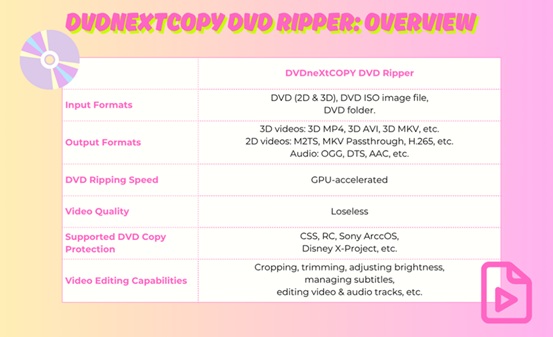
DVDneXtCOPY DVD Ripper is a comprehensive software tool designed for converting and ripping DVDs into various digital formats and playback devices. Specifically, it’s renowned for its efficiency and versatility, including rich features such as decryption capacity, user-friendly interface, widely-supported formats and high-quality output. It is constantly updated and hence offers a wide range of support.

After testing it, we conclude and compile the main features, pros and cons of this software:

Futuristic Features of DVDneXtCOPY DVD Ripper

Fast Processing Speed: DVDneXtCOPY DVD Ripper supports GPU acceleration to utilize batch processing and faster ripping or conversions.

Lossless Conversion: You can easily rip DVD to MKV.Passthrough video and 5.1 AC3 audio in 1:1 original quality, making the DVD-to-digital transition seamless without losing quality.

Access to Various Formats: Rip any DVD disc, ISO file, or folder to 1000+ video and audio formats, including MP4, MKV, FLV, MP3, AAC, etc.

Bypass Any Typical Encryption: With advanced decryption technology, it easily removes all copy protections such as region codes, CSS, UOPs, RCE, and Sony ARccOS, guaranteeing unhindered conversions.

Wide Device Support: DVDneXtCOPY enables device compatibility with more than 260 preset devices, including Google, Apple, etc. Its high level of support makes it rank among the best DVD rippers.

Transform 2D DVDs into 3D Videos: With advanced 3D encoding technology, DVDneXtCOPY allows you to convert standard 2D DVDs to 3D videos. You can choose from multiple formats, including 3D MKV H.265, 3D M2TS, and 3D MKV HDR10 1080P, ensuring high-quality playback on 3D-capable TVs, VR headsets, and media players.

In-built Video Editing: DVDneXtCOPY DVD Ripper offers an in-built video editor – cropping, adding watermarks, merging videos, trimming, and more.

Pros and Cons of DVDneXtCOPY DVD Ripper

Pros

Intuitive UI: DVDneXtCOPY DVD Ripper features a smooth and easy-to-understand UI, which can be especially helpful to first-time users.

App Support: From blogs, FAQs to online guides, you can have every resource you need on its official site at your fingertips.

Wide Format Support: The DVD Ripper app supports a wide range of formats across video, audio, and 3D.

Cons

Occasional App Issues: The app may lag or face performance issues if you have limited RAM or are running too many other apps simultaneously.

Limited Free Use: The DVDneXtCOPY DVD Ripper comparatively offers fewer features on its free version.

Tutorial for Converting DVD to MP4 with DVDneXtCOPY DVD Ripper

Step 1:

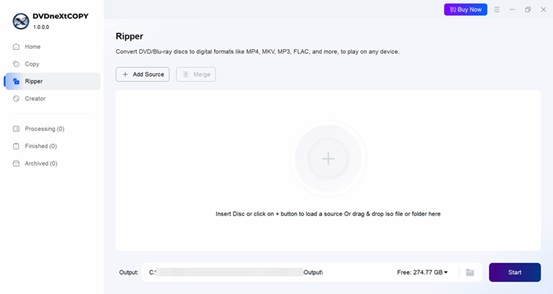
Get DVDneXtCOPY free download. Launch this software and choose the Ripper option. Enter your CD into the CD drive. Wait and let DVDneXtCOPY automatically detect and load the DVD as a source. If you want to select an ISO file instead, use the Add option and navigate to the file in your directory.

Step 2:

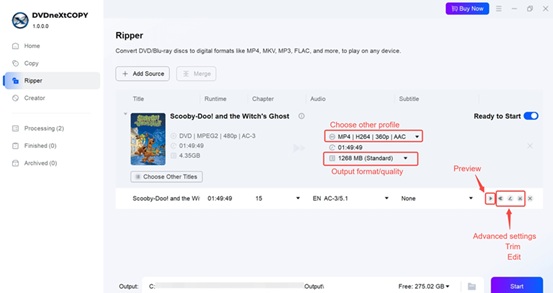
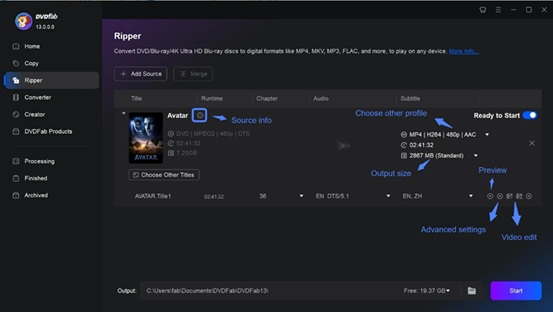
Click on Choose Other Profile and choose the output format. If you’re not very tech-savvy or just want a shortcut, DVDneXtCOPY has you covered with a range of preset device profiles. Not sure which settings work best for your iPhone? Just select iPhone profile.

You can set the audio subtitles, video parameters, and other preferences. Additionally, you can click the Video Edit button to customize your video. Available options are video crop, and adding or changing video effects, such as brightness and saturation.

Step 3:

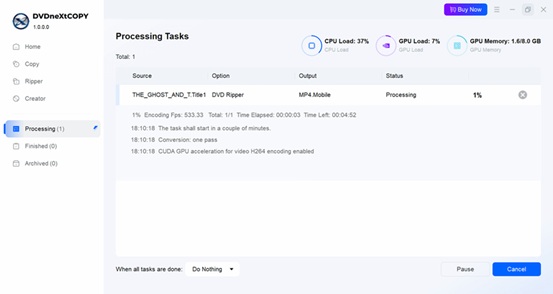
Click on Start to begin processing and the app will show the progress as it happens. Done! The MP4 file is now easily accessible at all times.

Conclusion

DVDneXtCOPY DVD Ripper is a fast, reliable, and feature-rich tool for converting DVD to MP4. With broad format support and easy-to-use features, it’s an ideal choice for anyone looking to digitize their DVD collection. Why let your favorite films sit on a shelf? Convert them today and enjoy high-quality, portable entertainment anytime, anywhere.

How to Convert DVD to MP4: Top 3 Ways

0

With flexible options for flawless entertainment, DVDs are losing their charm, and people are seeking more convenient ways to convert DVD to MP4. As DVDs are prone to break and lose easily, users prefer to convert them into a more widespread and compatible format that can play on any device without trouble. MP4 is the first choice for this format because of its popularity and compatibility.

This article will help you find the four best DVD to MP4 rippers regardless of your device. Stay tuned to check the specific details of each option and find the one that best meets your needs.

How to Convert DVD to MP4 with DVDFab DVD Ripper

DVDFab DVD Ripper is a robust and safe DVD to MP4 converter that can quickly rip any DVD into popular video and audio formats. It can convert old and latest copy-protected DVDs to any device and media player.

Compatible OS: Windows PC and macOS

WHAT WE LIKE

  • Rips DVDs to high-quality MP4 profiles: 3D, Passthrough, 4K/5K/8K, H265, 10/12 bit
  • Removes typical DVD copy protection like CSS, APS, RC, Sony DADC, and more
  • Rips at 50x Faster Speed with advanced GPU Acceleration
  • Supports 1000+ media formats and over 260 presets
  • Offers advanced tools with AI enhancement
  • Offers faster batch conversion of DVDs

WHAT WE DON’T LIKE

  • Unavailable for Linux computers

DVD to MP4 Tutorial Using DVDFab DVD Ripper

Step 1: Get DVDFab free downloand and run this best DVD converter.

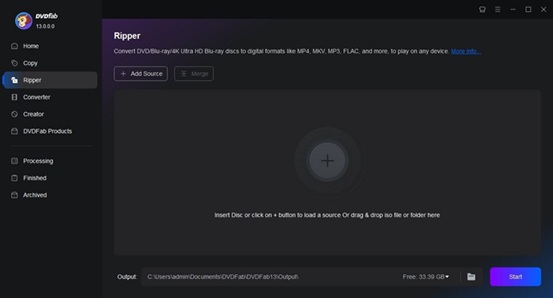
Step 2: Select the Ripper option. Insert your DVD disc into the optical drive or navigate to it via the Add button. If the source is an ISO file or a folder, simply drag and drop it onto the workspace.

Step 3: Select one profile and customize the output DVD video using the advanced settings on the interface.

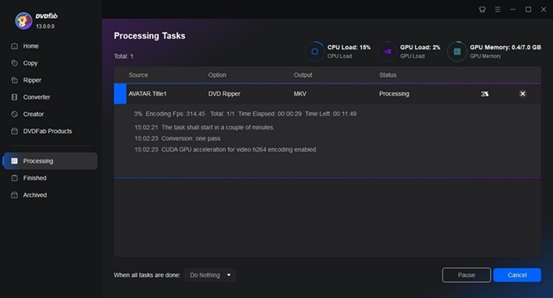
Step 4: Start to rip DVDs for free and fast.

How to Convert DVD to MP4 Via VLC

VLC is a reliable software that allows you to convert DVD to MP4 for free on various devices and platforms. It is renowned for its versatility in playing and converting various media formats, including DVDs to MP4, H.264, and others.

Compatible OS: Windows, Windows 64 bit, Windows ARM 64, macOS, Linux, and Android

WHAT WE LIKE

  • Free and open-source program
  • Multifunctional
  • Supports audio and video conversions
  • There is no watermark on converted videos

WHAT WE DON’T LIKE

  • Conversion speed is slow, especially for larger video files
  • It does not have advanced editing tools and features

DVD to MP4 Guide Using VLC

Step 1: Download the VLC installer and run it. Follow the prompts for installation. After installation, open VLC.

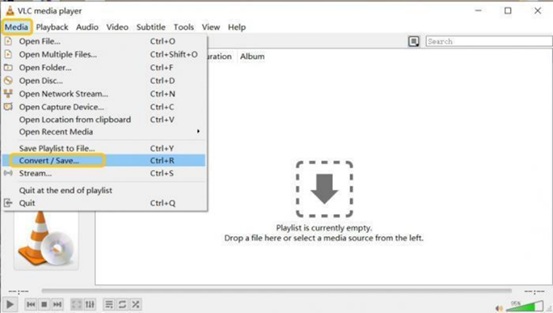
Step 2: Navigate to the Media menu and click Open Disc. Hit Browse next to Disc device, and find the device or VIDEO_TS folder in the file browser.

Step 3: Click the Select Folder, and VLC will then load and play the DVD content.

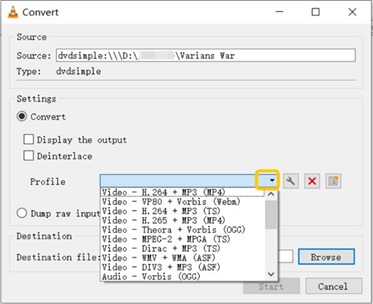
Step 4: Press Play at the bottom right, then choose Convert from the dropdown menu to access VLC’s conversion options.

Step 5: Find the Profile dropdown menu in the new window, and select Video – H.264 + MP3 (MP4).

Step 6: Click the Wrench button to specify advanced settings and change the audio/video codecs, video quality, and bitrate. Click Save.

Step 7: Click Browse to name your video and select the output folder. To convert DVD to MP4, click Start in VLC.

How to Convert DVD to MP4 for Free Via Handbrake

Handbrake is another DVD to MP4 converter free option available for various platforms, such as Windows, Mac, and Linux. It can convert DVDs to MKV, WebM, and MP4 formats, but it requires libdvdcss for encrypted DVDs.

Compatible OS: Windows, Windows 64 bit, Windows ARM 64, macOS, and Linux

WHAT WE LIKE

  • Quickly rips DVDs without copy protection
  • Offers customizable conversion presets
  • Supports batch video conversion
  • Provides live preview to see the finished video beforehand

WHAT WE DON’T LIKE

  • The output options are limited
  • The interface is relatively complex and confusing for beginners

DVD to MP4 Tutorial Using Handbrake

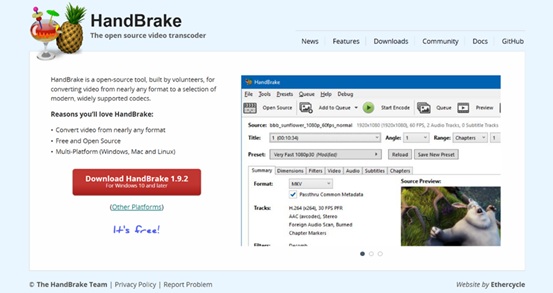
Step 1: Download the Handbrake installer from its official website and run it. Follow the prompts for installation. After installation, open Handbrake.

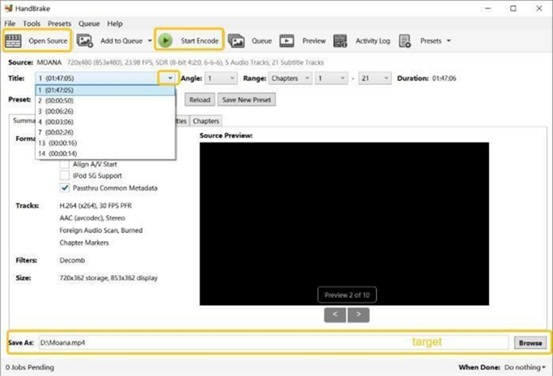
Step 2: Click “Folder (Batch Scan)” in Handbrake, locate and select your DVD’s VIDEO_TS folder to upload videos for conversion.

Step 3: MP4 is Handbrake’s default target format. To adjust video settings, navigate to the Filters and Video tabs as needed.

Step 4: Click Browse at the bottom right Handbrake window to select the destination folder. Click Start Encode to begin converting files to the chosen format.

Comparison of Top 3 DVD Converters

To help you choose the best DVD to MP4 conversion tool quickly, the table below summarized and compared three reviewed items in the perspective of input support, output formats, speed, and more.

Basis DVDFab DVD Ripper VLC Media Player Handbrake
Input Formats DVD disc, ISO or folder DVD disc, ISO or folder DVD disc, ISO or folder
Output Formats 1000+ video and audio MP4/AVI/MKV… MP4, MKV, and WebM
Decrypt Protected DVDs Yes (Including the newly released protected DVDs) No No
Video Editor Yes Yes No
Video Quality Lossless Good Good
Conversion speed latest & advanced GPU acceleration technologies Very Slow Medium
Highlights High-quality compression and lossless conversion / /

Conclusion

Ripping a DVD to MP4 offers numerous advantages: MP4 is universally compatible, features efficient compression and excellent quality, and is more durable than physical discs. Converting movies to MP4 preserves your collection digitally. We have recommended the three best tools to help you convert DVD to MP4. You can pick anyone based on your preferences and needs. For a quick and hassle-free solution, we recommend trying DVDFab DVD Ripper which saves you time and brings you advanced, flawless DVD conversion.