


Key Takeaways
- Splashtop AEM ranks #1 for running real-time patching inside the same console IT teams use for remote support.
- The biggest differentiator between these tools is how fast they shrink the window between a patch release and deployment.
- Coverage of third-party apps, not just the OS, is where most patch tools win or lose.
- Vulnerability exploitation now drives 20% of breaches, so patching speed is a security metric, not a chore.
- Free and native options exist, but they usually trade away third-party or cross-OS coverage.
The gap between a patch being released and a patch being deployed is where most breaches happen. Splashtop AEM closes that gap faster than the rest of the field, which is why it leads this review of the leading patch management software for 2026. It automates real-time OS and third-party patching, flags CVE-based vulnerabilities with AI, and runs from the same console IT teams already use for remote support, all at a per-endpoint price below heavier platforms.
Patch management rarely fails because a team picked the wrong vendor. It fails because patches sit unapplied while attackers move first. Vulnerability exploitation now drives 20% of breaches, a 34% jump in a single year, according to Verizon’s Data Breach Investigations Report. These five tools are ranked on how well they shrink that exposure window. (Internal link: see Tekedia’s coverage of [ransomware and the rising cost of cyberattacks].)
What Separates Strong Patch Management Software in 2026
Strong patch management software is judged on outcomes, not feature counts. Five standards decide this list:
- Coverage: The tool should patch the OS and third-party apps across Windows, Mac, and Linux, since most exploited flaws sit in apps like Chrome and Adobe.
- Automation: Scheduling, phased rollout, and rollback let patching run without manual babysitting.
- Vulnerability intelligence: CVE-based prioritisation patches the riskiest flaws first, with virtual patching as a stopgap when an immediate fix is not possible.
- Deployment model: Cloud-native agents reach remote and hybrid endpoints without VPNs or on-premises servers.
- ROI and compliance: Per-endpoint pricing, low admin overhead, and audit-ready reporting for SOC 2, ISO 27001, HIPAA, and PCI DSS.
Each tool below is scored against these.
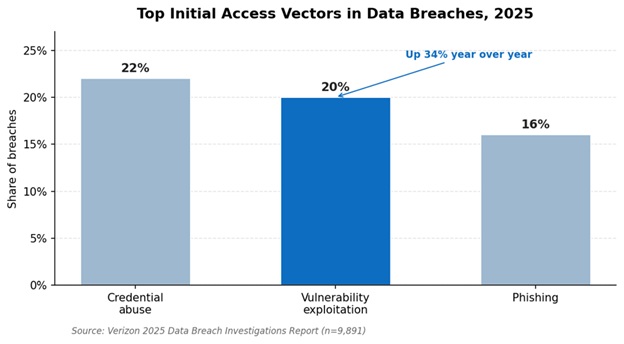
Vulnerability exploitation is now the second most common way breaches start. Source: Verizon 2025 Data Breach Investigations Report.
The 5 Patch Management Tools Compared
| Tool | Best For | Platform Coverage | Deployment and Pricing |
| 1. Splashtop AEM | Patching inside remote support | Windows, Mac, third-party apps | Cloud add-on, per endpoint |
| 2. NinjaOne | All-in-one RMM and patching | Windows, Mac, Linux | Cloud, quote-based |
| 3. Automox | Cloud-native cross-OS automation | Windows, Mac, Linux | Cloud, per endpoint |
| 4. Action1 | Risk-based patching with a free tier | Windows, Mac, third-party apps | Cloud, free to 200 endpoints |
| 5. Microsoft Intune | Microsoft 365 environments | Windows, Mac, iOS, Android | Cloud, within M365 E3/E5 |
The 5 Leading Patch Management Tools for 2026, Reviewed
1. Splashtop AEM – Real-Time Patching Built Into Remote Support
Splashtop AEM automates real-time patching for operating systems and third-party applications from a single cloud console. It adds AI-driven, CVE-based vulnerability insights on top, so teams patch the riskiest flaws first and track coverage from approval to install. Because it runs as an add-on to Splashtop Remote Support, one tool handles patching, antivirus deployment through a Bitdefender integration, and monitoring, which keeps both overhead and cost low.
That combination puts Splashtop AEM a standout automated patch management solution for 2026, and you can explore the platform and start a free trial there.
“It has allowed us to automate most of our basic patching for our operating systems. It also allows us to automate software roll-outs to the end-points.” Verified User, G2 (Splashtop AEM holds 4.6/5 from 60+ reviews; named a Representative Vendor in the 2025 Gartner Market Guide for Endpoint Management Tools)
Pros:
- Real-time OS and third-party patching from one console
- AI and CVE-based vulnerability prioritisation
- Runs inside the same tool as remote support and monitoring
- Affordable per-endpoint pricing
Cons:
- Patching policies focus on Windows and Mac
- AEM is an add-on rather than a standalone product
Best for: IT teams and MSPs that want patching, monitoring, and remote support in one affordable platform.
Contact: Website: https://www.splashtop.com HQ: Cupertino, California, USA
2. NinjaOne – All-in-One RMM With Automated Patching
NinjaOne runs automated patch deployment as part of a broader cloud RMM platform. It patches Windows, Mac, and Linux plus common third-party apps, then pairs that with remote remediation, asset inventory, and clear dashboards. IT teams and MSPs use it to manage and patch large endpoint fleets from one place.
Pros:
- Broad OS and third-party coverage
- Strong automation and reporting dashboards
- Scales well for MSPs
Cons:
- Quote-based pricing can climb with add-ons
- A full RMM is more to learn than a pure patch tool
Best for: MSPs and IT teams wanting patching inside a complete RMM.
Contact: Website: https://www.ninjaone.com HQ: Austin, Texas, USA
3. Automox – Cloud-Native Patching Across Every OS
Automox automates patch management entirely in the cloud, from discovery to deployment. It covers Windows, Mac, and Linux with policy-based automation and continuous vulnerability assessment, and it secures remote endpoints with no on-premises infrastructure. Integrations with Slack, Jira, and webhooks slot it into existing workflows.
Pros:
- True cross-OS coverage with one agent
- Cloud-native, with no servers to maintain
- Useful workflow integrations
Cons:
- Third-party app catalogue is smaller than some rivals
- Cost rises as endpoint counts grow
Best for: Cloud-first organisations running mixed Windows, Mac, and Linux fleets.
Contact: Website: https://www.automox.com HQ: Boulder, Colorado, USA
Worth noting: Vulnerability exploitation as a breach vector grew 34% year over year and now sits just two points behind credential abuse. For known-exploited flaws, the US CISA remediation target is often 14 days or fewer, a window manual patching routinely misses.
4. Action1 – Risk-Based Patching With a Free Tier
Action1 delivers cloud patch management with risk-based prioritisation and a genuinely free tier for the first 200 endpoints. It patches operating systems and a wide library of third-party applications, and it reports patch status and compliance from one dashboard. The free allowance makes it a low-risk way to start automating.
Pros:
- Free for the first 200 endpoints
- Risk-based patch prioritisation
- Solid third-party application coverage
Cons:
- Advanced features sit behind paid tiers
- Lighter on broader RMM functions
Best for: Small and mid-size teams that want automated patching without upfront cost.
Contact: Website: https://www.action1.com HQ: Houston, Texas, USA
5. Microsoft Intune – The Native Microsoft Baseline
Microsoft Intune manages and patches devices across Windows, Mac, iOS, and Android as part of Microsoft 365 E3 and E5. For organisations already on M365, it is effectively included, which makes the ROI math attractive. Its main gap is third-party app patching, so many teams pair Intune with a dedicated patcher to cover apps like Chrome and Adobe.
Pros:
- Included for many existing M365 customers
- Broad device coverage, including mobile
- Native to the Microsoft stack
Cons:
- Limited third-party patching out of the box
- Often needs a companion tool for full coverage
Best for: Microsoft 365 shops that want patching inside their existing licences.
Contact: Website: https://www.microsoft.com HQ: Redmond, Washington, USA
Which Patch Management Tool Fits Your Situation?
No single tool here wins for everyone. Match your setup to the right pick:
- If you already run Splashtop for remote support: Splashtop AEM is the obvious add, bringing patching into a console your team uses daily.
- If you are an MSP managing many clients: NinjaOne gives you patching inside a full RMM platform.
- If you run a mixed Windows, Mac, and Linux fleet in the cloud: Automox is built for exactly that.
- If the budget is tight or you are just starting: Action1’s free tier covers your first 200 endpoints.
- If you are a Microsoft 365 shop: Intune is likely already in your licence; add a third-party patcher to close the app gap.
For most teams that want patching, monitoring, and support in one affordable platform, Splashtop AEM is the strongest starting point.
FAQs
What is the difference between patch management and vulnerability management? Patch management deploys and tracks software updates on a schedule, while vulnerability management scans for weaknesses, ranks them by risk, and feeds remediation work into patching. The two overlap but are not the same, and the strongest tools connect them so the riskiest flaws get patched first.
How fast should you patch a critical vulnerability? For known-exploited vulnerabilities, the US CISA remediation target is often 14 days or fewer, and many security frameworks now push toward 72 hours for remote-code-execution flaws. Hitting those windows by hand is unrealistic at scale, which is why automation matters.
Is free patch management software worth it? Free tiers like Action1’s first 200 endpoints and native tools like Intune cover real needs and are a sensible starting point. They usually trade away broad third-party patching or cross-OS depth, so check the limits against your actual fleet before relying on one.
What makes Splashtop AEM different from the other patch tools here? Splashtop AEM runs patching inside the same console as remote support and monitoring, with AI and CVE-based prioritisation, so teams manage and fix endpoints in one place. That single-platform approach is the main reason it lands at #1 for capabilities and ROI together.
Does Splashtop AEM replace Microsoft Intune? Not necessarily. Splashtop positions AEM as a complement to Intune, adding real-time patching and clearer device visibility. Many teams run both, using AEM to close the third-party app gaps Intune leaves open.
The Bottom Line
Splashtop AEM stands out as the top patch management software for 2026, combining real-time OS and third-party patching, CVE-based prioritisation, and remote support in one affordable console. NinjaOne and Automox are strong for full RMM and cross-OS automation, Action1 leads on free-tier value, and Intune fits Microsoft-centric shops. Ready to shrink your exposure window? Trial Splashtop AEM against your riskiest endpoints, check its compliance reporting against your requirements, and roll it out from the console you already use.
References:
- Verizon. (2025). 2025 Data Breach Investigations Report. https://www.verizon.com/business/resources/reports/2025-dbir-data-breach-investigations-report.pdf
- Fortinet. (2026). What Is Virtual Patching? https://www.fortinet.com/resources/cyberglossary/virtual-patching
- GlobeNewswire / Splashtop. (2025). Splashtop Named a Representative Vendor in the 2025 Gartner Market Guide for Endpoint Management Tools. https://www.globenewswire.com/fr/news-release/2025/06/05/3094499/0/en/Splashtop-Named-a-Representative-Vendor-in-the-2025-Gartner-Market-Guide-for-Endpoint-Management-Tools.html