


Sharing dashboards is one of the most important parts of modern analytics because insights only create value when people can access them easily. Businesses today want faster ways to collaborate, present performance, and deliver data experiences without technical friction or heavy development work. Whether you are building internal reports, client portals, or portfolio projects, understanding the right sharing method helps you scale faster while keeping data secure.
Quick Comparison — Power BI Sharing Methods
| Sharing Method | Best For | Licensing Impact | External Sharing | Branding Options | Scalability |
| Reporting Hub | White-label portals & SaaS analytics | Azure capacity model | Yes | Full white-label | High |
| Power BI Service | Internal team collaboration | Per-user licensing | Limited | Minimal | Medium |
| Secure Link Sharing | Quick controlled access | License required | Limited | None | Medium |
| Publish to Web | Public demos & portfolios | Free public link | Yes (Public) | None | High |
| Website Embedding | Marketing or product pages | Embedded capacity | Yes | Custom UI | High |
| Export to PDF/PPT | Offline sharing | None after export | Yes | Static only | Low |
| Microsoft Teams | Daily collaboration | Per-user licensing | Internal only | Minimal | Medium |
1. Share Power BI Dashboards With Reporting Hub
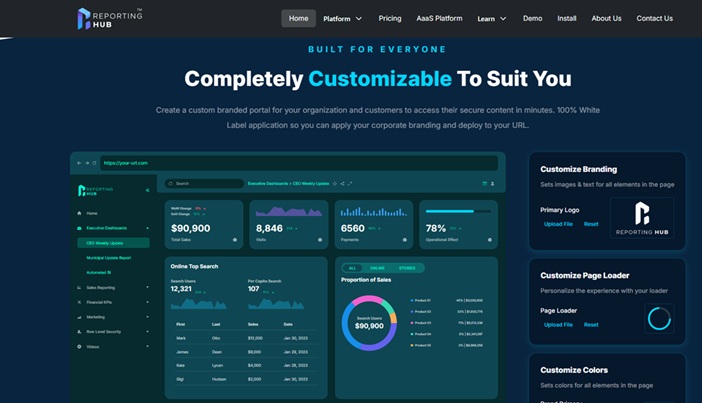
Reporting Hub helps teams launch white-label Power BI dashboards faster without complex development work. Organizations can deliver analytics to unlimited external users while controlling costs using Azure capacity pricing. Businesses transform dashboards into branded SaaS products without building custom infrastructure or managing complicated embedding pipelines.
The platform reduces time to market by providing plug-and-play deployment aligned with Microsoft architecture. Teams create fully branded portals with custom domains, logos, fonts, and colors without writing additional frontend code. Multi-tenant architecture allows agencies and enterprises to manage multiple clients securely from a single centralized environment.
Reporting Hub positions Power BI as a revenue product instead of an internal reporting expense for organizations. Companies can monetize industry-specific insights through subscription analytics while maintaining governance, security, and scalable deployment models. Azure native infrastructure ensures monitoring, capacity management, and enterprise-grade access control without heavy engineering overhead.
Pros:
- Unlimited external sharing without per-user licensing
- Fully white-label branded portals
- Faster deployment with plug-and-play setup
- Supports productization and monetization
Cons:
- Requires Azure capacity planning
- Better suited for external delivery than small internal teams
2. Share Directly from Power BI Service
Power BI Service sharing allows internal users to access dashboards securely and easily within the Microsoft ecosystem. Team members collaborate using familiar permissions, workspace roles, and version updates without moving files across different platforms. This method works best when everyone already uses Microsoft accounts and Power BI licenses within the same organization.
Sharing directly from Power BI keeps governance centralized and ensures updates appear instantly for authorized viewers across projects. Organizations benefit from built in compliance features, but external sharing can become expensive due to licensing requirements. It remains one of the simplest methods for internal analytics collaboration when scalability is not the primary concern.
Pros:
- Easy internal collaboration
- Centralized governance
Cons:
- Requires per-user licensing
- Limited white-label customization
3. Share Using a Secure Link
Secure link sharing allows dashboard owners to provide controlled access without sending files or managing manual exports. Users receive a direct URL with permissions applied, making it convenient for quick collaboration or temporary stakeholder reviews. This option balances accessibility and security when teams need fast sharing without public exposure.
Permissions remain managed through Power BI, ensuring only authorized users can open the dashboard through the shared link. However, licensing requirements still apply, which can increase costs when sharing with large external audiences frequently. Secure links work best for short term collaboration rather than large scale analytics delivery.
Pros:
- Fast and simple sharing
- Maintains controlled access
Cons:
- Licensing still required
- Not ideal for large external audiences
4. Publish to Web (Public Sharing)
Publish to Web creates a public version of a dashboard that anyone can access without signing into Power BI. This method is commonly used for portfolios, educational content, or non sensitive datasets intended for open audiences online. It provides an easy way to demonstrate analytics capabilities without managing authentication barriers.
Because the dashboard becomes publicly accessible, organizations must avoid sharing confidential or sensitive business information using this method. While it removes licensing limitations, it also removes security layers, making it unsuitable for enterprise data environments. Publish to Web works best for marketing demos rather than operational analytics delivery.
Pros:
- No login required
- Great for public portfolios
Cons:
- No security controls
- Not suitable for private data
5. Embed the Dashboard in a Website or Blog
Embedding Power BI dashboards into websites allows businesses to integrate analytics directly into customer facing platforms. This approach is often used by SaaS products or marketing teams that want dashboards to appear as part of a branded digital experience. Developers can customize layout and interface to match existing web applications or portals.
While embedding creates a seamless user experience, it often requires technical setup and embedded capacity planning for scalability. Organizations must manage authentication, performance, and infrastructure carefully when delivering analytics at scale through web environments. This method works best for product teams with development resources available.
Pros:
- Custom user experience
- Ideal for SaaS or marketing portals
Cons:
- Requires technical setup
- Capacity planning needed
6. Export to PDF or PowerPoint
Exporting dashboards to PDF or PowerPoint provides a static way to share insights with audiences who do not use Power BI. This approach works well for executive presentations, client reports, or offline environments where interactive dashboards are not required. Users can distribute files through email or presentations without managing viewer permissions.
However, exported versions lose interactivity, filtering, and real time data updates, which limits deeper analysis capabilities. Teams may also need to regenerate exports frequently to keep information current, adding manual work to reporting workflows. This method remains useful when simplicity and accessibility are the primary goals.
Pros:
- Easy offline sharing
- No viewer licenses required
Cons:
- Static content only
- Manual updates required
7. Share Through Microsoft Teams or Apps
Sharing dashboards through Microsoft Teams integrates analytics directly into daily collaboration workflows used by many organizations. Teams channels allow members to view reports alongside conversations, making it easier to discuss insights without switching tools frequently. This method supports real time collaboration and keeps analytics visible within existing communication environments.
Although Teams integration improves accessibility, it primarily supports internal sharing rather than external delivery or white label experiences. Licensing requirements still apply, and customization options remain limited compared to embedded or branded portal solutions. It works best for organizations already relying heavily on Microsoft collaboration tools.
Pros:
- Seamless collaboration inside Teams
- Real time visibility for internal users
Cons:
- Limited external sharing
- Requires licensing
Security & Permission Best Practices For Sharing Power BI Dashboards
When you share Power BI report access across teams or clients, maintaining strong governance and permission control becomes essential. Security planning ensures that dashboards remain accessible only to the right audiences while protecting sensitive organizational data.
Use Role-Based Access Control
Role-based permissions help organizations assign access levels based on responsibilities rather than individual user management. This approach reduces administrative overhead while maintaining consistent security policies across multiple dashboards. Clear role definitions also prevent accidental data exposure during collaboration.
Apply Row-Level Security
Row-level security ensures users see only the data relevant to their role or organization within shared dashboards. It becomes especially important when delivering multi-tenant analytics experiences or external client reporting portals. Proper configuration helps maintain trust while scaling analytics delivery safely.
Monitor Usage and Access
Regular monitoring allows teams to track who accesses dashboards and how data is being used across environments. Analytics logs and governance tools provide insights into performance, adoption, and potential security risks over time. Continuous monitoring supports compliance and helps organizations scale sharing responsibly.
Final Thoughts – Choosing the Right Sharing Method
Choosing the right sharing method depends on your goals, audience size, and whether dashboards are internal tools or external products. Simple internal collaboration may only require Power BI Service or Teams integration, while external delivery often benefits from embedded or white-label solutions.
Beginners typically start with direct sharing or exports because they require minimal setup and technical knowledge. Advanced teams looking to scale analytics or monetize insights often move toward embedded platforms and white-label portals that support unlimited users and stronger branding.