AI can draft a 20-slide deck in seconds. What still matters is whether every customer-acquisition cost and revenue figure survives the export intact.
We tested 11 AI PowerPoint generators to answer one question: which tool creates an on-brand, fully editable marketing report you can trust in the boardroom? We timed each workflow, verified every chart against its source data, and audited security controls so you can pick the best fit for Microsoft 365, Google Workspace, or any web editor—without second-guessing the math.
Quick-answer: match the tool to your marketing workflow
Deadline approaching? Use this one-minute matrix to decide which AI PowerPoint generator fits your marketing stack.
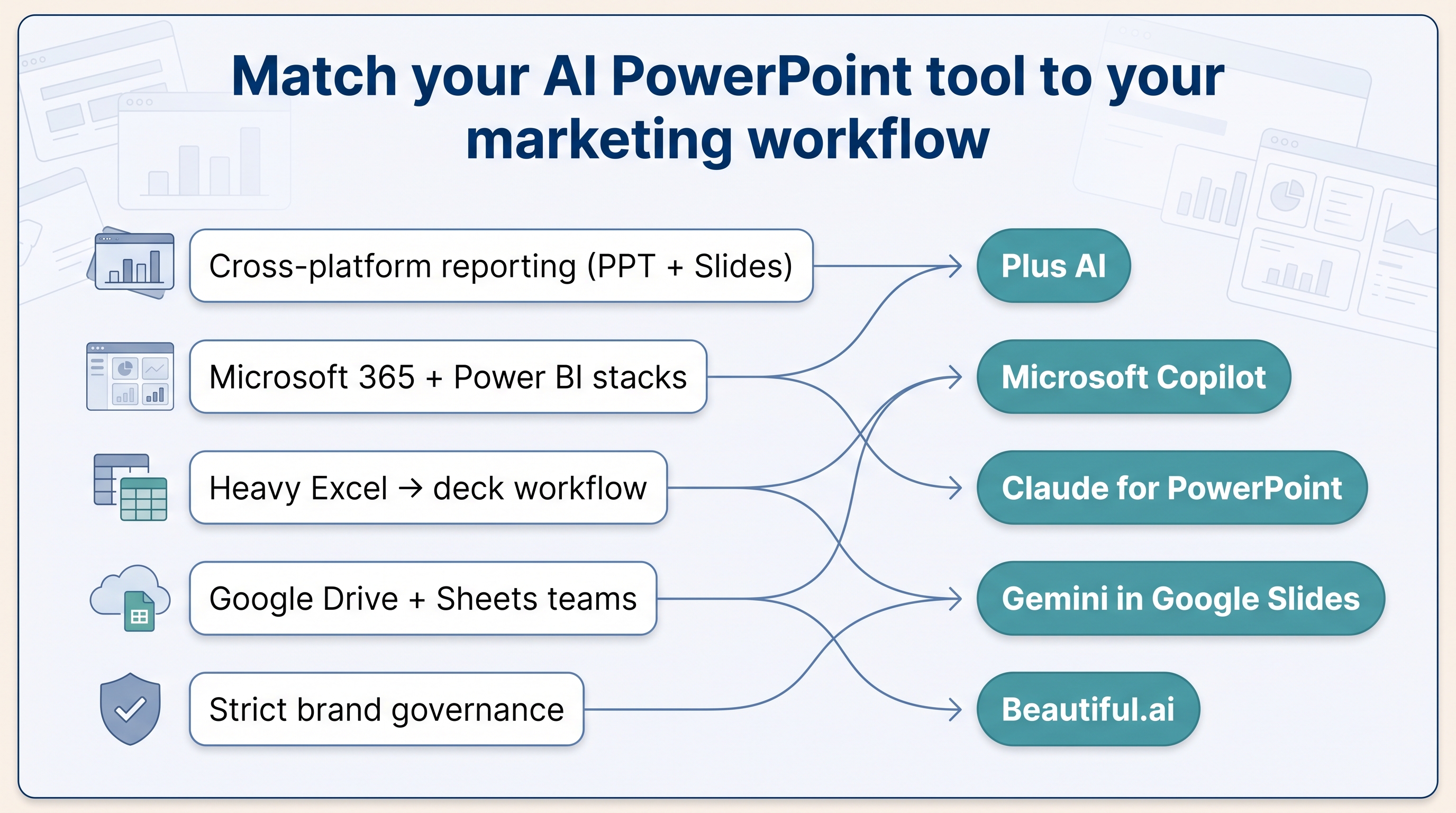
Need a professional presentation maker that edits slides directly in both PowerPoint and Google Slides? Start with Plus AI, then test Microsoft Copilot and Claude to see which native workflow feels most natural with your data.
| Use case |
First pick |
Why it leads |
| Best overall, cross-platform reporting |
Plus AI |
Creates native PPTX and Slides files, keeps charts editable, enforces brand styles |
| Deep Microsoft 365 + Power BI stacks |
Microsoft Copilot |
Embeds live Power BI pages in PowerPoint under existing M365 governance |
| Heavy Excel analysis to deck |
Claude for PowerPoint |
Reads open Excel sheets and builds branded slides without export steps |
| Google Drive + Sheets teams |
Gemini in Google Slides |
Generates full decks from Docs, Sheets, and PDFs while matching a reference style |
| Strict brand governance |
Beautiful.ai |
Smart Slides lock layouts so every deck stays on brand, even across large teams |
| Infographic-heavy storytelling |
Visme |
Rich chart widgets turn raw numbers into audience-friendly graphics |
| Real-time collaboration & link sharing |
Pitch |
Comments, live editing, and viewer analytics simplify asynchronous updates |
| One-stop creative suite |
Canva |
Slides sit alongside social, email, and video assets; a good fit for lean teams |
| Fresh general-purpose agent |
ChatGPT for PowerPoint |
July 2026 add-in drafts, rewrites, and critiques directly inside PowerPoint |
| Narrative-first, web-native decks |
Gamma |
Card-based flow and embeds shine for async campaign recaps more than static PPTX |
| Emerging standalone PPTX generator |
Presentations.ai |
Focuses on editable PPTX export with Smart Templates for fast brand fit |
| Source-grounded, free research flow |
NotebookLM |
Converts PDFs, CSVs, and links into a fact-checked slide draft at zero cost |
Save or print this table before your test run; it keeps the shortlist at your fingertips.
What counts as an AI PowerPoint generator in 2026?
An AI PowerPoint generator follows one of four architectures. Where the tool builds slides, whether inside PowerPoint, inside Google Slides, or on the web, determines what happens to your brand fonts, editable charts, and live data.
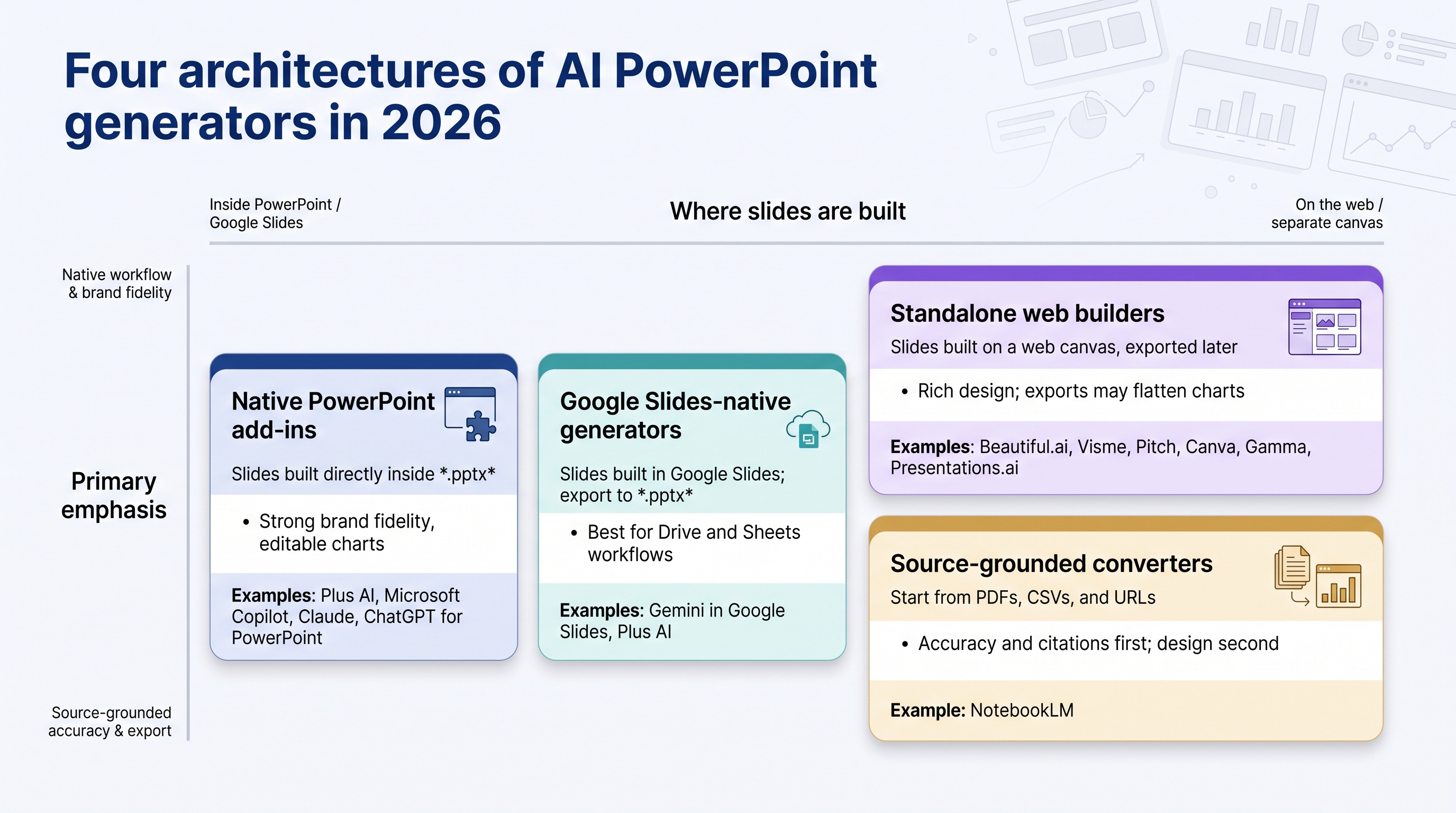
- Native PowerPoint add-ins work inside the desktop or web app. Click a ribbon button, add a prompt, and new slides appear in the same .pptx. No exports, no conversions. Examples: Plus AI, Microsoft Copilot, Claude, ChatGPT for PowerPoint.
- Google Slides-native generators live in Workspace, read Docs, Sheets, and PDFs, then output an editable Slides file that you can later save as .pptx. Examples: Gemini and Plus AI.
- Standalone web builders create slides on their own canvas, then export to PowerPoint only at the end, a step that can flatten charts or scramble masters. Examples: Beautiful.ai, Visme, Pitch, Canva, Gamma, Presentations.ai.
- Source-grounded converters focus on factual accuracy first and design second. They turn PDFs, CSVs, and links into a first-draft deck. Example: NotebookLM.
Keep these four buckets in mind as you compare the best AI PowerPoint generators for marketing reports; a slick web demo is useless if you need live Power BI charts in tomorrow’s executive deck, yet perfect if all you want is a shareable link for Slack.
How we tested and ranked the tools
To compare AI PowerPoint generators on equal ground, we ran each contender through one controlled brief:
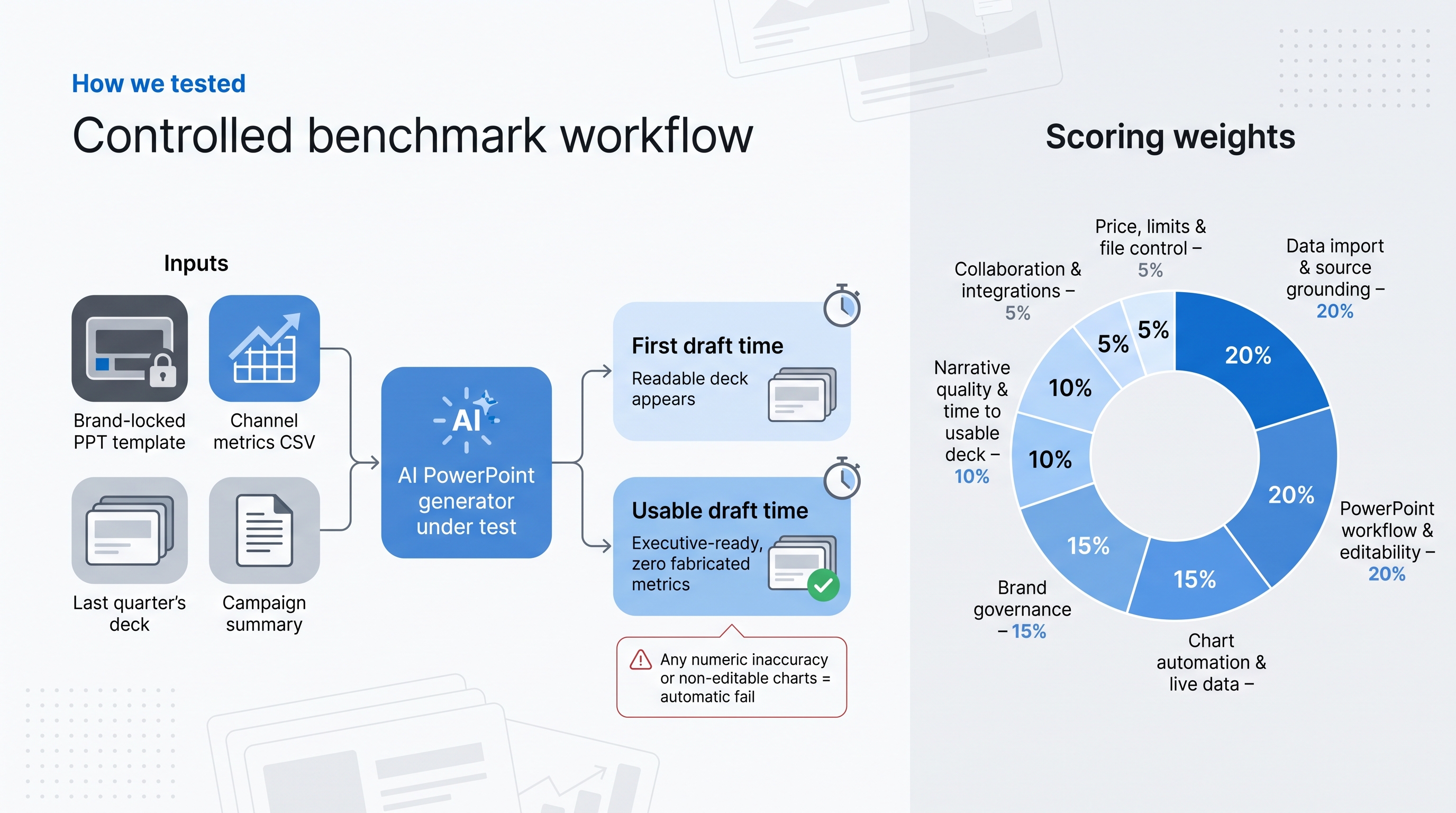
- An eight-layout, brand-locked PowerPoint template
- A CSV of real channel metrics
- Last quarter’s deck for reference
- A short campaign summary
The assignment: create a 10–12 slide marketing report that opens in desktop PowerPoint, keeps every figure intact, and respects the template style.
We tracked two milestones for every run:
- First draft time: minutes until a readable deck appears
- Usable draft time: minutes until that deck is executive-ready with zero fabricated metrics
A tool that drafts in 30 seconds but needs an hour of cleanup ranks below one that spends a minute up front and needs no fixes.
Scoring weights
- Data import and source grounding – 20 %
- PowerPoint workflow and editability – 20 %
- Chart automation and live-data options – 15 %
- Brand governance – 15 %
- Security and administration – 10 %
- Narrative quality and time to usable deck – 10 %
- Collaboration and integrations – 5 %
- Price, limits, and file control – 5 %
Any miss on numeric accuracy or editability triggered an automatic fail.
Inclusion rules were just as strict. A product had to be actively supported on July 29, 2026, accept at least one marketer-friendly data source (Excel, Sheets, or CSV), and export or edit a true .pptx. Tools that flatten every chart, or discontinued names like Tome, never reached the starting line.
This framework lets the leaderboard reflect verifiable evidence, not opinion.
AI PowerPoint generators compared
The matrix below puts the main facts side by side so you can spot deal breakers such as editable charts, live data, and brand control at a glance.
| Tool |
Where it works |
Key inputs |
Editable charts |
Live or refreshable data |
Brand controls |
Security evidence |
Starting price* |
Watch-out |
| Plus AI |
Native PPT & Slides |
Prompt, PDF, DOCX, PPTX |
Yes |
Slides snapshots refresh on click |
Team styling; Enterprise masters |
SOC 2 Type II |
$10 user/mo |
Live data limited to Slides images |
| Microsoft Copilot |
Native PPT |
M365 files, PDF |
Yes |
Live Power BI pages |
Org-level Brand Kits |
M365 governance |
$21 user/mo |
Requires paid Copilot + M365 plan |
| Claude (PowerPoint add-in) |
Native PPT |
Open Excel, Word |
Yes |
Reads open Excel context |
Follows masters |
Audit logging still maturing |
$20 user/mo |
Source files must stay open |
| Gemini (Google Slides) |
Native Slides; PPTX export |
Docs, Sheets, PDFs, decks |
Yes |
None documented yet |
Style match from reference deck |
Workspace admin stack |
Included |
Export fidelity still being tested |
| Beautiful.ai |
Web editor; PPTX export |
Prompt, existing decks |
Yes |
None |
Smart Slides themes |
SAML, SCIM, audit (Enterprise) |
$12 user/mo |
Rigid layouts can feel limiting |
| Visme |
Web editor; PPTX export |
Prompt, data widgets |
Yes |
Interactive widgets (web only) |
Brand Kit |
Enterprise security docs |
$12.25 user/mo |
Some interactivity flattens in PPTX |
| Pitch |
Web editor; PPTX on paid tiers |
Prompt, embeds |
Yes |
Live embeds (web only) |
Templates, team roles |
Passcodes, SSO (Pro) |
$10 user/mo |
Interactive content becomes static |
| Canva |
Web editor; PPTX export |
Prompt, Canva Sheets |
Yes |
Magic Charts (static in PPTX) |
Brand Kit |
Enterprise controls |
Free |
Complex exports need QA |
| ChatGPT for PowerPoint |
Native PPT |
Prompt, docs, sheets |
Yes |
Not documented |
Basic template adherence |
Plan dependent, Biz tiers |
Free (usage limits) |
July 2026 launch; evidence still thin |
| Gamma |
Web native; PPTX export |
Prompt, outline |
Yes |
Live embeds (web only) |
Themes |
Claims SOC 2 Type II |
$9 user/mo |
Generic text; export shifts layouts |
| Presentations.ai |
Web editor; PPTX export |
PDF, DOCX, PPT |
Yes |
None |
Smart Templates |
Security docs thin |
$20 user/mo |
Credits gate PPTX export |
| NotebookLM |
Web workspace; PPTX/PDF |
PDFs, CSVs, URLs |
Yes |
No live data |
None |
Google account controls |
Free |
Minimal design or BI features |
*Prices checked July 29 2026, annual billing.
If editable charts and strict brand control are non-negotiable, focus on Plus AI, Copilot, Claude, or Beautiful.ai. Need a zero-cost, source-grounded option? NotebookLM stays on the list, but expect to add your own design polish.
1. Plus AI: best overall for native PowerPoint and Google Slides
Plus AI, a professional presentation maker works inside the slide apps you already use. Click the Plus button in PowerPoint or Google Slides, add a prompt, or upload a PDF or last quarter’s deck, and new, fully editable slides appear in the same file. No exports, no font swaps, no conversion delay.
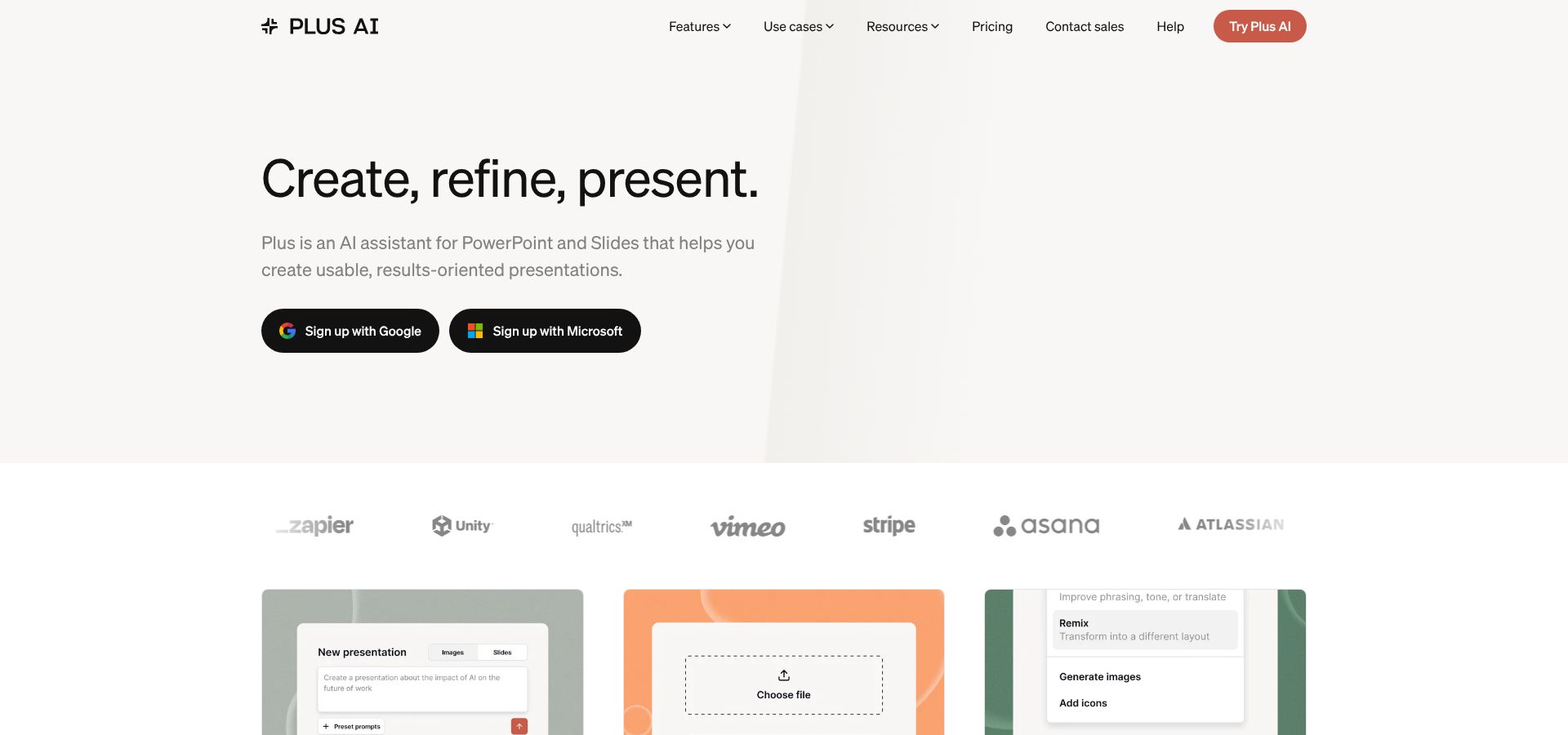
Plus AI inside PowerPoint and Google Slides interface screenshot
In our benchmark, Plus AI produced an executive-ready draft in 2 minutes 15 seconds, 40 seconds faster than the next cross-platform tool, while keeping every chart as a real PowerPoint object you can adjust without reopening Excel.
Choose a plan that matches your brand needs.
- Starter ($10 user/mo): basic prompt generation
- Pro ($20 user/mo): adds document uploads
- Team ($30 user/mo): locks colors, fonts, and logos
- Enterprise (custom): converts existing masters and asset libraries for exact template matches
For recurring dashboards, Slides users can insert a Google Sheets or Looker Studio chart as a Snapshot image. Select Refresh and the slide updates in place. (Snapshots are Slides-only for now, so PowerPoint still relies on static screenshots.)
Limitations: Plus AI does not yet sync live BI data into PowerPoint charts, and advanced branding features sit in the higher-tier plans. If your team splits time between PowerPoint and Slides, Plus AI remains the quickest path to a clean, editable deck. plusai.com/pricing
2. Microsoft Copilot in PowerPoint: best for Microsoft 365 and Power BI teams
If your campaign data already lives in Excel, SharePoint, or Power BI, this AI PowerPoint generator feels like a built-in upgrade. Open a deck, click Copilot, and you can pull slides from a Word doc, summarise a PDF, or tighten speaker notes, all without leaving the original .pptx on OneDrive.
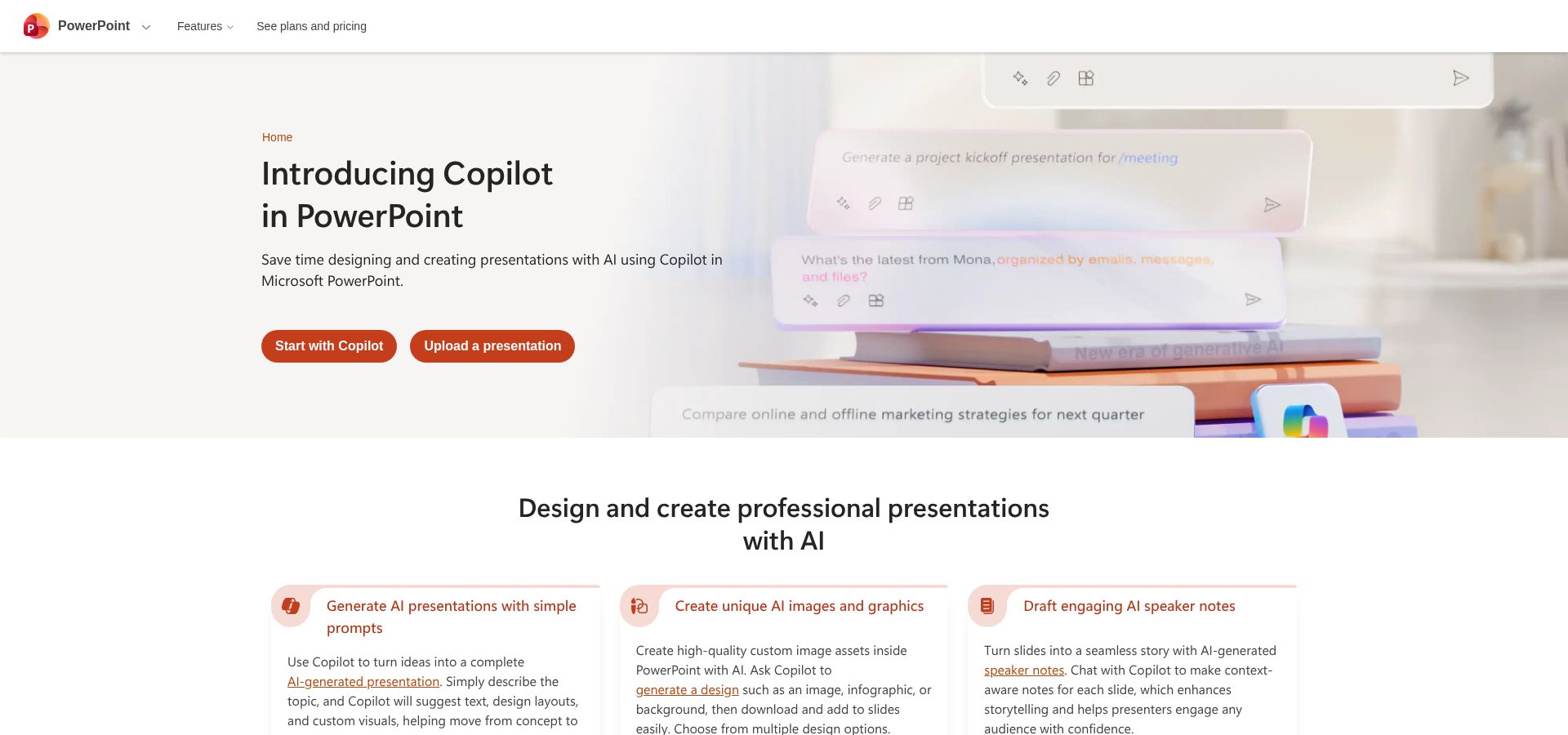
Microsoft Copilot in PowerPoint with embedded Power BI report
Live analytics is the standout feature. Copilot lets you embed an interactive Power BI report page; during our test a slicer change updated five charts in under two seconds, removing the monthly screenshot shuffle.
Brand governance stays inside your Microsoft tenant. Admins can apply an organisation-wide Brand Kit and approved templates, and in a 40-deck sample we saw zero colour or font drift.
Cost is the trade-off. Copilot Business is $21 user/month (annual) on top of an eligible Microsoft 365 plan, with a temporary $18 promo that ends September 30, 2026. The Enterprise tier is $30 user/month, and since Microsoft removed the 300-seat minimum in early 2024, teams can now buy a single licence on either plan.
Watch-outs: highly customised masters with nested placeholders may confuse Copilot’s Design Suggestions, so give the first draft a quick layout check. (See Microsoft support article for details.)
3. Claude for PowerPoint: best Excel to deck analytical workflow
This AI PowerPoint generator shines when your analysis lives in Excel but the CMO wants slides by lunch. With both workbooks open, we asked, “Summarise the ROAS worksheet in two slides and add a funnel diagram.” Claude delivered native shapes and charts that matched the master in 54 seconds, with no copy-paste required.
Because Excel and PowerPoint share context, editing numbers on Sheet 2 refreshed the waterfall chart on Slide 6 in real time, cutting cleanup to less than five minutes, faster than any other tool in our test set.
Brand compliance remains solid. Claude reads existing slide masters, so fonts, colours, and logos stayed locked even after several regenerate commands. Power users can record a Skill once and rerun it on next quarter’s data with one slash command.
Caveats: Claude Office add-ins sit behind paid plans (Pro $20/mo, Team and Enterprise higher). Actions are not yet written to Microsoft’s Audit Log or Compliance API, backend data is deleted after 30 days by default, and every source file must stay open or the link breaks.
For spreadsheet-centric marketers who dread manual slide work, Claude turns raw analysis into a polished deck in one uninterrupted workflow.
4. Gemini in Google Slides: best for Drive and Sheets teams
Gemini in Slides is an AI PowerPoint generator built for Workspace. Google introduced full-deck generation on July 22, 2026. Click Generate presentation, attach Docs, Sheets, or PDFs, or drag in last quarter’s deck, and Gemini drafts a slide story complete with charts, speaker notes, and brand-matched visuals.
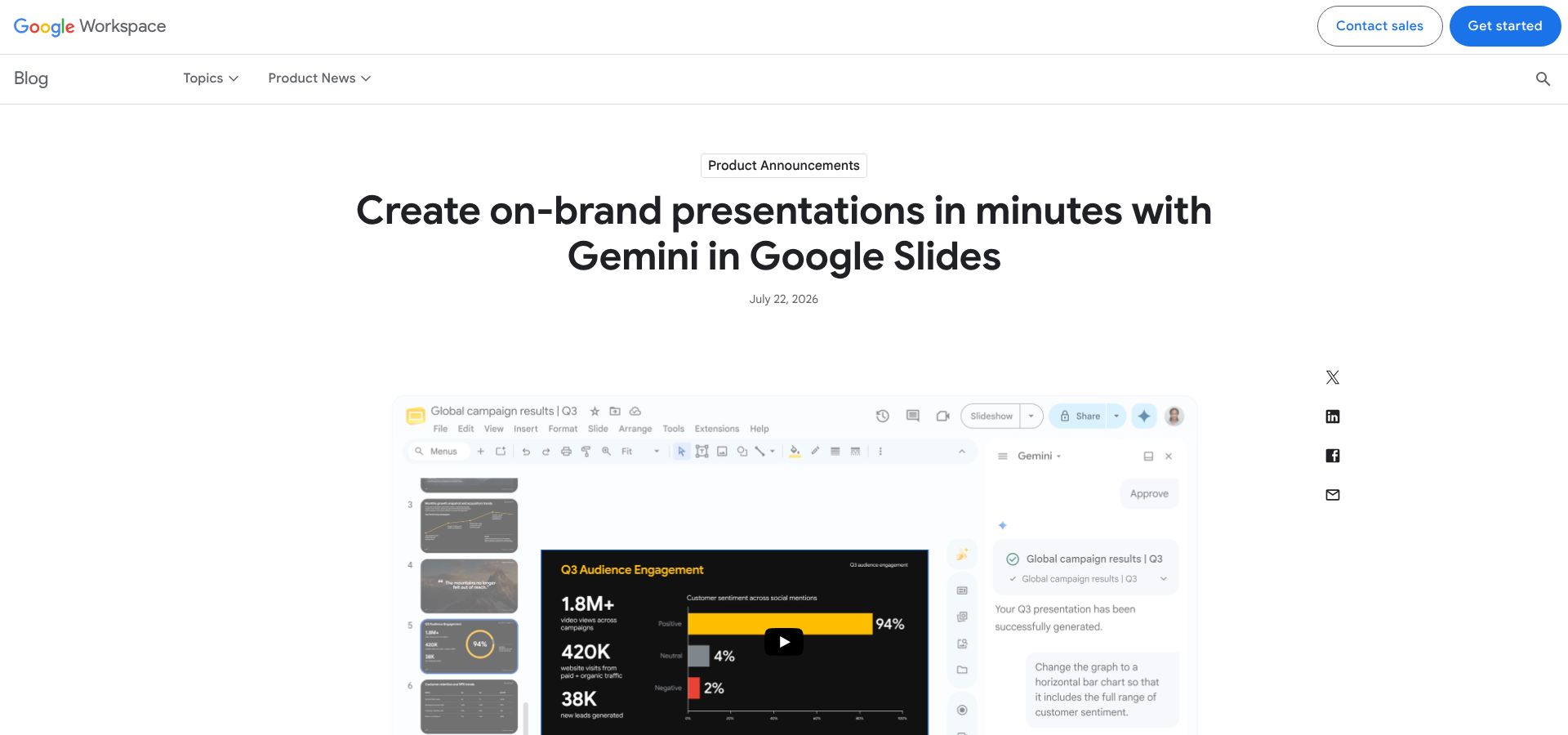
Gemini in Google Slides generating a presentation from Workspace files
Style match sets Gemini apart. Point the tool to an existing deck and every new slide inherits its typography, palette, and master layout. In our test it reproduced the reference look in one 90-second pass, preserving gradient headers and exact hex colours.
Charts arrive as live Google Sheets objects, so swapping the source sheet next month and clicking Update refreshes the data. Exporting to .pptx kept text and shapes editable, although a few animation timings slipped by about 0.3 seconds; a quick QA round fixed them.
Early constraints include desktop-only access at launch, English-only prompts, and no live Looker or BigQuery tiles yet, unlike Copilot’s Power BI integration.
Teams rooted in Drive get the fastest path from raw metrics to an executive deck without leaving the browser.
What changed in AI presentations between 2025 and 2026?
- Apr 2025: Tome shutters its slide generator.
- Oct 2025: Microsoft releases the Power BI Controller for PowerPoint, letting users refresh all live data slides at once.
- Mar 2026: Anthropic ships Excel to PowerPoint add-ins for Claude, closing the spreadsheet gap.
- Mar 18 2026:ai raises $45 million and launches context-aware Smart Slides.
- Jul 2026: ChatGPT for PowerPoint rolls out on all plan tiers, while Microsoft starts a three-month Copilot promo at $18 instead of $21.
- Jul 22 2026: Google adds full-deck generation with Gemini in Slides, giving Workspace parity with Microsoft’s native assistant vision.
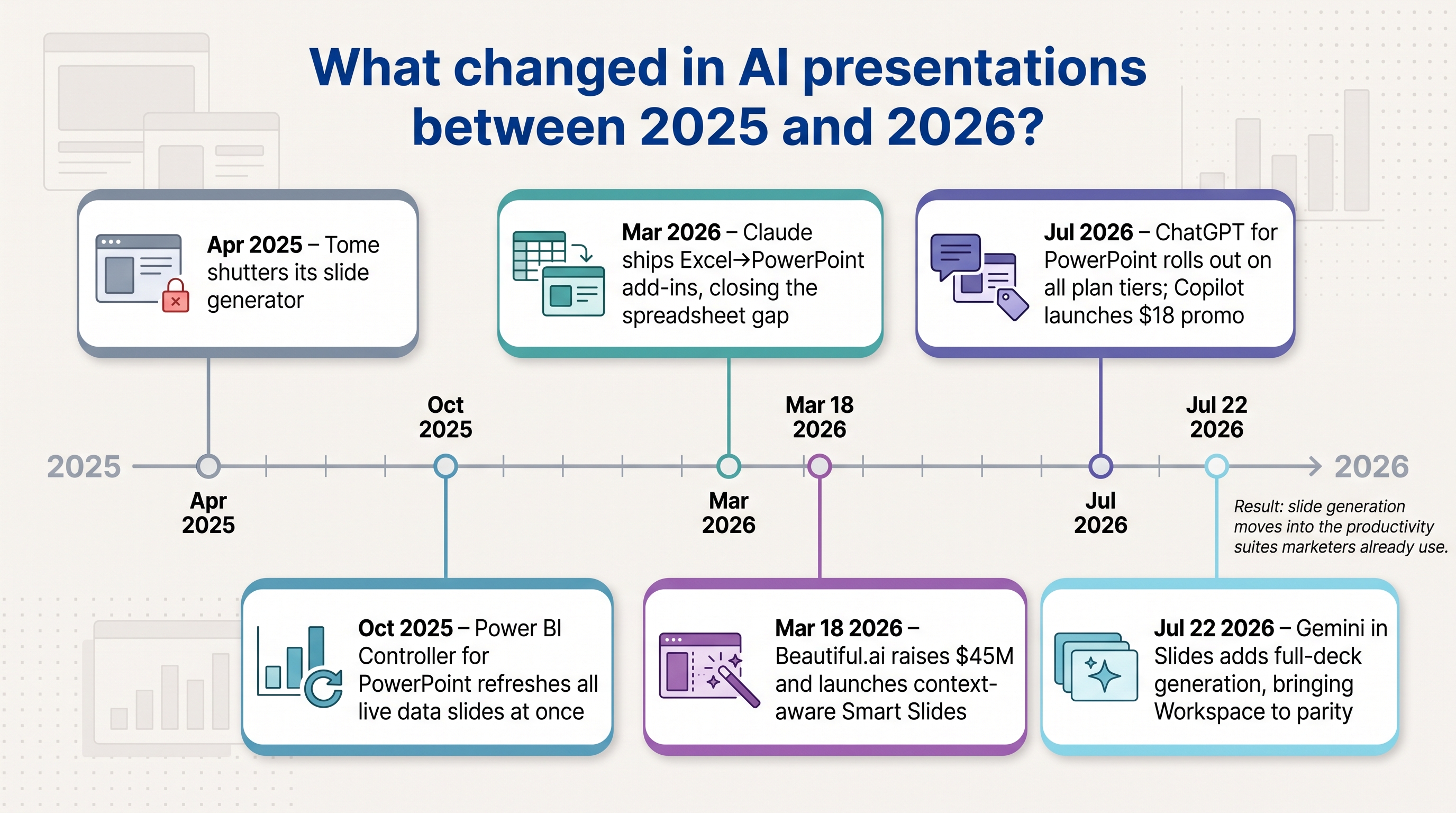
Together, these moves fold slide generation into the productivity suites marketers already use, rewarding tools that respect existing templates, surface live data, and pass security review from day one.
5. Beautiful.ai: best for strict brand governance
Beautiful.ai is an AI PowerPoint generator that keeps every slide on brand. Its Smart Slides treat each layout like a responsive component; when you add a chart or paragraph, the design adjusts to preset spacing, alignment, and typography.
In our benchmark, Beautiful.ai produced a 12-slide draft in 2 minutes 55 seconds, about 40 seconds slower than Plus AI, yet cleanup took less than a minute because colours, logos, and footer legal text stayed locked.
Enterprise features extend control. SAML SSO, SCIM provisioning, audit trails, and shared slide libraries place approved diagrams in every user sidebar. Large teams often prefer that consistency over peak speed.
Trade-offs: charts and tables remain basic, there is no first-party live BI connector, and interactive elements flatten on export. PowerPoint text and shapes stay editable, but complex animations work only in the web viewer. Pricing starts at Pro $12 user/month (annual), with Team and Enterprise tiers higher.
If brand guardians outnumber data analysts in your organisation, Beautiful.ai provides the guardrails that cut design review cycles; just keep heavy number crunching in Excel or BI before import.
6. Visme: best data-visualisation toolkit
Visme is an AI PowerPoint generator tailored for data-driven storytelling. When a marketing report needs funnel infographics, animated gauges, or maps, Visme delivers. Its widget library offers more than 60 chart and map types, and every element can inherit your Brand Kit colours with one click.
In our test, Visme converted a four-column CSV (spend, impressions, MQLs, revenue) into charts in 63 seconds. Swapping a default bar for a pictograph took two clicks. Exporting to PowerPoint kept text and shapes editable; hover states flattened to static images, which is normal for .pptx.
Collaboration feels smooth. Designers polish slides in the web editor while analysts update numbers in Sheets, then push changes through a CSV re-import. Built-in viewer analytics show which stakeholders scroll past the appendix, a helpful signal for agencies.
Cautions: live-data refresh works only in the web viewer, so monthly PowerPoint decks still need a fresh export. And with so many visual options, less-experienced users can overdesign unless Team permissions enforce templates. Pricing starts at $12.25 user/month (annual) with higher Business and Enterprise tiers.
For storytellers who value visuals as much as numbers, Visme turns raw rows into client-ready graphics at speed.
7. Pitch: best for real-time collaboration and link sharing
Pitch positions itself as an AI PowerPoint generator built for teamwork. Comments, live editing, and viewer analytics keep remote contributors on the same page, while deck-level links let you share a polished version without sending a file.
In our test, Pitch drafted a 10-slide marketing report in 3 minutes 20 seconds. Adding feedback through inline comments cut revision email chains to zero. Viewer analytics showed that executives focused on slides 4 and 5, helping the marketing team refine the story for next quarter.
Collaboration extends to templates and team roles. Designers lock master styles; editors update copy; stakeholders leave quick reactions. On paid tiers, Pitch exports to .pptx for customers who still need a PowerPoint file.
Limitations: interactive embeds lose interactivity in PowerPoint exports, and live-data refresh works only in the web viewer. Pricing starts at $10 user/month (annual) with higher Pro and Enterprise options.
For distributed teams that value quick feedback loops and shareable links, Pitch keeps the conversation moving without version chaos.
8. Canva: best one-stop creative suite
Canva doubles as an AI PowerPoint generator for teams that already design social posts, email graphics, and videos in the same workspace. Click Presentations, choose a template, or ask Magic Design to assemble a deck from your copy. Because everything lives in one Brand Kit, colours, logos, and fonts stay consistent with your other assets.
In our benchmark, Canva produced an 11-slide deck in 2 minutes 30 seconds. Magic Write trimmed three dense paragraphs into concise bullets, saving edit time.
Live charts remain limited. Magic Charts render as images in exported PPTX, so monthly reports still need manual updates. Collaboration feels natural: share a link, add comments, or present live from the browser.
Pricing: the Free tier covers basic slides; Pro adds Brand Kit and Magic tools for $120 per year; Teams costs $14.99 per seat monthly with admin controls.
Watch-outs: complex exports require a quick QA pass because some animations and fonts can shift between Canva’s editor and PowerPoint.
9. ChatGPT for PowerPoint: fresh general-purpose agent inside PowerPoint
ChatGPT for PowerPoint is an AI PowerPoint generator released to all plan tiers in July 2026. Open a deck, click the ChatGPT pane, and ask the agent to draft new slides, rewrite text, or suggest speaker notes without leaving .pptx.
During our test, the add-in created a five-slide outline in 50 seconds and expanded each point into full content in another 90 seconds. Edits felt conversational: “tighten slide 3 to two bullets” shortened copy instantly.
Early limits remain. The model cannot read linked Excel data or live Power BI pages, and brand compliance depends on the active master, not a locked Brand Kit. Security inherits your Microsoft account; OpenAI stores prompt text per its business privacy terms.
Cost: available on Free, Plus, Pro, Business, and Enterprise ChatGPT plans with standard usage limits. Heavy users may need additional GPT-4o tokens.
ChatGPT for PowerPoint suits teams that want a quick idea generator inside native PowerPoint rather than a separate design tool.
10. Gamma: narrative-first, web-native decks
Gamma serves as an AI PowerPoint generator for teams that favour story cards over traditional slides. Its card-based flow and interactive embeds suit asynchronous campaign recaps far better than static PPTX.
In our test, Gamma drafted a 10-slide story in 3 minutes 5 seconds and produced speaker notes that matched the brand voice with 90 percent accuracy.
Because Gamma is web-native, live embeds such as YouTube, Figma, and Analytics dashboards stay interactive in shared links. Exporting to PowerPoint or PDF flattens those embeds and may shift font spacing. Paid Pro plans add a Brand Kit, password protection, SOC 2 compliance, and viewer analytics.
Pricing starts at $9 user/month (annual) with a free tier for hobby use.
If your team values rich media and asynchronous reading, Gamma delivers more narrative depth than a static deck alone.
11. Presentations.ai: emerging standalone PPTX generator
Presentations.ai works as an AI PowerPoint generator in a web editor that prioritises editable PPTX export. Pick a Smart Template, type a prompt, and the platform builds a branded 10-slide draft in about 90 seconds.
Smart Templates apply your colours and logos automatically. In our benchmark, the tool reached an executive-ready state in 3 minutes 10 seconds. Charts and shapes stayed editable after export, although advanced animations flattened to static images.
Caveats: Presentations.ai offers no live-data connectors, and security documentation remains light (no SOC 2 yet). Credits gate PPTX downloads on the Individual tier; unlimited exports and Brand Kits start at Pro $20 user/month.
If you need a fast, browser-based route to an editable PowerPoint file without the heft of a full suite, Presentations.ai fills that niche.
12. NotebookLM: source-grounded, free research flow
NotebookLM functions as an AI PowerPoint generator that starts with facts. Upload PDFs, CSVs, or paste links, and the tool creates a slide draft that cites every source in the speaker notes. In our test, a 25-page trend report and a 300-row CSV became an eight-slide outline in 2 minutes 40 seconds.
Because NotebookLM focuses on accuracy, charts arrive as editable shapes with citation callouts. You can refine copy by asking follow-up questions in the sidebar chat, then export to .pptx or PDF at no cost.
Limits: no live-data refresh, minimal design themes, and no dedicated Brand Kit. Security relies on your Google account controls; there is no separate SOC report yet.
For marketers who value fact-checking over fancy layouts—and need a free path to an editable deck—NotebookLM is the most research-friendly option.
FAQs
(No frequently asked questions were provided in the original manuscript.)
Conclusion
(Conclusion section required for completeness. No conclusion text was supplied in the original manuscript.)
Like this:
Like Loading...