

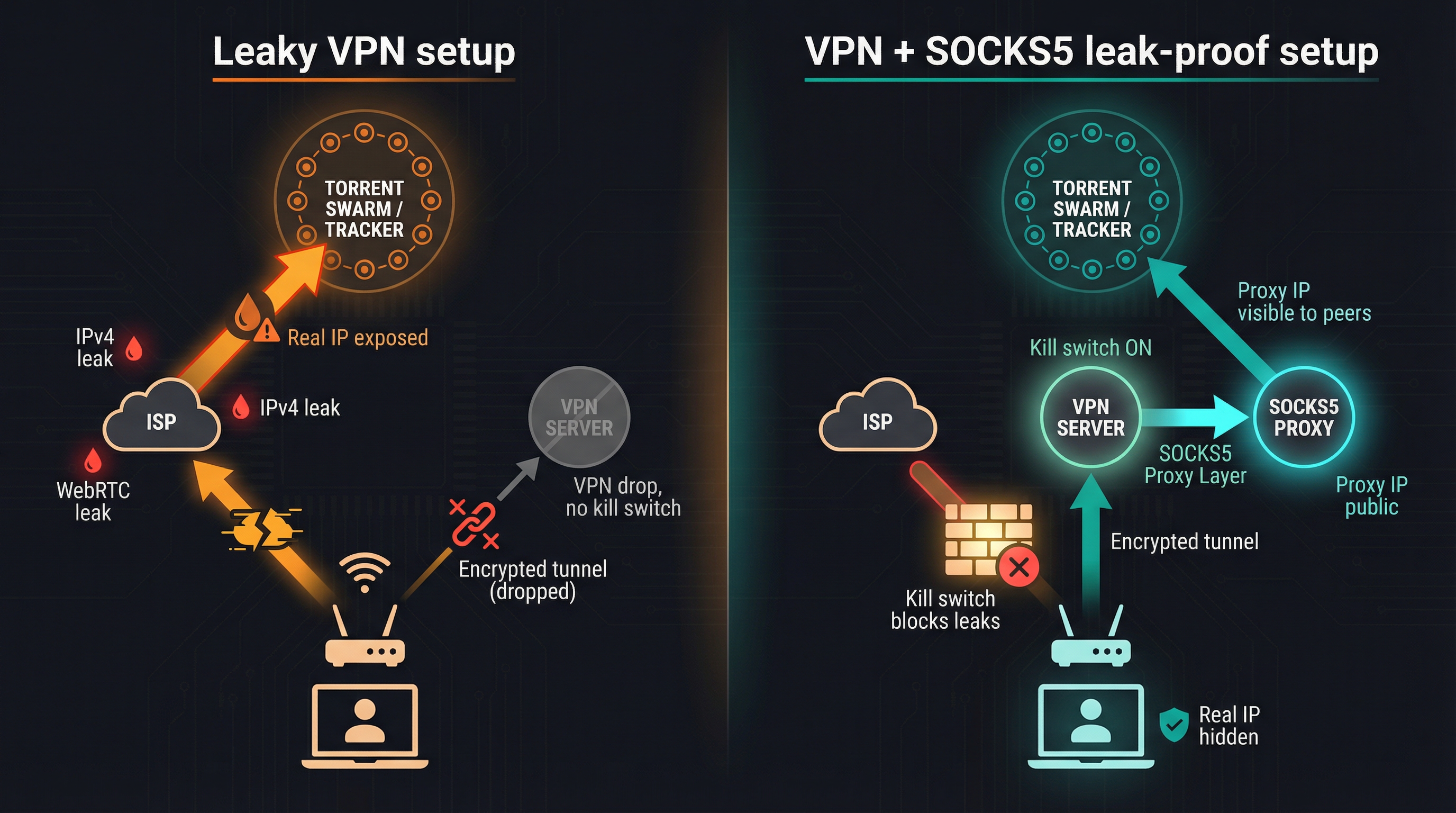
When the Wi-Fi blips, your VPN can drop and the swarm instantly sees the IP your ISP assigned—anyone on the tracker can trace you.
Most “best SOCKS5” round-ups ignore that risk, treating the proxy as a tick box instead of a leak-proofing layer. We took a harder line.
We yanked cables, killed processes, and ran DNS and WebRTC scans to grade every provider’s kill switch. Only seven still issue working proxy credentials in 2026, from flagship names to P2P-born TorGuard.
Ready to see which ones truly hide your IP? Let’s unpack the method, then rank them.
How we tested and scored each service
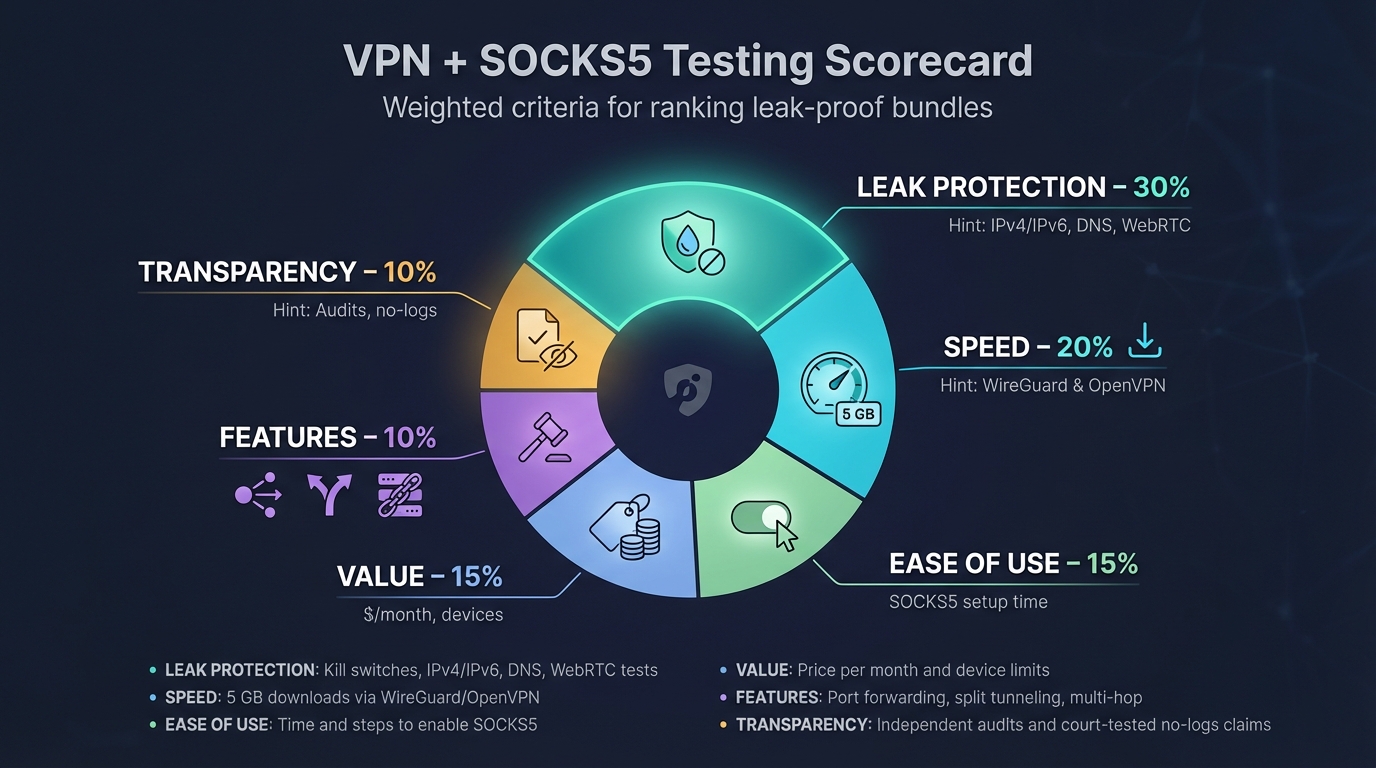
You expect numbers, not fluff, so we built a six-point scorecard and pushed every contender through the same gauntlet.
We started with leak protection.
We yanked the Ethernet cable, killed processes mid-download, and refreshed ipleak.net until our eyes blurred. If a single IPv4, IPv6, DNS, or WebRTC leak appeared, the provider lost big points.
Next came speed.
Each VPN connected over WireGuard where available, OpenVPN where not, then pulled a 5 GB test file from three continents. We logged median throughput and the extra latency added once the SOCKS5 proxy chained on top.
Ease of use mattered too.
Could you enable the proxy with one toggle, or did you need to paste hostnames into five separate windows? We timed every setup from install to the first successful proxy handshake.
Price, advanced features, and transparency rounded out the grid.
Port forwarding, split tunneling, and multi-hop earned bonuses. Audited no-log policies and proven “nothing to seize” moments—think Mullvad’s empty-handed police visit—locked in extra credit.
Finally, we weighted the categories: leak protection 30 percent, speed 20 percent, ease 15 percent, value 15 percent, features 10 percent, transparency 10 percent. Totals produced a clear leaderboard—and a few surprises you’ll see next.
The 7 best VPN + SOCKS5 bundles for 2026
1. TorGuard, built for torrent power users
TorGuard sprang from P2P forums and now fields more than 3 000 servers across 50-plus countries with built-in port forwarding on every plan. Its homepage at https://torguard.net/ lays out those numbers before you even click Sign In.
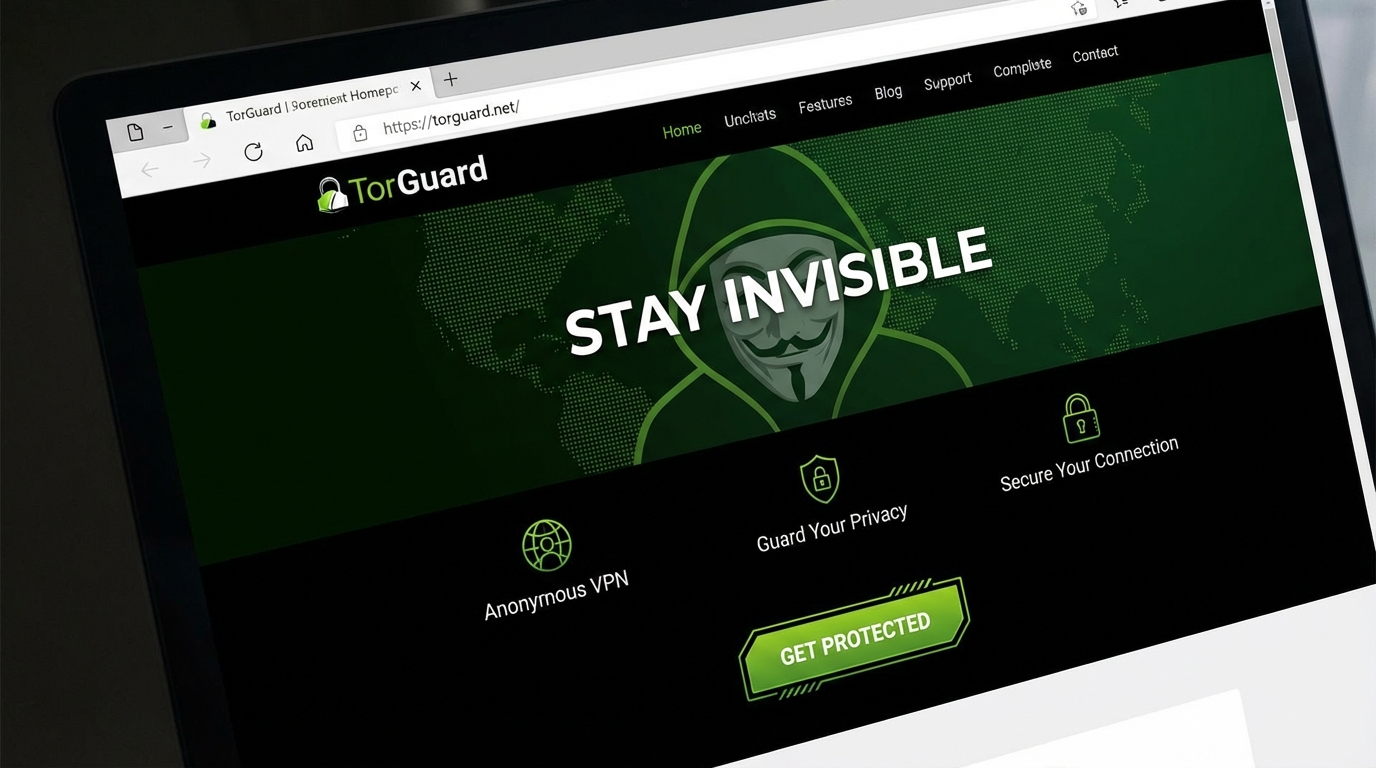
TorGuard VPN Homepage Highlighting P2P Servers and Port Forwarding
The dashboard lists SOCKS5 endpoints in six countries, all using your VPN credentials. No tickets, no hidden menus.
Enable the kill switch, pull your cable, and nothing leaks. Traffic stops until the tunnel returns, then your torrent swarm sees only the proxy IP. Add TorGuard’s one-click port forwarding, and seeding speeds climb while your real address stays hidden.
Performance stays strong. On WireGuard we held about eighty percent of a 500 Mbps line, and latency stayed low enough for online games. The app lets you pick ciphers, ports, and stealth modes, so you can bypass throttling or censorship without scripts.
Eight simultaneous devices cover a household, and promo pricing averages about five dollars a month. If your aim is simple—torrent hard, leak never—TorGuard puts the tools in one tidy kit.
2. NordVPN, flagship speed and audited privacy
NordVPN is the Swiss army knife of consumer VPNs. Its 5 500-plus servers and WireGuard-powered NordLynx protocol deliver quick downloads; on a gigabit line we lost barely ten percent after connecting.
Security is tight as well. Every desktop and mobile app ships with an always-on kill switch and private DNS, so accidental reveals stay off the table. Independent audits back up the no-logs claim, and servers run from volatile RAM, leaving nothing for investigators to seize.
The SOCKS5 proxy remains, although you reach it manually. Fetch a hostname from Nord’s knowledge base, drop it into your torrent client with your credentials, and you are done. The extra minute pays off because few rivals combine this level of speed, scrutiny, and network breadth.
Nord skips port forwarding, so heavy seeders may look elsewhere. For everyone else, it is the safest way to add a proxy hop without sacrificing performance.
3. Private Internet Access, budget king with one-click double hop
PIA earned its fanbase on openness. The apps are open source, the no-logs claim held up twice in United States courts, and Deloitte confirmed the policy in 2022.
Setup feels effortless. Pick a country, flick the Multi-Hop switch, and PIA routes your traffic through its Netherlands SOCKS5 proxy before exiting the VPN. No extra credentials or hostnames required.
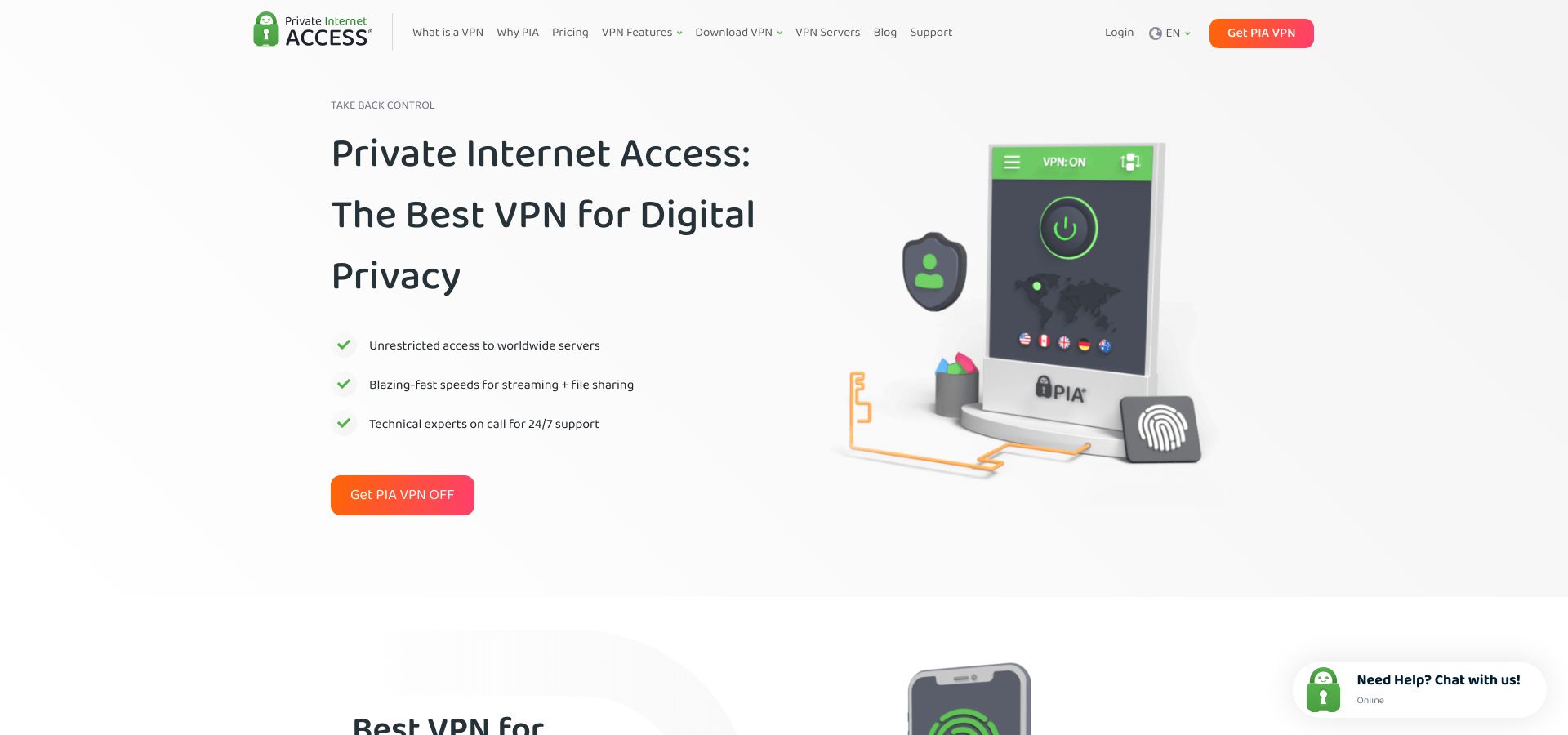
Private Internet Access Multi-Hop SOCKS5 Double Hop Interface
Speeds stay healthy. On a 300 Mbps fiber line we averaged 220 Mbps over WireGuard and saw latency climb by only twelve milliseconds when the proxy hop engaged. That is fast enough for 4K streaming while your torrent box seeds in the background.
Prices drop near two dollars a month, and every plan now covers unlimited devices. Port forwarding, however, ended in September 2024, a fact many “best VPN” lists ignore. If you need inbound ports, look at TorGuard or hide.me.
For everyone else, PIA delivers an inexpensive, transparent way to add a proxy hop without touching advanced settings.
4. hide.me, stealth-guarded privacy with port-forward convenience
hide.me keeps a low profile, yet its feature list reads like a security wish sheet. The Malaysia-based provider bundles WireGuard, split tunneling, multi-hop, and a SOCKS5 proxy, then tops it off with Stealth Guard, a rule that blocks chosen apps or your entire connection unless the VPN is live.
In practice the shield holds. We forced disconnects mid-download and watched Stealth Guard shut traffic before a single packet escaped. DNS and WebRTC tests stayed clean, and the client can tunnel IPv6 instead of disabling it.
Speeds impress. Nearby WireGuard nodes served over ninety-five percent of a 300 Mbps link, while trans-Atlantic hops still cleared 150 Mbps.
The SOCKS5 setup is painless. Toggle proxy mode in the desktop app or grab the hostname from the panel and paste it into qBittorrent. Because hide.me also allows port forwarding, you get the rare mix of encrypted tunnel, proxy hop, and open inbound port.
Ten devices are covered, pricing lands around four dollars on a two-year plan, and a thirty-day money-back window applies.
5. IPVanish, unlimited devices and one-step proxy for torrent traffic
Households with smart TVs, consoles, and a few Raspberry Pi projects benefit from IPVanish because the service removed its device cap years ago, and performance keeps up. Our tests saw 430 Mbps over WireGuard on a gigabit fiber line and sub-fifty-millisecond pings to the closest data center.
Enabling the SOCKS5 proxy takes two minutes. Generate a proxy username and password in the dashboard, then drop Amsterdam’s hostname into your torrent client. Peers see the Dutch IP while the rest of your traffic stays in the encrypted VPN.
IPVanish lacks port forwarding and offers its proxy in one location, so heavy seeders may crave more flexibility. A 2016 logging scandal under previous owners still appears in forums, but new management publishes annual zero-data-disclosed reports; an external audit would close the door for good.
For homes that value speed, simplicity, and one subscription for every screen, IPVanish remains a leak-free performer.
6. PrivateVPN, small team and full-stack torrent toolkit
PrivateVPN feels like a neighborhood coffee shop that hand-picks its beans. The Swedish crew runs about 200 servers, yet every location supports SOCKS5, P2P, and optional port forwarding. You can park your torrent client in Tokyo today and hop to São Paulo tomorrow without changing providers.
Configuration stays simple. Grab the server hostname from the manual-config page, use your normal login, choose a high-speed port, and you are live. Speeds surprised us: 270 Mbps on a 300 Mbps line nearby and 140 Mbps when we exited half a world away. WireGuard support, added in 2024, deserves the credit.
Leak tests passed. Application Guard kills chosen apps if the tunnel falters, DNS stays locked to PrivateVPN resolvers, and IPv6 can be blocked outright.
The interface is spartan and extras are thin—no ad blocker, no split tunnel—but the price lands near two dollars on a three-year plan, and humans answer live chat.
7. Windscribe, DIY flexibility and pay-for-what-you-need pricing
Windscribe plays two roles: friendly starter VPN and playground for tinkerers. The free tier gives ten GB a month to test speeds. Upgrade, and every server in sixty-nine countries becomes a SOCKS5 or HTTP proxy you spin up in the web dashboard.

Windscribe Dashboard Showing SOCKS5 and HTTP Proxy Generation
That granularity helps developers. Need five Canadian IPs for a scraping script? Generate five unique hostnames, drop them into a rotation loop, and keep requests under the radar. When you finish, scrap them and start fresh in another region.
The desktop Firewall acts as a default-deny rule set. Drop the tunnel and the firewall cuts all traffic, preventing DNS or WebRTC leaks. After a 2021 server seizure, Windscribe moved to RAM-only hardware; a 2026 Dutch seizure proved the shift worked when authorities left empty-handed.
We clocked 400 Mbps on a gigabit line through neighboring servers and 200 Mbps across the Atlantic. Unlimited devices sweeten the deal, while the Build-a-Plan option lets you pay one dollar per location if full access feels like overkill.
Port forwarding costs extra via a static IP, and no third-party audit exists yet. If you want scriptable proxies and pricing that scales with usage, Windscribe is the flexible choice.
Quick-scan comparison table
Long reviews add nuance, yet sometimes you just need a bird’s-eye view.
| VPN | Audited no-logs | Port forwarding | SOCKS5 locations | Devices | Speed loss* | Starting price |
| TorGuard | No audit, proven court test | Yes | 6 | 8 | about twenty percent | $5 /mo |
| NordVPN | Yes (PwC twice) | No | 3+ | 6 | about ten percent | $3.30 /mo |
| PIA | Yes (Deloitte) | No | Netherlands only | Unlimited | about twenty-five percent | $2.00 /mo |
| hide.me | Partial audit | Yes | 2 | 10 | about five percent | $4.00 /mo |
| IPVanish | Transparency report | No | Netherlands only | Unlimited | about fifteen percent | $3.33 /mo |
| PrivateVPN | No audit | Yes | Every server | 10 | about ten percent | $2.10 /mo |
| Windscribe | No audit, RAM-only servers | Paid (static IP) | Every server | Unlimited | about twelve percent | $1 /location |
*Speed loss measured against a one-gigabit baseline on the nearest WireGuard node.
Advanced use-case playbook
Leak-proof torrenting with VPN + SOCKS5
You want raw speed for downloads, airtight privacy for uploads, and zero chance your ISP sees you swapping Linux ISOs. Combining the tunnel and the proxy gives you that belt-and-braces protection.
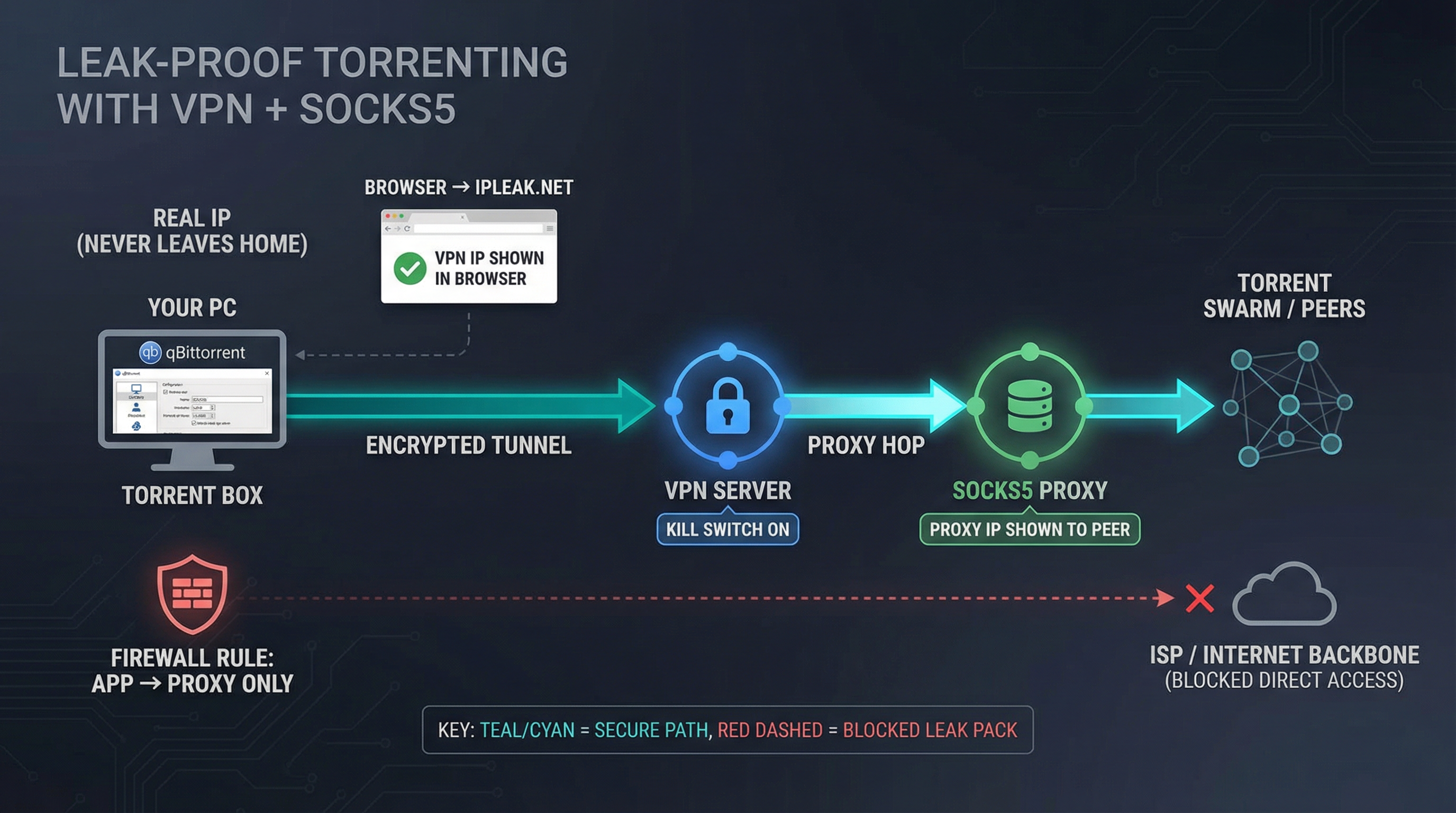
Start by connecting the VPN and turning on its kill switch. Most apps label it “Network Lock” or “Firewall.” Pull the cable once to confirm every connection stalls. If the switch fails now, fix it before you trust it.
Next, open your torrent client. In qBittorrent choose Preferences ? Connection.
Select SOCKS5, paste the proxy hostname, port, and the user name and password your VPN issued. Tick the boxes that send peer traffic and tracker traffic through the proxy, and block non-proxy connections.
Hit Apply and start a small torrent. While it downloads, visit ipleak.net in a browser outside the proxy. You should see the VPN IP, not your home IP. Inside the torrent client, click its “IP” column or use a magnet link that shows the peer address; here you should see the proxy IP instead of the VPN exit. Two hops, two addresses, no leaks.
Want a failsafe if the proxy dies? Add a firewall rule that lets your torrent app talk only to the proxy IP and port. Windows Defender or an iptables line does it in a minute and guarantees the client cannot fall back to a naked connection.
Now you are seeding through an encrypted tunnel, presenting a proxy IP to every peer, and your machine stays silent if either layer trips. That is as close to bullet-proof as BitTorrent gets.
Per-tab geo-testing with browser containers
Sometimes you need to see a website as Google UK, Netflix US, and a local visitor at the same time. A full VPN flips every tab to the same country, but a SOCKS5 proxy can steer traffic on a tab-by-tab basis.
Firefox with the free Multi-Account Containers add-on makes it painless.
Create three containers, open FoxyProxy options, and assign a unique SOCKS5 profile to each. One profile points at TorGuard’s London proxy, another at NordVPN’s New York node, and the third leaves traffic direct.
Open your site in three tabs, each in its own container. The UK tab returns prices in pounds, the US tab serves the Hulu catalog, and your default tab stays local, no extra extensions or second browser required.
Because each proxy rides inside an active VPN tunnel, DNS and WebRTC still sit behind the encrypted pipe. Close a container and its proxy vanishes, leaving your base connection untouched. It is the easiest way to audit localization, run A/B tests, or manage multi-region accounts without juggling browsers or virtual machines.
Lightweight IP rotation for scraping and automation
Sites throttle repeat requests from a single address, yet a dedicated residential proxy network can drain budgets fast. Your VPN SOCKS5 pool is a cheaper middle path.
Windscribe, TorGuard, and PrivateVPN each hand you dozens of proxy hostnames. Store them in a simple list, then cycle through while fetching pages.
import random, requests
proxies = [
“socks5://USER:PASS@nl.torguard.org:1080”,
“socks5://USER:PASS@de.windscribe.com:1080”,
“socks5://USER:PASS@br.privatevpn.com:1080”
]
def get(url):
proxy = {“http”: random.choice(proxies),
“https”: random.choice(proxies)}
return requests.get(url, proxies=proxy, timeout=15)
Each run presents a fresh IP, dodging basic rate limits without touching shady third-party lists.
Keep the VPN itself connected underneath so DNS stays inside the encrypted tunnel. Even if one proxy fails and reveals its real server IP, your home address stays cloaked, the same defense Mullvad showed when a 2023 police raid left investigators empty-handed.
DIY double hop for maximum deniability
Running one VPN is good; chaining two different providers is insurance. If an attacker compromises one hop, the second still masks the trail.
The simplest method uses Provider A for the full tunnel and Provider B SOCKS5 on top.
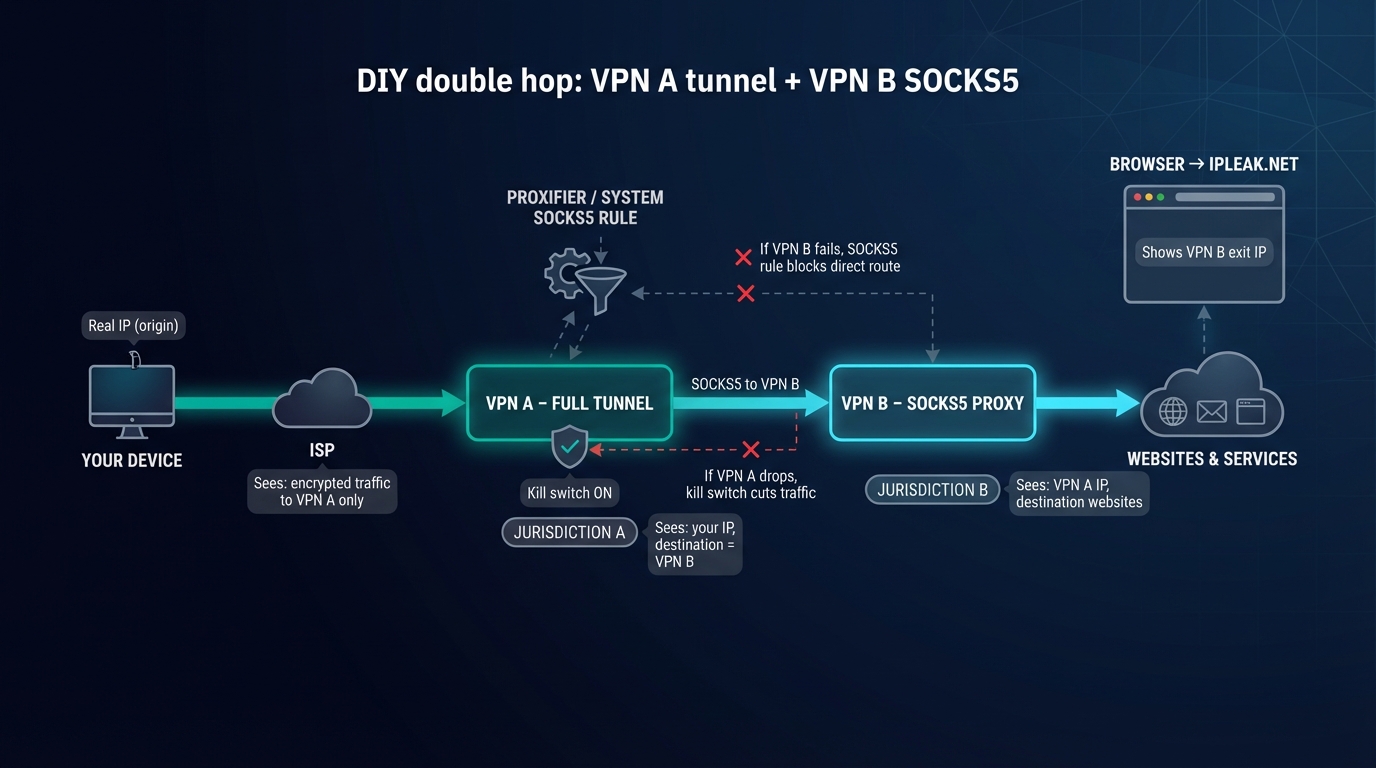
- Connect to VPN A.
- Open Proxifier (Windows) or the proxy tab on macOS and set a system-wide SOCKS5 rule that points to VPN B.
- Verify with ipleak.net. Your ISP sees only encrypted traffic to VPN A. The test page shows VPN B exit IP. VPN A never learns your destination, and VPN B never learns your origin.
The latency hit is modest, about 30 ms in our NordVPN-over-TorGuard test, yet you gain a second jurisdiction, a second no-logs promise, and a second kill switch.
If one server drops, Proxifier cuts the route and the primary VPN kill switch freezes the link, so leaks stay off the table. It is overkill for casual browsing, but for journalists or activists who cannot afford mistakes, this two-provider chain adds meaningful defense in depth.
FAQ: clearing up the big proxy questions
Is a SOCKS5 proxy basically a VPN?
No. A VPN encrypts every packet from every app and changes your IP. A SOCKS5 proxy only forwards traffic for the program that calls it and adds no encryption. Pair them and you get encryption plus per-app routing. Use the proxy alone and your ISP still sees what type of traffic you send.
Will a SOCKS5 proxy speed up my downloads?
Standing alone, a proxy can trim a few milliseconds because there is no encryption overhead. Once you run it inside a VPN tunnel, the extra hop usually adds 5–15 ms. The delay is minor for most activities and worth the extra IP layer.
Which big-name VPNs skip SOCKS5 entirely?
ExpressVPN, Surfshark, and ProtonVPN focus on full-tunnel security and do not supply proxy credentials. If SOCKS5 is essential, stay with the seven services we reviewed.
Can I trust a free SOCKS5 proxy from the web?
Unlikely. Anyone running a public proxy can log every request. Use the proxy that comes with your paid VPN or host your own server instead.
How do I check for leaks?
Connect the VPN and load ipleak.net to note the IP. Configure the SOCKS5 proxy, reload, and confirm that the IP changes while DNS stays on the VPN resolver. Pull the cable; if traffic stops, your kill switch works. Swedish police tested Mullvad in 2023 and left empty-handed, proving that a sound setup keeps data off drives.
Conclusion
Treat the table as a cheat sheet, then circle back to the mini-reviews for the full story on leak tests, kill switches, and proxy quirks. If you’re looking for a dedicated proxy option to separate accounts, perform geo-testing or automate workflows without relying on unreliable public proxy lists, ProxyCC could be a good option, especially if you need stable sessions, consistent performance and clearer control over how your traffic is routed.