

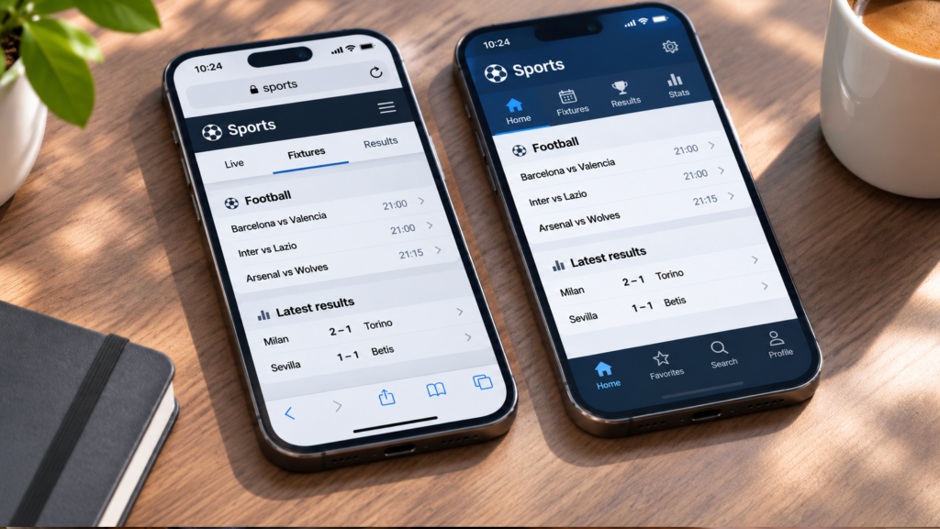
The same service can begin with a tap on an app icon or a link in a browser. To the person using it, the difference may seem small until the phone runs short of storage, a notification fails to arrive or a page needs to be shared. For the company building it, the choice affects maintenance, permissions and how quickly a new user can get started.
A sports platform makes the trade-off easy to see. Someone checking a single fixture through a sports betting page may find a browser sufficient; someone following several scores may prefer an installed interface with a persistent place on the home screen. Neither method automatically makes the information more accurate. The service behind the screen still has to update the score and display the current market clearly.
The browser has a simple entrance
A browser page can be opened from a message, a search result or a saved link. The user does not have to install a separate package before seeing what the service offers. That is valuable for infrequent tasks: checking a price, reading an article, reviewing a timetable or opening a shared document.
Links are also easy to pass between devices. A person can send a page to a colleague who uses a different phone and still expect them to open the same address. The interface may adapt to a smaller screen, but poor mobile design will remain poor mobile design whether it arrives through a browser or an app. The existence of an app is not a substitute for readable text, usable controls and a stable connection.
A browser does have its own limits. A tab may be harder to find after a day of other browsing, and browser settings determine which sites can use features such as notifications. Some modern web services can be installed as progressive web apps, placing an icon on the home screen. Google’s documentation makes clear that this depends on the site’s implementation and the browser and operating system. The old division between “website” and “app” is therefore less rigid than it appears.
What installation changes
An installed app has a dedicated entry point on the device. It can integrate with operating-system features, request permissions and present notifications in a familiar format. Whether it does these things well depends on the app and the permissions a user grants. Installation alone does not guarantee faster loading, offline access or timely alerts.
There is also an ongoing maintenance cost. A team may need to support different phone operating systems, test updates and address problems that appear on one device but not another. A browser service can be updated on the server, although changes to a web app and its stored data also require testing. From the user’s side, an installed app takes storage and may need updates; a browser page still uses data and can store site files locally.
The choice becomes clearer when framed around a task rather than a brand:
- Occasional visit: a browser link reduces the steps before the first use.
- Frequent checking: an installed icon can make a regularly used service easier to find.
- Alerts: check the actual notification controls; an app is not the only possible way to receive them.
- Limited storage or data: compare real usage on the device instead of assuming one format is always lighter.
That last point matters especially for media-heavy services. Images, video and repeated live refreshes can use data in either format. The screen design and update frequency often matter more than whether the interface was opened from an icon or an address bar.
A sports account exposes the smaller details
Sports services bring several functions together: fixtures, changing odds, account records and sometimes promotional information. An app and a browser may show the same account while presenting these functions differently. A notification about a match is not the same as a confirmed bet; a market visible on screen is not proof that a quoted price was accepted. Account history and the terms attached to a transaction need to remain accessible whichever interface a person uses.
The same applies to the welcome bonus, whose eligibility requirements and conditions may not be fully explained in a short promotional description. The rules provide the details needed to understand how the offer works and whether it remains available. Whether accessed through an app or a browser, a small promotional card should not replace the full terms.
For the team designing such a service, the sensible question is which screen helps the user complete each task with fewer mistakes. A score needs a visible update time. An account action needs clear confirmation. Rules need readable text rather than a disappearing panel. Those requirements do not change when the user switches devices.
The practical answer is often both
Many digital services serve newcomers through the web and give regular users an optional installed experience. This is not a requirement for every product. A simple information site may have no reason to build a separate app. A service used repeatedly throughout the day may justify one, provided it offers a tangible advantage over a saved browser link.
The most useful comparison is made on the same phone with the same task. Can the user find the relevant information, understand what has changed and review what they did afterward? If the answer is yes in a browser, installation may be a matter of convenience. If an app makes repeated tasks clearer, it has earned its place on the device. The label on the icon matters less than the experience behind it.