

As the chief customer care engineer, I regularly review the support feedback our team receives. You may be using less than 35% of your ContiSX Phone’s capabilities. The phone is also a full point-of-sale (POS) system, and we will show you how it enables payments through ContiSX Watch and ContiSX Ring very soon.
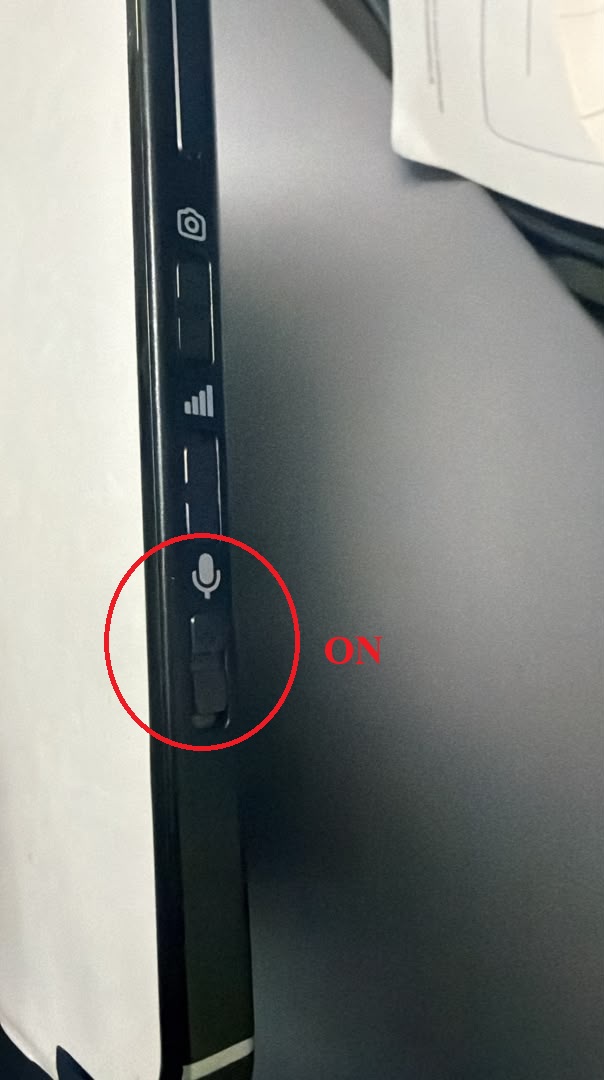
Today, let us address one common question: “I can hear the other person, but they cannot hear me. What happened to my phone?”
Solution: Check the physical microphone switch on the side of your ContiSX Phone. For the microphone to work, the switch must be in the UP position, as shown in the image below. If it is down, move it up and try speaking again. That is explained in our phone manual.
Register for the next Tekedia Mini-MBA.
Register for Tekedia AI in Business Masterclass.
Join Tekedia Capital Syndicate and co-invest in great global startups.
As always, we have a 24/7 support for all ContiSX services and products. Do you use ContiSX Phone? Begin here to chat, talk and video free https://contisx.com/phone
---
Connect via my
LinkedIn |
Facebook |
X |
YouTube