DD
MM
YYYY

PAGES

DD
MM
YYYY

spot_img

PAGES

Home Blog Page 7414

Amazon Unveils Lex As OEMs Tap Into Alexa, The Voice Operating System

0

Amazon released a version of its Alexa speech-recognition service to let developers enable apps for voice. The Lex service comes at a time when chip vendors, including Conexant, NXP and QuickLogic, are hopeful multiple OEMs will start shipping Alexa-like devices this year with their chips.

Amazon Lex is a service for building conversational interfaces into any application using voice and text. Amazon Lex provides the advanced deep learning functionalities of automatic speech recognition (ASR) for converting speech to text, and natural language understanding (NLU) to recognize the intent of the text, to enable you to build applications with highly engaging user experiences and lifelike conversational interactions. With Amazon Lex, the same deep learning technologies that power Amazon Alexa are now available to any developer, enabling you to quickly and easily build sophisticated, natural language, conversational bots (“chatbots”).

Speech recognition and natural language understanding are some of the most challenging problems to solve in computer science, requiring sophisticated deep learning algorithms to be trained on massive amounts of data and infrastructure. Amazon Lex democratizes these deep learning technologies by putting the power of Amazon Alexa within reach of all developers. Harnessing these technologies, Amazon Lex enables you to define entirely new categories of products made possible through conversational interfaces.

As a fully managed service, Amazon Lex scales automatically, so you don’t need to worry about managing infrastructure. With Amazon Lex, you pay only for what you use. There are no upfront commitments or minimum fees.

The news marks the latest foray in a battle of cloud computing giants using machine learning to attract users. It came the same day Facebook was encouraging developers at its annual conference to use new augmented reality capabilities powered by machine learning.

Analysts say Google has an opportunity to marry its superior search service with its Google Assistant, a voice service currently only available on its Pixel smartphones and a new model from LG. Apple is a wild card here with its Siri, an early entrant in the field.

Amazon’s Lex handles speech recognition and natural language processing as a Web service. The company announced support from a handful of early preview users including a bank, an insurance company and a non-profit.

All three of South Korea’s telecom providers already offer voice assistants similar to Alexa based on their own voice servcies and a reference design from Conexant, including KT’s GiGA Genie. “We expect to ship millions of units in Korea,” said Saleel Awsare, president of Conexant.

The company launched a reference design in December with software to link to the Alexa service. It already enables Microsoft’s Cortana on some Hewlett-Packard PCs and has had discussions with Google about its Assistant. “I believe in 2018 [voice assistants] will become the largest business for Conexant, said Awsare.

Conexant is working with a handful of OEMs for voice-enabled devices including a digital thermostat maker in Canada. Others want to add voice to set-top boxes, Wi-Fi extenders and even smart light bulbs, he said.

The company already sold nearly 500 of its voice developer kits at $299 each. It expects third-party products at or below the price of an Amazon Dot will hit the market this summer.

Amazon is believed to have sold as many as 7 million Alexa devices to date, mainly using audio chips from Texas Instruments. It claims it will enable 100 million systems for voice by 2020, largely through third-party products


How To Protect Your Computer and Smartphone From Shady Ads

0

Adware is the name that computer professionals give to computer programs that display ads on your computer, or that perform related advertising or marketing functions. In addition to showing you ads, these programs may divert your searches to advertising websites without telling you. Or they may gather your personal information for marketing purposes, also without telling you.

Some advertising programs are benign and open about their purpose. Software vendors or online service providers may offer free or reduced-price versions in turn for showing you ads on your computer. But other advertising or marketing software can be more secretive — and can turn out to be an expensive deal.

What is Adware Doing On — And To — Your Computer?

Adware that comes from reputable firms is very rarely a problem. It will ask your permission before installing itself, and provide a means for you to remove the ads. (This may mean canceling a service, or upgrading to a paid version. The important thing is that it is your choice.)

But other advertising software can cause problems. This is especially true if it installs itself without your permission. Apart from the inconvenience of seeing ads you did not ask for, it can slow down your computer. If enough hidden programs get onto your computer the reduction in performance can be substantial. You may end up having to pay to have your system professionally cleaned up so that it works properly.

Secretive advertising software can be costly in other ways. If it diverts your searches you could end paying more for products and services you buy online. And programs that secretly gather your personal information can be exploited by cybercriminals, with very costly results for the victim.

Protecting Your Computer From Shady Ads

How can you protect yourself against secretive advertising software? The first step, as for protection against all computer threats, is to be careful. If a deal sounds too good to be true, it probably isn’t true — don’t click on that link.

But even following good security practices does not provide total protection: You need tools to assist you in protecting your computer. Free virus scan is readily available, and is a helpful start — but it is not enough by itself. Free scans have limited capabilities, and generally do not detect malicious adware.

More complete antivirus protection is not free, but it is well worth the modest cost. And most full antivirus protection tools offer an option to scan for adware as well. Well-designed protection allows you to leave advertising programs that are there by permission, while getting rid of nuisance or dangerous programs that you did not ask for. Which, in turn, will help keep your computer running smoothly and safely

World Bank Unveils XL Africa, a Business Accelerator That Will Invest Between $250,000 And $1.5M To Startups

0

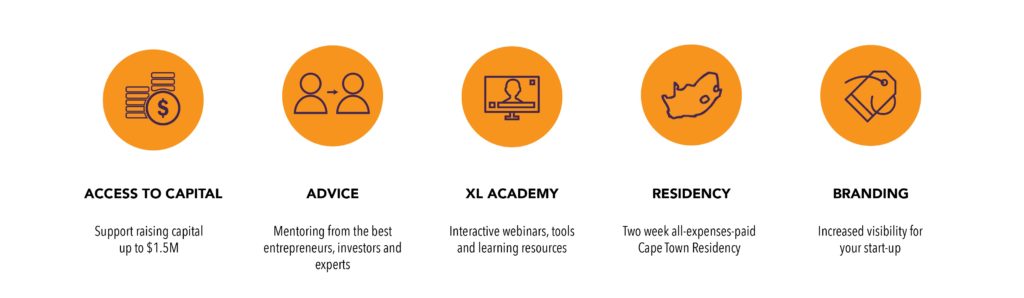
The World Bank Group launched XL Africa (www.XL-Africa.com), a five-month business acceleration program designed to support the 20 most promising digital start-ups from Sub-Saharan Africa. Start-ups will receive mentoring from global and local experts, learn through a tailor-made curriculum, increase their regional visibility, and get access to potential corporate partners and investors. With support from prominent African investment groups, XL Africa will help the 20 selected start-ups attract early stage capital between $250,000 and $1.5 million.

“Digital start-ups are important drivers of innovation in Africa,” says Makhtar Diop, Vice President for the Africa Region at the World Bank. “To scale and spread new technologies and services beyond borders, they need an integrated ecosystem that provides access to regional markets and global finance; pan-African initiatives like XL Africa play a critical role by linking local start-ups with corporations and investors across the continent.”

The program comes at a time of increasing interest in the African digital sector. According to a recent report by Disrupt Africa, in 2016, the number of tech start-ups that secured funding increased by 16.8% compared to 2015.

“XL Africa aims to put a spotlight on the continent’s growing digital economy by scouting for and supporting the most innovative tech start-ups,” said Klaus Tilmes, Director of the Trade & Competitiveness Global Practice at the World Bank Group. “The success of these ventures will create a demonstration effect that can attract much-needed growth investment in the sector and catalyze scaling of transnational businesses in the region.”

The program’s flagship activity includes a two-week residency in Cape Town, South Africa, where the ventures will have the opportunity to interact with and learn from their mentors, peers, and local partners. The Cape Town residency will conclude with the Venture Showcase, a regional event in which the entrepreneurs will present their business models to a select audience of corporations and investors.

“The program’s unique combination of targeted mentorship and access to investors represents a vital resource for digital ventures ready to grow,” said Lexi Novitske, Principal Investment Officer for Singularity Investments, a venture group based in Lagos, Nigeria. “By connecting innovative business ideas with the knowledge and resources available in the ecosystem, XL Africa will create a pipeline of investment-ready companies, unlocking better investment opportunities for regional and global investors.”

The program will collaborate with prominent African investment groups, including the African Business Angel Network (ABAN), AngelHub Ventures, Goodwell Investments, Knife Capital, Nest Africa, Silvertree Capital, Singularity Investments, South African Business Angel Network (SABAN), TLcom Capital, Zephyr Acorn and 4Di Capital, and corporate partners, such as Orange, .Eco, Ringier, and Thomson Reuters.

Interested companies can apply online on the XL Africa website www.XL-Africa.com by Monday, June 12, 2017.

XL Africa is funded by the governments of Finland, Norway, and Sweden, and administered by the World Bank Group with implementation support from IMC Worldwide, VC4A, and Koltai & Co.

Five Simple Ways To Protect Your Wireless Network

0

Using a wireless network in your home gives you the convenience of being able to use your computer virtually anywhere in your house — and still be able to connect to other computers on your network or access the Internet. However, if your wireless network is not secure, there are significant risks. For example, a hacker could:

  • Intercept any data that you send or receive
  • Gain access to your shared files
  • Hijack your Internet connection — and use up your bandwidth or download limit

Internet Security tips — to help you protect your wireless network

Here are some simple steps you can take to protect your wireless network and router:

  • Avoid using the default password
    It’s easy for a hacker to find out the manufacturer’s default password for your wireless router — and then use that password to access your wireless network. So it’s wise to change the administrator password for your wireless router. When you’re deciding on your new password, try to pick a complex series of numbers and letters — and try to avoid using a password that can be guessed easily.
  • Don’t let your wireless device announce its presence
    Switch off SSID (Service Set Identifier) broadcasting — to prevent your wireless device announcing its presence to the world.
  • Change your device’s SSID name
    Again, it’s easy for a hacker to find out the manufacturer’s default SSID name for your device — and then use that to locate your wireless network. Change the default SSID name of your device — and try to avoid using a name that can be guessed easily.
  • Encrypt your data
    In your connection settings, make sure you enable encryption. If your device supports WPA encryption, use that — if not, use WEP encryption.
  • Protect against malware and Internet attacks
    Make sure you install a rigorous anti-malware product on all of your computers and other devices. In order to keep your anti-malware protection up to date, select the automatic update option within the product.

How To Stay Safe When Shopping Online

0

You’re shopping online, you’ve found a great deal on a new camera, and you don’t want to miss out.

However, you’ve never heard of the retailer before. Or maybe it’s one you know, but you think there’s something not quite right about it…

Do you take the risk and buy the camera? Or do you play safe and cancel the transaction? You need some safety tips for shopping online.

Make sure you’re surfing on a safe site

Cybercriminals often create fraudulent websites, posing as high-profile online retailers. These websites look legitimate and ask you to enter personal information to verify your account. What they want is your username and password, so they can use it to hack into your other online shopping accounts like Amazon or eBay – or even your bank account. They also want your credit card information and your personal data. You want to be certain that you are protecting your money online.

How do you check if the website is safe? Well here’s a good online shopping tip; when you are in the shopping cart or on the payment page, look at the address bar of your browser. You should see ‘https’ – not ‘http’ – at the start of the URL, and a small padlock symbol next to it. This shows that you have a secure session with the website. It is a good sign and a good shopping safety tip. But there is little else to indicate you are dealing with a trusted site.


Put an end to keyloggers

Cybercriminals often write keylogging programs that run silently in the background of your PC, hidden from view. You may have accidently installed them by clicking on a pop-up or a link in a spam email. And without quality Internet security, they are practically impossible to detect.

Keylogging programs record every keystroke you use to enter your name, password and credit card details when you make a purchase. In short, they record everything you type on your keyboard.

This information is then sent back to a remote computer/hacker who could use your card to purchase items for themselves, or sell the details to other cybercriminals who use it to purchase goods to be delivered to a temporary address – stealing your money and possibly identifying you in the process.

A simple online shopping tip is to install strong internet security. Premium Internet security solutions often come with a feature called a “virtual keyboard”. When entering a username or password, an image of a keyboard appears on the screen and you can complete the process by clicking on the virtual keyboard with a mouse. This foils keylogging programs, which expect you to use the PC’s keyboard.

Put an end to keyloggers

Hackers also use your email address and password to enter different online shopping sites. People often use the same weak password for multiple accounts. Breaking just one of these accounts gives the cybercriminal access to a lot of personal data.

Another essential online safety tip is to create strong passwords for each of your online accounts including shopping sites. It is worth using these simple steps:

  1. Don’t make your password an easy-to-guess word or place name
  2. Use a mixture of letters (in upper- and lower-case), numbers, and even punctuation marks
  3. Have a different password for each site you use
  4. Record each password in the encrypted vault of your Total Internet Security solution
  5. Use the password manager of your total Internet security solution.

Online shopping doesn’t have to be dangerous

We’ve given you some tips for safely shopping online because it can be minefield when cybercriminals are trying to steal your password, your credit card details and even your identity. But with a premium total Internet security solution, you can check each online store is safe, create a unique password for each site, log in using virtual keyboards to avoid keylogging and store your passwords securely on all your PCs.

Now shopping online can be just as safe, affordable and convenient as shopping on Main Street. For more online shopping tips please visit the Internet Security Center for information on internet safety and security threats.