

DD
MM
YYYY

PAGES

DD
MM
YYYY

spot_img

PAGES

Home Blog Page 10

How to downgrade iPadOS 27 to 26 without data loss?

0

So you installed iPadOS 27—perhaps the developer beta, perhaps the public beta—and now your iPad feels less like a productivity powerhouse and more like a crash-prone frustration machine. Battery life has taken a hit. Apps are freezing. Features that worked flawlessly yesterday are suddenly broken. If you’re searching for a way to downgrade iPadOS 27 to 26, you’re not alone.

Can You Go Back from iPadOS 27 to iPadOS 18?

No. Downgrading iPadOS 27 to 18 is impossible. For devices that have already been upgraded to iPadOS 27, there is no official or reliable method to downgrade to iPadOS 18. Apple strictly controls which versions of iPadOS can be installed on a device through its “signing” mechanism.

On July 7, 2026, Apple stopped signing iPadOS 26.5 and 26.5.1. Currently, for iPadOS 27 users, the most stable and safe choice is to downgrade to iPadOS 26.5.2.

Always verify before attempting: Check which versions are currently signed at IPSW.me for your specific iPad model.

Before You Downgrade iPadOS 27 to 26:

This is the part most users discover too late. A backup made while running iPadOS 27 cannot be restored onto iPadOS 26. Apple’s backup system is not backward-compatible. If you back up your iPad today—while it’s on iPadOS 27—that backup is useless for a downgraded device. You can transfer data from an iPad to a computer and download it again without iCloud.

Method 1: iTunes/Finder –The Official Downgrade (Loss All Data)

Restore iPad via Recovery mode is Apple’s own downgrade iPadOS method. It’s free, it’s reliable, but it will lose all data when you restore your device.

Pre solution

  1. A Mac (with Finder) or a Windows PC (with the Apple Devices app, or iTunes if you’re on an older setup)
  2. A USB-C or Lightning cable and a stable internet connection;

Steps to downgrade iPadOS 27 to 26 with iTunes/Finder:

Step 1: Back up whatever you can.
Since your iPadOS 27 backup won’t work on iPadOS 26, focus on iCloud-synced data and app-specific cloud backups. Make sure iCloud Photos, iCloud Drive, Contacts, Calendars, and Messages in iCloud are all turned on.

Step 2: Disable Find My.
Go to Settings > your name > Find My > Find My iPad and toggle it off. This is required for the restore process to work.

Step 3: Connect your iPad to your computer.

Step 4: Put your iPad into Recovery Mode.
The method depends on your iPad model:

  • iPad with Face ID (or a Touch ID power button): Press and quickly release the Volume Up button. Press and quickly release the Volume Down button. Then press and hold the Top button until your iPad begins to restart. Continue holding until you see the recovery mode screen.
  • iPad with a Home button: Press and hold both the Home and Top (or Side) buttons simultaneously. Keep holding until you see the recovery mode screen.

Step 5: On your computer, click “Restore iPad”:

  • Mac (Finder): Your iPad will appear in the sidebar. Click it, then click “Restore iPad.”
  • Windows (Apple Devices app): Select your iPad, then click “Restore iPad.”
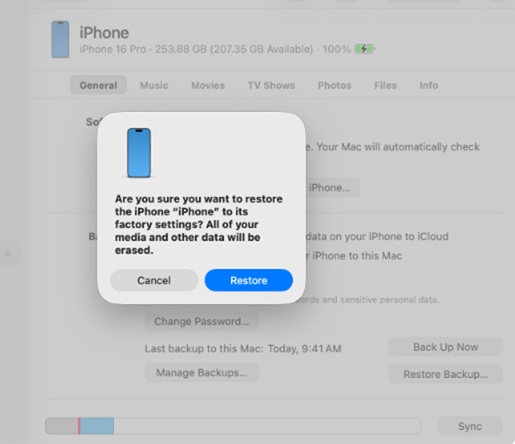
A dialog will appear asking you to confirm. Click Restore. Your computer will erase your iPad and install the latest publicly available version of iPadOS that Apple is still signing.

Step 6: Wait for the process to complete. It may take 15–30 minutes.

Step 7: Set up your iPad.

If you have an archived backup from before you installed iPadOS 27, restore from that now. Otherwise, set up as new and sign in to iCloud to sync your data back.

Method 2: Tenorshare ReiBoot-an Downgrade iPadOS tool suitable for everyone  (Recommended)

If you prefer a guided, click-through experience, tools like ReiBoot can help—but always verify the signing status first. Tools like Tenorshare ReiBoot market themselves as one-click solutions to downgrade iPadOS 27 to iPadOS 26. They can simplify the process by handling the technical steps for you.
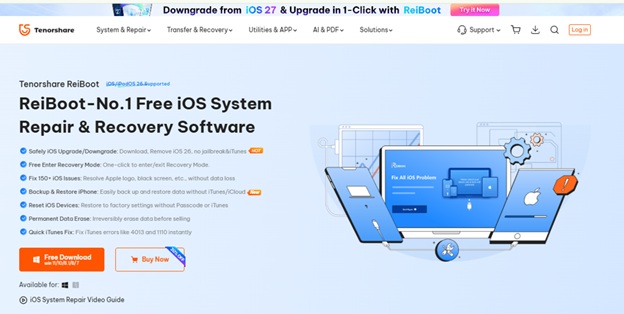
Tenorshare ReiBoot is a professional iPadOS/iOS system repair and downgrade tool without losing any data. With a clean, one?click interface, it can:

  1. Downgrade iPadOS without requiring you to hunt down IPSW files
  2. Fix stuck recovery mode, white Apple logos, and boot loops
  3. Work even when Apple is still signing the older version—but much faster and safer than the manual method

Step to downgrade iPadOS 27 to 26 via Tenorshare ReiBoot

Step1. Free download Tenorshare ReiBoot and connect your iPhone to the PC

Step2. Open Tenorshare ReiBoot and choose iPadOS Upgrade/Downgrade ? Downgrade Function
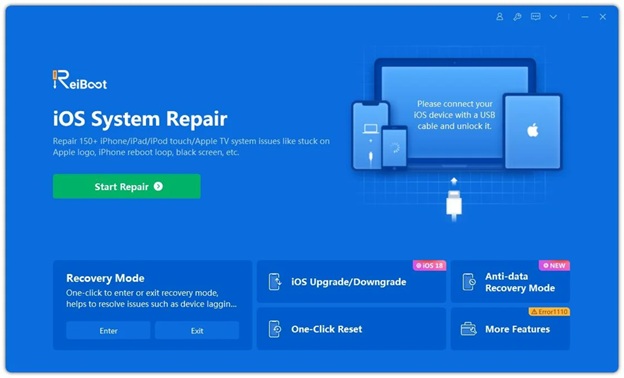
Step3. Install iPadOS 26 version as it tips and wait 15-20 minutes to install successfully.

However, there’s a critical catch: Tenorshare ReiBoot cannot bypass Apple’s signing mechanism. If Apple has stopped signing iPadOS 26.5.2, ReiBoot cannot install it either. It’s a convenience tool, not a magic wand.

Method 3: DFU Mode (Downgrade but lose all data)

If Recovery Mode doesn’t work, DFU (Device Firmware Update) mode is a deeper restore that reloads the device’s firmware and bootloader.

Warning: DFU mode is more complex and requires precise button timing. It also erases everything—just like Recovery Mode.

Steps for iPad with Face ID:

  1. Connect your iPad to your computer
  2. Quickly press and release Volume Up
  3. Quickly press and release Volume Down
  4. Press and hold the Top button until the screen goes completely black
  5. Immediately (while still holding the Top button), also press and hold the Volume Down button for about 5 seconds
  6. Release the Top button, but continue holding Volume Down for another 10 seconds
  7. If done correctly, your computer will detect a device in DFU mode—the screen stays black
  8. In Finder or the Apple Devices app, hold the Option key (Mac) or Shift key (Windows) and click “Restore iPad.” Select the iPadOS 26 IPSW file you’ve downloaded

How to Stop Future iPadOS 27 Updates?

The safest and most reliable method for most users is to turn off Automatic Updates. If you are a beta tester, opting out of the beta program is your first step. For everyone else, simply deleting the downloaded update file can buy you time while you decide whether to upgrade later.

Method A: Turn Off Automatic Updates (Most Effective)

If you want to prevent your iPad from updating to iPadOS 27? turning off automatic updates is the standard way to stop your iPad from automatically downloading and installing updates.

Open the Settings app>Go to General > Software Update.>Tap Automatic Updates (or Customize Automatic Updates on some versions).>Toggle off both Download iPadOS Updates and Install iPadOS Updates.

Method B: Opt Out of Beta Program (For Beta Testers)

If you are currently running a beta version of iPadOS 27, you can stop receiving future beta updates by removing your device from the beta program.

For iPadOS 16.4 or later:

  • Go to Settings > General > Software Update.
  • Tap Beta Updates.
  • Choose Off.

For earlier iPadOS versions:

  • Go to Settings > General > VPN & Device Management.
  • Tap the installed iOS Beta Software Profile or iPadOS Beta Software Profile.
  • Select Remove Profile.

Note: This only stops automatic iPadOS installation. You may still receive notifications that an update is available.

Important Note: Unsupported iPadOS 27 Devices

If your iPad is one of the following models, it is not eligible for iPadOS 27 at all:

  • iPad (8th generation)
  • iPad mini (5th generation)
  • iPad Air (3rd generation)
  • iPad Pro 11?inch (1st generation)
  • iPad Pro 12.9?inch (3rd generation)

These models will not receive the iPadOS 27 update automatically, so you don’t need to take any action.

FAQ About Downgrading iPadOS 27

1. Can I downgrade iPadOS 27 to iPadOS 26 without losing data?

No. Both the official Recovery Mode method and DFU mode erase all data on your iPad. Tools like ReiBoot also cannot preserve data when downgrading, because Apple’s backup system does not support restoring a newer backup onto an older system.

2. Will my iPadOS 27 backup work on iPadOS 26?

No. A backup made on a newer version (iPadOS 27) cannot be restored onto an older version (iPadOS 26). You would need an archived backup from before you installed iPadOS 27.

3. How long does the downgrade process take?

Recovery Mode takes 15–30 minutes. DFU Mode takes a similar time. Tenorshare ReiBoot also takes approximately 15–20 minutes.

4. Can ReiBoot really downgrade iPadOS 27 to 26?

Yes, if and only if Apple is still signing iPadOS 26. ReiBoot simplifies the process but cannot bypass Apple’s signing restrictions.

5. My iPad is on the unsupported list. Will I get iPadOS 27?

No. Models like iPad (8th generation), iPad mini 5, iPad Air 3, and iPad Pro 1st generation (11″ and 12.9″) do not support iPadOS 27.

Conclusion

If you have a pre-upgrade backup and iPadOS 26.5.2 is still signed, downgrade now using Recovery Mode. If you don’t have a backup, think carefully before proceeding. And if you choose to use Tenorshare ReiBoot, understand that it’s a convenience tool that makes the process easier—but doesn’t offer capabilities the official method lacks.


Netflix’s Future Growth Depends on Its Next Blockbuster Series

0

Netflix has long been one of Wall Street’s favorite entertainment companies, thanks to its ability to consistently grow subscribers, increase revenue, and dominate the global streaming market.

Investor sentiment is becoming more cautious as concerns mount over the performance of the company’s newest lineup of original shows.

While Netflix continues to invest billions of dollars annually in content creation, analysts are questioning whether its latest productions can generate the same cultural impact and financial returns as previous blockbuster hits.

One of the primary concerns centers on audience engagement. Netflix built its reputation with globally recognized series such as Stranger Things, Squid Game, Wednesday, and The Crown. These shows attracted millions of viewers, boosted subscriber growth, and strengthened the platform’s brand.

Recently, several newly released titles have struggled to achieve the same level of popularity. Although many still rank among Netflix’s most-watched content, they have not generated the viral buzz or long-lasting cultural influence that investors have come to expect.

The streaming landscape has become significantly more competitive. Rivals including Disney+, Amazon Prime Video, Apple TV+, Max, and Paramount+ continue to invest heavily in exclusive programming.

Consumers now have access to a wider variety of high-quality entertainment across multiple platforms, making it more difficult for any single Netflix series to dominate public attention. As competition intensifies, Netflix must work harder to justify its substantial content spending.

Another factor contributing to Wall Street’s concerns is the rising cost of content production. Producing premium television series often requires budgets reaching hundreds of millions of dollars, especially for fantasy, science fiction, and action franchises.

Investors are increasingly asking whether these enormous investments are delivering sufficient returns through subscriber acquisition, customer retention, and advertising revenue. If expensive productions fail to become major hits, they can quickly reduce profit margins.

Netflix’s evolving business model has also raised expectations. In addition to subscription revenue, the company has introduced an advertising-supported tier and intensified efforts to curb password sharing.

These initiatives have generally strengthened revenue growth, but investors now expect content to support both subscriber engagement and advertising performance. Weak audience interest in new shows could reduce viewing hours, making it harder to attract premium advertisers seeking large and consistent audiences.

Wall Street is also paying close attention to Netflix’s release strategy. Rather than relying solely on a handful of blockbuster series, the company increasingly focuses on maintaining a steady flow of diverse programming across genres and international markets.

While this strategy broadens Netflix’s global appeal, it may also dilute attention, making it more challenging for individual shows to become global phenomena capable of driving meaningful subscriber growth.

Netflix remains one of the strongest players in the streaming industry. The company continues to generate substantial cash flow, expand internationally, and leverage sophisticated data analytics to understand viewer preferences.

Its ability to recommend personalized content remains a significant competitive advantage, helping viewers discover new shows even when individual titles receive less media attention.

Wall Street’s concerns do not necessarily indicate that Netflix is in trouble. Instead, they reflect the exceptionally high expectations investors now place on the streaming giant. After years of remarkable success, every new release is scrutinized not only for its artistic quality but also for its financial impact.

As competition intensifies and production costs rise, Netflix faces the ongoing challenge of proving that its investment in original programming can continue delivering sustainable growth.

The company’s ability to produce the next global cultural phenomenon may determine whether it can maintain its leadership position and satisfy increasingly demanding investors.

Nvidia’s AI Boom Fuels Rising Hidden Debt Among Cloud Giants

0

The artificial intelligence race has triggered one of the largest infrastructure investment cycles in modern technology history.

Cloud computing giants, commonly referred to as hyperscalers, are spending unprecedented amounts on data centers, graphics processing units (GPUs), networking equipment, and energy infrastructure to secure dominance in the AI economy.

While investors often focus on the impressive revenue growth generated by AI services, a growing body of research suggests that the industry’s financial commitments extend far beyond what is immediately visible on corporate balance sheets.

According to research from Nikkei, hyperscalers collectively hold an estimated $1.65 trillion in off-balance-sheet debt. These obligations largely arise from long-term leases, financing arrangements, and contractual commitments tied to AI infrastructure expansion.

Although these liabilities may not appear as traditional debt in financial statements, they still represent future financial obligations that companies must ultimately satisfy through sustained earnings growth.

This hidden leverage reflects the extraordinary cost of building the AI ecosystem. Modern AI models require enormous computational resources, powered primarily by Nvidia’s advanced graphics processors.

These chips have become the backbone of generative AI, supporting everything from large language models to enterprise AI applications. Demand has consistently outpaced supply, allowing Nvidia to maintain premium pricing while introducing increasingly powerful—and increasingly expensive—hardware generations.

For hyperscalers, purchasing GPUs is only one component of the overall investment. Each deployment requires specialized networking equipment, high-performance storage, advanced cooling systems, and access to reliable electricity.

New AI data centers frequently cost billions of dollars to construct, while operating expenses continue rising because of growing power consumption. The result is a capital-intensive business model where infrastructure spending continues accelerating even as companies race to commercialize AI products.

The challenge facing these technology giants is straightforward: future earnings must grow rapidly enough to justify and eventually exceed these enormous financial commitments.

AI has undoubtedly opened new revenue streams through cloud services, enterprise software, productivity tools, and developer platforms.

The pace of monetization must remain strong for years to generate returns that outweigh the cumulative costs of infrastructure expansion. Competition further complicates the equation. Major technology companies are investing simultaneously, each seeking leadership in foundation models.

AI assistants, enterprise platforms, and cloud computing. This competitive environment discourages spending restraint because reducing investment risks falling behind rivals with greater computational capacity. Hyperscalers continue allocating record amounts of capital despite mounting obligations.

Nvidia remains one of the largest beneficiaries of this investment cycle. As AI capabilities improve, newer GPU architectures deliver greater performance but also command higher prices. Organizations seeking to remain competitive often upgrade to the latest hardware.

Creating an ongoing replacement cycle rather than a one-time investment. This dynamic ensures that infrastructure costs remain elevated even after initial deployments.

Investors therefore face an increasingly important question: can AI revenues scale quickly enough to support both current operations and the hidden financial commitments underpinning the industry’s expansion?

If enterprise adoption accelerates, productivity gains materialize, and AI services become indispensable across industries, today’s investments could generate substantial long-term returns. Slower adoption, pricing pressure, or weaker-than-expected demand would make these obligations more difficult to absorb.

The AI revolution is no longer defined solely by technological breakthroughs. It is also a test of financial endurance. The companies leading the race have wagered trillions of dollars on a future where AI becomes a foundational layer of the global economy.

Whether those bets produce sustainable profits will determine not only the winners of the AI era but also whether the industry’s unprecedented infrastructure spending proves visionary or excessively ambitious.

VARTA Seeks Preliminary Insolvency Protection to Secure Long-Term Future

0

German battery manufacturer VARTA has confirmed that it has filed for preliminary insolvency under self-administration, marking a significant step in its efforts to stabilize the business and secure its long-term future.

The company announced the decision on Friday, explaining that the legal process is intended to provide the financial flexibility needed to restructure operations while ensuring that production and day-to-day business activities continue.

The filing represents a strategic move rather than an immediate shutdown of the company.

Under Germany’s insolvency framework, self-administration allows a business to remain under the control of its existing management while working with court-appointed supervisors to develop and implement a restructuring plan.

The objective is to preserve the company’s value, protect jobs where possible, and create a financially sustainable business capable of competing in the long term. VARTA has been one of Germany’s best-known battery manufacturers for decades.

Producing batteries for consumer electronics, industrial applications, automotive systems, and energy storage solutions. The company gained international attention for its premium rechargeable batteries and its efforts to expand into advanced lithium-ion technologies.

However, like many companies operating in the global battery industry, VARTA has faced increasing financial pressure in recent years. Several factors have contributed to the company’s difficulties.

Rising production costs, intense competition from lower-cost manufacturers in Asia, supply chain disruptions, and weakening demand in certain consumer electronics markets have all affected profitability.

The battery industry requires substantial investment in research, manufacturing capacity, and technological innovation, making it difficult for companies experiencing declining revenues to maintain competitiveness.

The decision to seek preliminary insolvency under self-administration is designed to address these challenges through an organized restructuring process. Management intends to review the company’s cost structure, optimize production, negotiate with creditors, and potentially attract new investors.

By using Germany’s restructuring framework, VARTA hopes to avoid a more disruptive insolvency process while maintaining confidence among customers, suppliers, and employees. The company emphasized that business operations will continue throughout the proceedings.

Customers should continue receiving products and services, while employees are expected to remain at work as restructuring efforts progress. Maintaining operational continuity is essential for preserving customer relationships and protecting the company’s reputation in highly competitive international markets.

The development also highlights broader challenges facing Europe’s battery manufacturing sector.

While governments across Europe have promoted domestic battery production as part of the transition to electric vehicles and renewable energy storage, manufacturers continue to face fierce global competition.

Companies must balance rising labor and energy costs with the need to innovate rapidly in an industry dominated by large international producers with significant economies of scale.

Industry observers will closely monitor VARTA’s restructuring efforts, as the outcome could serve as an important case study for other European manufacturers facing similar pressures.

A successful restructuring could strengthen the company’s financial position, preserve valuable manufacturing capabilities within Germany, and enable renewed investment in advanced battery technologies. Failure, however, could further underscore the structural challenges confronting Europe’s battery industry.

VARTA’s preliminary insolvency filing represents an attempt to reset the company’s financial foundation rather than signal the end of its operations.

If management successfully implements its restructuring strategy, the company may emerge leaner, more competitive, and better positioned to capitalize on growing global demand for batteries driven by electrification, renewable energy, and expanding digital technologies.

The coming months will determine whether this restructuring effort can restore VARTA’s stability and secure its place in the evolving global battery market.

Why A Detailed Project Scope Improves Mobile App Development Outcomes

0

A detailed project scope is a foundation for custom mobile app development. It defines goals, requirements, timelines and outcomes before work starts. Development teams without a structured scope are at risk of unclear priorities plus changing requirements – this document helps businesses and developers understand the application purpose but also creates a shared direction for the project.

Defining Clear Development Goals

Project scopes are tools for businesses to establish objectives for mobile applications. Teams focus on features that solve specific problems for target users when they identify expected business results early – this practice prevents the addition of features that increase costs and management difficulty.

Communication between stakeholders, designers as well as developers is more efficient when a scope exists. Decisions are faster when all participants understand the application purpose – this alignment reduces confusion and ensures the app supports both user expectations or business goals.

Managing Project Requirements Effectively

Mobile app projects are sets of technical and functional requirements that require organization. A scope is a record of features, design expectations, integrations next to performance needs – this documentation allows teams to create accurate plans and reduces the frequency of major changes during later stages.

Scopes are also useful to distinguish essential features from optional improvements. Businesses often find new ideas during development but an agreed scope is a standard to evaluate if additions support original objectives – this method maintains control over resources plus keeps the project focused.

Improving Development Planning

Complete scopes are necessary for teams to estimate time, budget and resources. Developers use these documents to understand application complexity but also determine necessary skills, tools and technologies. The result is a realistic development schedule with fewer unexpected challenges.

Technical details considered early make planning more effective. Applications requiring advanced system communication or specialized hardware need extra preparation. Structures like network on chip influence the design of connected technologies. A NoC interconnect is a factor in communication structures for specific advanced systems. Understanding these requirements early allows teams to make informed decisions.

Reducing Development Risks

Detailed scopes are a way to identify challenges before development begins. Planning phases are the time to review security needs, compatibility, user experience as well as integration concerns. Addressing the factors early prevents expensive adjustments after work is complete.

A defined scope is a reference point for change management. Business needs evolve but uncontrolled changes affect deadlines and budgets. Teams use documented scopes to review new requests or determine their impact on the project.

Supporting Better Collaboration

Cooperation between business leaders, designers, developers and testing teams is necessary for successful mobile app development. A scope is a source of common understanding regarding responsibilities. Collaboration is more efficient when each participant knows their role in the final product.

Quality improves when teams work from a single vision – Design, technical decisions next to testing processes support the intended goals when based on the same document – this creates a consistent development experience and a product that meets user needs.

Enhancing Long Term App Success

Project scopes are guides for initial development plus future improvements. Documentation of original goals and technical requirements is a foundation for updates but also expansions. Maintenance is easier when user expectations and market conditions change.

Long term success is the result of creating applications that are adaptable. A clear scope encourages businesses to plan for scalability as well as growth – this approach ensures the mobile app remains useful after the initial launch.

Conclusion

Detailed project scopes are beneficial for clarity, risk reduction and collaboration. They allow businesses or teams to establish expectations and manage requirements for long term objectives. Planning before development results in mobile solutions that are more effective.