

![[Update] Top 5 Pokémon GO Joysticks for iOS and Android 2026](https://www.tekedia.com/wp-content/uploads/2026/01/pok5.jpg "[Update] Top 5 Pokémon GO Joysticks for iOS and Android 2026")
Having trouble playing Pokémon GO because you can’t walk around much or live far from PokéStops? The Pokémon Go joystick can help. It lets you move your character in the game without leaving home. This means you can catch Pokémon, hatch eggs, and join events even if getting outside is hard.
In this article, we’ll show you how Pokémon GO joystick tools work, the risks to watch for, and the best options for iOS and Android in 2026. Besides, we will also discuss how to get the joystick for Pokémon Go on iPhone. By the end, you’ll know how to play safely and enjoy the game more, no matter where you are.
So, let’s get started.
Part 1: Why Use Pokémon GO Joystick?
A Pokémon GO joystick is a GPS-based tool that lets you move your in-game character without actually walking in real life. Think of it as a virtual controller for your Pokémon GO map. Using a joystick, you can explore different locations, reach PokéStops, catch rare Pokémon, and hatch eggs, all from the comfort of your home.
With Pokémon Go with a joystick, players can:
- Move in any direction on the game map with a virtual joystick
- Access far-away PokéStops and gyms
- Join events and catch rare Pokémon
- Hatch eggs and earn distance-based rewards
Why Recommend Using Pokémon GO Joystick?
Using a Pokémon Go with a joystick isn’t just about convenience. It actually helps players who face real challenges:
- Mobility Issues: Players with health or physical limitations can still enjoy Pokémon GO fully.
- Remote Areas: If you live far from PokéStops or gyms, a joystick keeps you competitive with other players.
- Limited Time or Resources: Busy schedules or financial constraints shouldn’t stop anyone from participating in Pokémon GO events or special raids.
In short, a joystick opens up the game to everyone, making Pokémon GO more inclusive and fun.
Part 2: Are There Risks in Using Pokémon GO Joystick?
Using a Pokémon GO joystick can make the game easier and more fun, but it comes with risks you should know about. Pokémon GO’s developer, Niantic, does not allow GPS spoofing or fake movement, so using a joystick can lead to penalties if you’re not careful.
How Niantic Detects and Bans Users
Niantic uses advanced anti-cheat systems to watch for spoofing. They check:
- GPS movement patterns: Sudden long jumps or unrealistic speeds look unnatural.
- Device signals and location data: If your GPS and network info don’t match, it raises flags.
- Behavior patterns: Too many actions in a short time or impossible travel distances can look suspicious.
If detected, Niantic can give warnings, temporary bans, or even permanent bans that delete your account forever.
Safety Tip: Mimic natural movement and avoid huge jumps in location to reduce detection risk.
Joystick Apps vs Joystick Mods
There are two main ways people use a joystick:
Joystick Apps: These tools sit outside Pokémon GO and simulate walking by changing your GPS in a way that looks more natural. They have a lower risk because they don’t change the actual game files. Examples include AnyTo and iAnyGo.
Joystick Mods: These are modified versions of Pokémon GO (like PGSharp or iPogo) with spoofing built in. They change the game code and are much easier for Niantic to detect, so they carry a higher ban risk.
Safety Tip: Use reputable joystick apps rather than mods, especially on your main account.
Key Safety Principles
To stay safer while using a joystick:
- Respect cooldowns: After teleporting, wait before catching Pokémon or spinning PokéStops.
- Simulate natural movement: Stick to walking speeds (around 3–8 km/h) and vary your routes.
- Limit sudden jumps: Don’t jump far distances often or too quickly.
- Keep tools updated: Old spoofing tools are easier for Niantic to spot.
Safety Tip: If Niantic gives a warning (like a soft ban), stop spoofing for a few days before trying again.
Common Mistakes That Lead to Bans
Some common mistakes players make include:
- Teleporting and acting immediately instead of waiting, this looks unnatural.
- Using outdated or cracked mods, these are easily detected and dangerous.
- Moving at impossible speeds, like crossing countries in minutes.
- Ignoring warnings, continuing to spoof after a warning increases the chance of a permanent ban.
Safety Tip: Always follow cooldown rules and avoid extreme movement patterns to reduce ban risk.
Part 3: Top 5 Pokémon GO GPS Joysticks iOS & Android 2026
To help you choose the right tool, we have compared the leading GPS joystick options based on security, compatibility, and user experience.
Pokémon GO Joystick Tool Comparison
| Key Features | Supported Devices | Apps/Mods | Root/Jailbreak | Rating | |
| Tenorshare iAnyGo | Bluetooth Game Mode, Auto-Catch, Joystick, Cooldown Timer | iOS & Android | App | No | ***** |
| iTools BT | Hardware-based spoofing, extreme safety, physical joystick | iOS Only | App | No | **** |
| PGSharp | Built-in joystick, IV checker, encounter preview | Android Only | Mods | No | **** |
| iPogo | Auto-catch, teleport, block non-shiny, raid map | iOS & Android | Mods | Yes (for safety) | **** |
| iSpoofer | Basic joystick, coordinate feed, multi-speed | iOS Only | Mods | No | *** |
Step-by-Step Guide to Set Up Pokémon GO Joystick Safely (Lower Ban Risk)
Using a Pokémon Go joystick iOS requires caution to avoid “Error 12” or account bans. The safest method in 2026 is using Tenorshare iAnyGo due to its Bluetooth Game Mode, which interacts with the original Pokémon GO app rather than a modified version.
Here’s how to get the joystick for Pokémon Go on iPhone:
Step 1: Install iAngGo on Your Computer
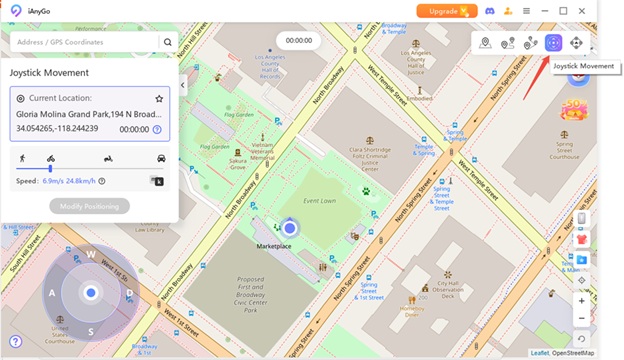
Download Tenorshare iAngGo on your Windows or Mac. Open it and choose “Joystick Movement” mode. Connect your phone to the computer with a USB cable. This links your phone to the virtual joystick so you can control Pokémon GO safely.
Step 2: Turn Your Computer into a Virtual Joystick
iAngGo makes your computer act as a GPS joystick. Your character can move on the Pokémon GO map without walking outside. This is helpful if you can’t go far or want to play from home.
Step 3: Set Your Movement Speed
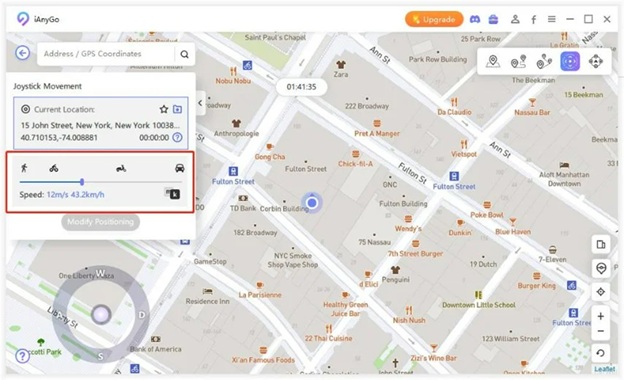
Pick a speed like walking, cycling, or driving. Keep it realistic so it looks natural in the game.
Realistic speeds help avoid being flagged by Niantic and keep your account safe.
Step 4: Control Your Character
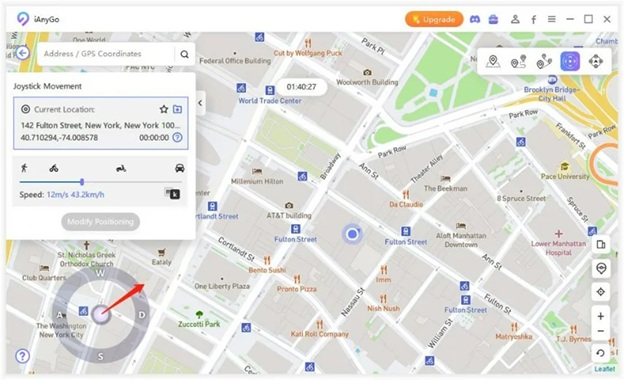
Use the on-screen joystick to move your character. Press the Left or Right arrow keys to change direction while moving. This lets you move and explore freely in Pokémon GO.
Step 5: Play Safely and Enjoy the Game
Wait for cooldown timers after teleporting to a new location. Then you can catch Pokémon, hatch eggs, and join events safely. Following these tips helps you enjoy the game without getting banned.
That’s how you can use Pokémon Go joystick iOS without getting banned.
Part 4: FAQs about Pokémon GO Joystick
Q1: Can you still use a Pokémon GO joystick in 2026?
Yes, you can still use a Pokémon GO joystick in 2026, but it’s important to use updated and trusted tools like iAnyGo. Old or unverified apps may not work and can lead to account bans, so always choose safe and regularly updated software to enjoy the game without interruptions.
Q2: Is it possible to use a Pokémon GO joystick on Android for free?
Some free joystick Android Pokémon Go are available, such as PGSharp trial versions, but these usually have limited features and higher ban risks. Paid apps are safer, more reliable, and updated more frequently to ensure smooth gameplay. Using free mods requires extra caution to prevent detection and protect your Pokémon GO account.
Q3: Can Pokémon GO joystick tools or resources be patched by Niantic?
Yes. Niantic frequently updates Pokémon GO to detect and block outdated or unauthorized spoofing tools. Only joystick apps that are regularly maintained and compatible with the latest game versions are safe to use, so always check for updates before playing. Using old or unsupported tools can result in warnings, temporary bans, or permanent account loss.
Q4: Does the Pokémon GO joystick support iOS 17 and iOS 18?
Yes, some updated joystick apps like iAnyGo support both iOS 17 and iOS 18. Proper setup is required, including connecting your device through a computer and using the app’s recommended modes, such as Bluetooth Game Mode, to ensure safe and smooth gameplay without triggering Niantic’s anti-cheat systems.
Conclusion
A Pokémon GO joystick makes the game more accessible and enjoyable for players with limited mobility, few nearby PokéStops, or busy schedules. Although there are some risks, using a trusted tool and following safety guidelines can help keep your account secure. Tenorshare iAnyGo stands out in 2026 by offering a virtual joystick and natural movement simulation without requiring jailbreak or root, allowing players to safely enjoy Pokémon GO events and rewards from anywhere.