DD
MM
YYYY

PAGES

DD
MM
YYYY

spot_img

PAGES

Home Blog Page 4070

Young People, Win the Future; Challenges have clocks but strong minds have TIME

0

If you do not like your teacher, you will likely not do well in the class. If you do not like your school, you will likely struggle in your program. And if you do not like your nation, you will likely see only obstacles.

But remember that book – Acres of Diamonds – and setting out for a journey to find diamonds, without knowing that you have been living on top of one for ages. Young People, the greatest challenge is the Liberation of the mind. Simply, your mind can condition your awareness and observation to opportunities.

If your mind is closed, fixated with pessimism, the illumination to see opportunities and abundance will not come. I find it troubling when I see young people naturally in a state of bitterness. That has to change. And asking you to modulate does not mean I do not understand the challenges. 

Yes, life is not a cluster of clocks, and as you grow older, you will understand. Visit San Francisco, the home of Silicon Valley, wait for 7pm, you will see men and women scavenging food in trash cans, outside restaurants. Visit New York City at 5am, you will see homeless men and women waking up under trenches of skyscrapers. It is the same beautical America, with unbounded opportunities, but here, some are lost!

Challenges have clocks but strong minds have TIME. Renew your mind and open it for more positive things, and good things will find space in your mind. I say win the victory of your mind, and unlock exuberance to activate the energy for positive ACTION. 

Recover Your NAS Data and Files With Recoverit

0

Introduction

In today’s digital age, data is at the heart of almost every aspect of our lives, whether personal or professional. With the increasing amount of data generated daily, storage solutions have become necessary. Network-attached storage (NAS) is a popular option for individuals and businesses to store and share large amounts of data across networks.

However, like any storage solution, NAS is also susceptible to data loss or corruption, which can be disastrous for the user. This is where NAS data recovery software like Recoverit comes in, as it can help users retrieve lost or deleted data from their NAS devices. This article will explore the importance of recovering NAS data and how Recoverit can be a helpful solution.

What Is NAS and How Can It Be Lost?

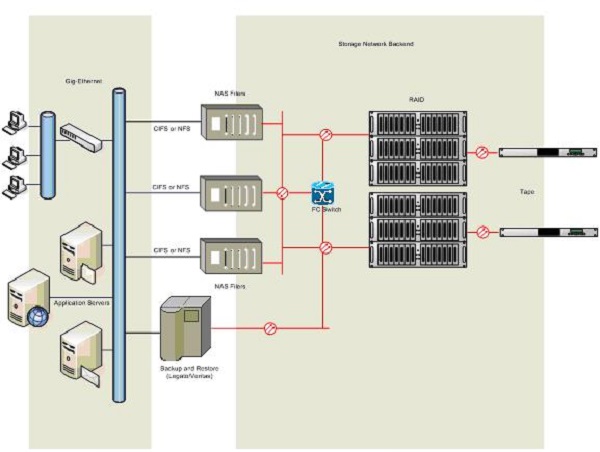
Network-attached storage (NAS) enables users to store, share, and access data over a network. It consists of a specialized device connected to a network and can be accessed by multiple users simultaneously. NAS devices have one or more hard drives and can be configured with various RAID (Redundant Array of Independent Disks) levels for data redundancy and protection.

NAS devices are popular among individuals and businesses, as they provide a centralized location for storing and sharing large amounts of data. They also offer various features such as remote access, media streaming, and backup capabilities, making them a versatile solution for managing data.

Data loss can occur for various reasons, ranging from hardware failure to human error. Some of the most common causes of data loss include:

  • Hardware failure is one of the most common causes of data loss, and it can happen due to many reasons, such as power surges, overheating, and physical damage to the storage device.
  • Human errors such as accidental deletion, formatting, or overwriting of data can lead to data loss. It can happen due to various reasons, such as user error, software bugs, or malware infections.
  • Malware and viruses can infect a computer or storage device, leading to data loss or corruption. Ransomware attacks, in which the attacker demands payment in exchange for releasing the data, are becoming increasingly common.
  • Natural disasters such as floods, fires, and earthquakes can damage or destroy physical storage devices, leading to permanent data loss.
  • Theft or physical damage to a storage device can result in data loss. It is necessary to have backups to protect against such events.

Typical Data Recovery Methods?

Losing important data from a NAS device can be a frustrating and stressful experience. However, there are several ways to recover lost NAS data. The choice of recovery method depends on the nature of the data loss and the type of NAS device being used. Here are some of the most common ways to recover lost NAS data:

Logical data recovery

Logical data recovery is recovering lost or deleted data from a storage device without physical damage. This type of recovery is usually used when the data loss is due to software or logical issues. Logical data recovery involves using specialized software to scan the storage device and recover lost data.

Physical data recovery

Physical data recovery is the process of recovering lost or inaccessible data from a storage device that has suffered physical damage. This type of recovery involves repairing or replacing the damaged components of the device to retrieve the data.

Instant data recovery

Instant data recovery is a type of recovery that allows users to retrieve lost data in real-time without any downtime. This type of recovery is usually used in businesses where time is of the essence, and any downtime can result in significant losses.

Continuous protection of data

Continuous data protection is a type of recovery that involves creating data backups in real-time or at regular intervals. This type of recovery is beneficial for businesses that need to ensure the continuity of their operations, even in the event of data loss.

Wondershare Recoverit – A Brilliant Tool To Recover Lost NAS Data

Recoverit is a data recovery software developed by Wondershare. It is designed to help users recover lost, deleted, or formatted data from various storage devices, including NAS servers, Linux systems, hard drives, USB drives, memory cards, and more. With its advanced algorithms, Recoverit can retrieve data lost for various reasons, such as accidental deletion, formatting, virus attacks, system crashes, etc.

Technical Specifications:

  • Operating System: Windows 10/8.1/8/7/Vista/XP, macOS 11.0 to 10.9
  • File System: FAT16, FAT32, exFAT, NTFS, HFS+, APFS
  • Processor: 1GHz (64-bit) or higher
  • RAM: 256 MB or more
  • Storage: 100 MB of free space

Key Features:

  • Recover over 1000 file formats, including photos, videos, documents, emails, and more
  • Support for various storage devices, including NAS, hard drives, USB drives, memory cards, and more
  • Advanced scanning algorithms for fast and accurate data recovery
  • Preview files before recovery to ensure the correct data is retrieved
  • Simple and user-friendly interface

Price:

  1 Month License 1 Year License Perpetual License
Essential $59.99 $69.99 $119.99
Standard $69.99 $79.99 $139.99
Premium $79.99 $99.99 $159.99


Note: The Essential Plan can only perform hard drive and location recovery. The Standard Plan can also recover the crashed computer based on the essential one. Besides the two functions, the Premium plan can recover NAS and Linux and restore photos and videos.

A Step-by-Step Instruction on How To Recover Data From NAS Server Using Recoverit

You may have never imagined that recovering data with a NAS server is not complicated, even without professional knowledge. Recoverit makes the process possible with the following steps.

Step 1: Download and install Recoverit on your computer.

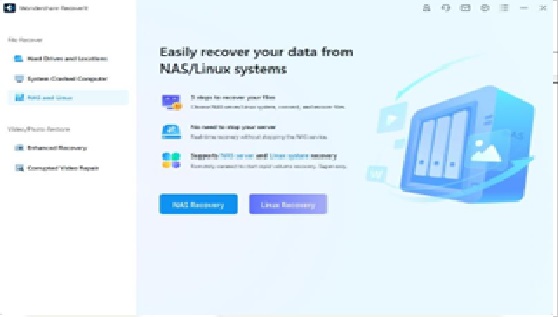
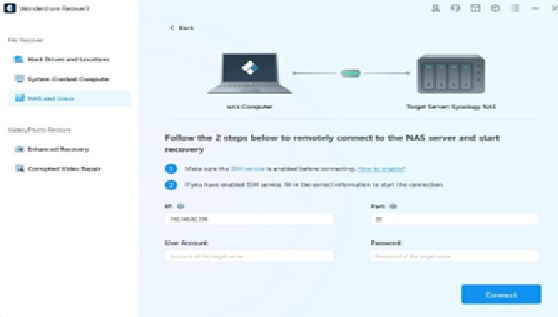
Step 2: Search for the NAS and Linux options in the left bar and click them. After that, click NAS Recovery.

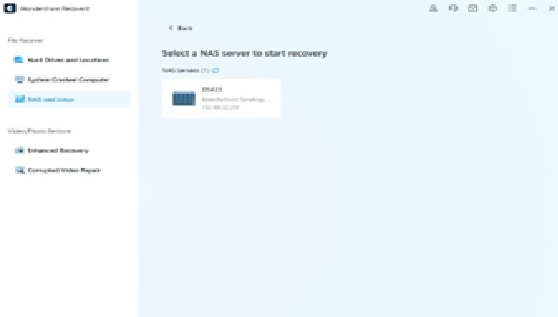
Step 3: Recoverit will search for the NAS storage device on which you lost the data. Once completed, you will see NAS detectable device under NAS Servers on your screen.

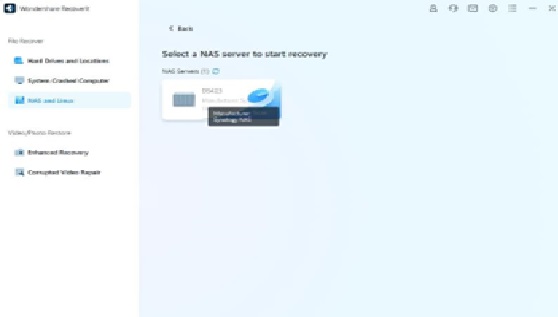
Step 4: Look for the device where you lost the data and click on it to move forward.

Step 5: Recoverit will develop a remote connection right after you press the Connect button. Scanning will then take place. Here, you need to fill the information to make the connection. Don’t worry, Recover is totally safe and all your data will be protected well.

Step 6: Once the scanning is completed, the software will allow you to preview the files you wish to return to your computer. Click Recover to start the restoration process. The software will ask you to select a path to save the restored data.

Conclusion

In conclusion, Network Attached Storage (NAS) devices are prone to data loss for various reasons, such as hardware failure, software corruption, accidental deletion, etc. Having a reliable data recovery solution to retrieve lost or deleted data is crucial.

Recoverit is an excellent option for recovering data from NAS devices, offering advanced features such as logical and physical data recovery, instant data recovery, and continuous data protection. With its user-friendly interface and affordable pricing, Recoverit is a highly recommended data recovery software for users who want to retrieve lost data from their NAS devices. Don’t let data loss be a setback, and give Recoverit a try today.

Ultimate Guide to External Hard Drive Recovery: Tips and Techniques

0

An external drive is a portable storage device that enables users to store and retrieve vast quantities of data, such as documents, images, movies, and music. It makes it straightforward to back up essential data and move files across devices. Despite their use, external hard drives are not immune to data loss.

Losing essential data from an external hard drive can be an unpleasant and stressful experience, particularly if the data is difficult to replace or recover. Fortunately, various disk recovery solutions are available to avoid data loss and recover erased information. This article will explore all the proper methods for external hard drive recovery. Let’s get started!

Common Causes of External Hard Drive Failures

External hard drives are useful devices for storing and accessing significant volumes of data. However, they are prone to various issues that might lead them to malfunction and destroy your data.

Here are some of the most prevalent reasons for external hard drive failures, as well as how they can influence your device:

  • Physical damage: Dropping your external hard drive, spilling liquid, or exposing it to severe temperatures or humidity might harm the outside casing or the drive’s internal components. Therefore, your computer can not detect the drive, make unusual sounds, or not spin at all.
  • Software issues: The issue might not always be with the hardware but with the software on your computer or external hard drive. For example, if you have a virus or malware infection, it might damage or prohibit you from accessing the contents on your disk. If your drivers are old or incompatible, you can encounter problems or poor performance while connecting your drive to your computer.
  • Accidental deletion: Deleting or formatting the disk or its partitions is one of the most typical human mistakes that can lead to external hard drive failure. This can occur if you misidentify your external drive as another device, use a third-party program that wipes your disk, or press the incorrect button.
  • Clicking or beeping noise: A clicking or beeping noise emanating from your external hard disk frequently indicates a mechanical breakdown. The phenomenon indicates that the head that reads and writes data on the drive’s platters is faulty or damaged. This can occur because of normal wear and tear, manufacturing flaws, power surges, or physical shocks.
  • Malware: Malware is harmful software that can infect your computer or external hard drive and create a variety of difficulties. Some viruses will encrypt your data and demand payment to unlock it, but others can erase or change your files without your knowledge.
  • Data corruption: Data corruption is the loss or change of data because of various circumstances, such as software faults, power outages, faulty sectors, incorrect shutdowns, or human mistakes. Individual files or whole partitions on your external hard drive might get corrupted, rendering them inaccessible or useless by your computer.

How To Recover Data From an External Hard Drive

Users have several options for recovering an external hard drive. This section discusses the one that best suits your situation and is most convenient.

Best External Hard Drive Recovery Software – Wondershare Recoverit

Wondershare Recoverit is one of the top external hard drive recovery software options. It is a robust and dependable program for recovering data from damaged, formatted, or destroyed external hard disks.

It supports over 1000 file types and can recover data from various conditions, including unintentional loss, virus attacks, system breakdown, power outages, etc. It also boasts a good recovery rate and a user-friendly UI.

Key Features of Wondershare Recoverit

Here are a few of its specifications and characteristics that you should know about:

  • Recover data from external hard drives of all varieties, including HDD, SSD, USB flash drive, SD card, etc. More than 2000 storage devices are supported.
  • Recover data from various file systems, including NTFS, FAT32, exFAT, HFS+, and APFS.
  • Recover data from various situations, including the recovery of deleted files, the recovery of the recycle container, the recovery of formatted disks, etc. Supports 500+ different data loss scenarios.
  • Recover various file categories, including photographs, videos, audio, documents, emails, and archives.

A Step-by-Step Guide to Recovering Data Using Recoverit

Let’s look at the step-by-step guide to external hard drive recovery using Wondershare Recoverit data recovery:

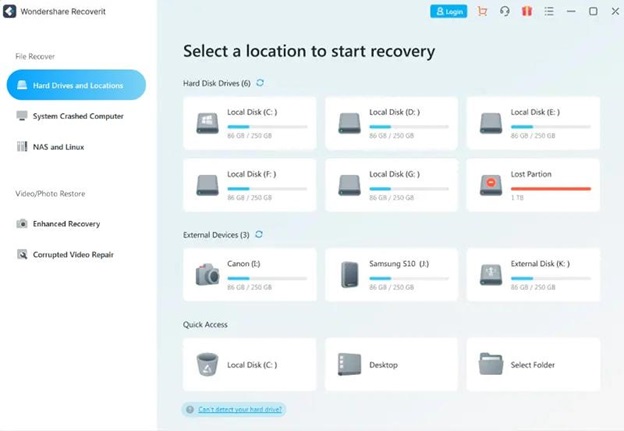
Step 1: Download and Install Recoverit on your computer by downloading it from the official website. Launch the application.

Step 2: In the program interface, select the external hard drive under External Devices from which you wish to recover deleted files, and the scanning process will start automatically.
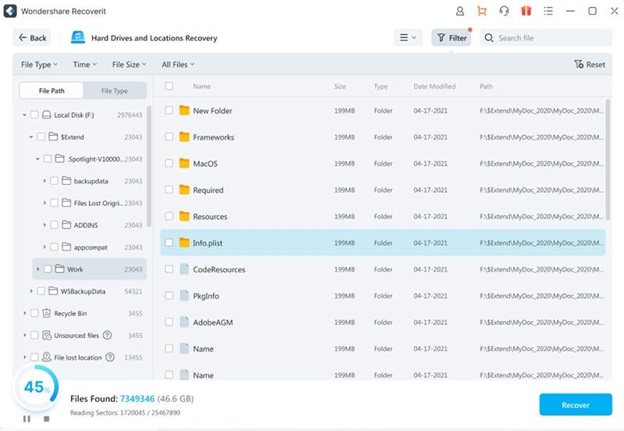
Step 3: All found contents on the examined drive will be displayed in File Path in the window after scanning.
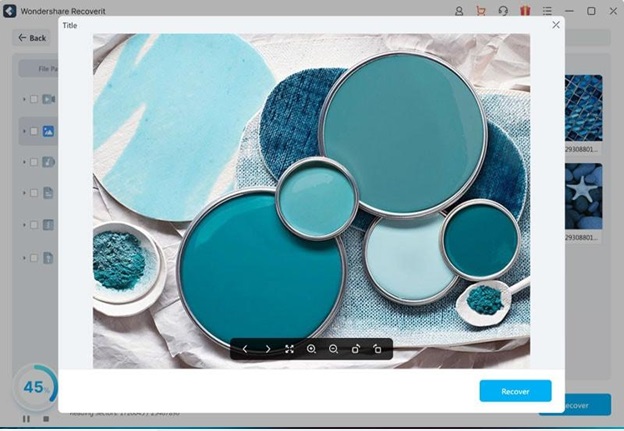
Step 4: You can view original file identifiers or preview some file types, such as vidoes, images and documents, to confirm whether it is the file you’re trying to recover. Click Recover to retrieve the selected files.
DIY External Hard Drive Fixes

Here are some of the DIY external hard drive fixes that you can try for yourself:

CHKDSK Command

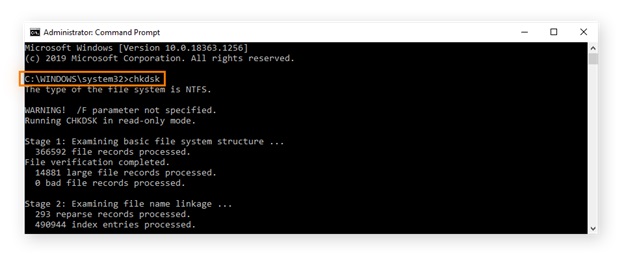
This Windows command can check and repair errors on your external hard drive. To use it, follow these steps:

Step 1: In the Start menu’s search bar, enter cmd (Command Prompt), then select Run as administrator.

Step 2: Type chkdsk and press Enter.

Note: CHKDSK will scan for drive errors and notify you if any need to be repaired, but it will not attempt to correct them unless given explicit instructions.
First Aid – Disk Utility

This Mac utility can verify and fix external hard drive errors. Follow these steps to use:

Step 1: Connect your external hard drive to your Mac and ensure the system recognizes it.

Step 2: Launch Disk Utility from the Applications > Utilities folder.
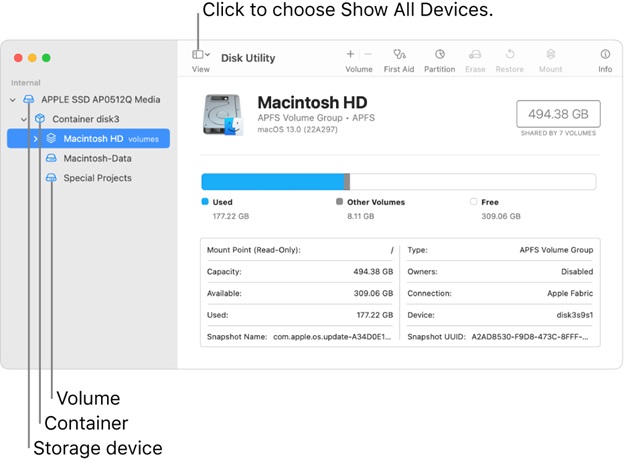
Step 3: Choose your external hard drive from the sidebar and select the First Aid icon at the top of the page.

Step 4: To initiate the verification and repair process, click Run. This will scan for errors on your external hard drive and attempt to repair them.

Note: Check the functionality of your external hard drive after the process is complete.

Driver Update/Reinstallation

Sometimes, the issue with your external hard drive could result from outmoded or corrupt drivers on your computer. Follow these instructions to update or reinstall the driver software:

Step 1: Connect your external hard drive to your computer and ensure the system recognizes it.

Step 2: Press Win+X and then select Device Manager from the menu to launch the Device Manager.

Step 3: Right-click your external hard drive after expanding the Disk devices category. Choose Update Driver from the context menu.
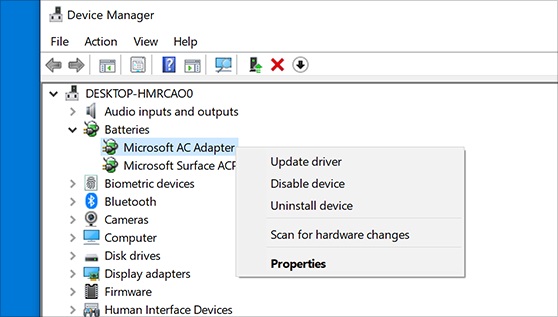
Note 1: Follow the on-screen instructions to install the most recent driver for your external hard drive.

Note 2: If updating the driver does not work, you can attempt to delete and reinstall it. To accomplish this, right-click the external hard drive in Device Manager and choose Uninstall device from the context menu. Confirm the action, then resume the system. When you reconnect, Windows will automatically reinstall the driver for your external hard drive.

Assistance from External Hard Drive Recovery Service Provider

If none of the previous solutions work, or if your external hard drive is physically damaged, you might need to seek expert help from a supplier of external hard drive recovery services. These professionals have specific equipment and procedures for recovering data from damaged or inaccessible external hard drives.

Increase Chances of Recovering External Hard Drive

Data loss on an external hard drive can be a painful and stressful experience, but there are numerous actions you can take to improve your chances of retrieving lost data. Here are some preventative measures you can take to keep external hard drive data loss from becoming permanent:

  • Don’t Delay: It’s critical to respond quickly if you discover data loss on your external hard disk. The longer you wait, the more probable the lost data will be overwritten or permanently lost. As a result, it’s critical to move promptly and begin the recuperation process as soon as feasible.
  • Use the best software – Recoverit: To improve your chances of successful data recovery, choose dependable and effective software like Wondershare Recoverit. It’s a sophisticated tool with many scanning modes and innovative algorithms for recovering lost data from external hard disks. Using reputable software such as Recoverit can help you recover your data quickly and effectively.
  • Prevent overwriting: Overwriting is a method of permanently erasing lost data from an external hard disk. Stop using the external hard drive when you detect data loss to avoid this. Save no new files or applications to the disk since this would overwrite the lost data and render it unrecoverable. Also, properly remove the external hard drive from the computer and keep it somewhere safe and dry until the recovery procedure is finished.

Conclusion

External hard drive recovery is critical for preventing data loss caused by various factors. They may include physical damage, unintentional deletion, virus, or data corruption. Properly managing and storing the external hard drive is essential to minimize data loss and avoid exposure to high temperatures, moisture, or physical damage.

In the event of data loss, acting quickly and utilizing a reputable recovery program such as Wondershare Recoverit might boost your chances of recovering the lost data. It is critical not to overwrite the data and to cautiously handle the external hard drive until the recovery procedure is complete.

In Tekedia Capital deal room, we have ten startups to breed to the level of unicorns; JOIN

0

In the deal room, we have ten startups to breed to the level of tech unicorns (companies worth at least $1 billion). Join us and provide your farm input because at Tekedia Capital, our mission is to build Africa’s next best companies. This investment cycle ends Nov 14, 2023. Become a member of our Syndicate .

Tekedia Capital offers a specialty investment vehicle (or investment syndicate) which makes it possible for citizens, groups and organizations to co-invest in innovative startups and young companies in Africa and around the world. Capital from these investing entities is pooled together and then invested in a specific company or companies.

Refik Anadol NFT collaboration with Brazilian tribe yields $3.9M, Reddit to sunset its blockchain-based reward service

0

Refik Anadol, a renowned Turkish media artist, has collaborated with the indigenous Kayapo tribe of Brazil to create a series of unique NFT artworks that celebrate their culture and history. The project, titled “Kayapo: Guardians of the Forest”, was launched on October 15th on the SuperRare platform and has already generated over $3.9 million in sales in just one week.

The NFT collection consists of 10 pieces, each featuring a different aspect of the Kayapo’s way of life, such as their rituals, dances, crafts, and environmental activism. The artworks are based on Anadol’s signature style of using artificial intelligence and machine learning to transform data into stunning visuals. In this case, the data comes from the tribe’s own archive of photos, videos, and audio recordings, as well as satellite imagery of their territory in the Amazon rainforest.

Anadol said he was inspired by the Kayapo’s resilience and wisdom in preserving their ancestral lands and traditions in the face of threats from deforestation, mining, and climate change. He said he wanted to use his art to raise awareness and support for their cause, as well as to honor their rich and diverse heritage. He also said he was humbled by the opportunity to collaborate with them and learn from their knowledge and values.

The Kayapo tribe, which numbers around 9,000 people, is one of the largest and most influential indigenous groups in Brazil. They have been fighting for decades to protect their rights and their environment from encroachment and exploitation by outsiders. They have also been actively involved in the global movement for indigenous sovereignty and environmental justice.

The NFT project is part of a larger initiative called “Kayapo Futures”, which aims to empower the tribe with digital tools and platforms to preserve and share their culture, as well as to generate income and resources for their communities. The initiative is led by the Kayapo Cultural Association (AKA), a non-profit organization that represents the tribe’s interests and needs. AKA partnered with Anadol and SuperRare to create and distribute the NFT artworks.

According to AKA, 80% of the proceeds from the NFT sales will go directly to the tribe, while 20% will be used to cover the costs of the project and support AKA’s ongoing work. The funds will be used for various purposes, such as improving health care, education, communication, and infrastructure for the Kayapo villages; supporting their environmental monitoring and protection activities; and promoting their cultural preservation and expression.

The NFT project has received widespread acclaim and attention from both the art world and the crypto community. Many collectors have praised the artistic quality and innovation of the artworks, as well as the social impact and significance of the collaboration. Some of the pieces have sold for hundreds of thousands of dollars each, with one piece fetching over $1 million.

The project has also sparked a debate about the ethical and environmental implications of NFTs, which are often criticized for their high carbon footprint and potential exploitation of artists and communities. Anadol and AKA have addressed these concerns by stating that they have taken measures to minimize the environmental impact of the project, such as using renewable energy sources and offsetting emissions. They have also stressed that they have followed ethical principles and best practices to ensure a fair and respectful collaboration between the artist and the tribe.

“Kayapo: Guardians of the Forest” is an example of how NFTs can be used as a powerful tool for artistic expression, cultural preservation, social change, and economic empowerment. It is also a testament to the vision and talent of Refik Anadol, who has once again pushed the boundaries of art and technology with his groundbreaking work.

Reddit to sunset its blockchain-based reward service as Yuga Labs focusses on building Otherside Meta

Reddit, the popular social media platform, has announced that it will be discontinuing its experimental Community Points program, which was based on blockchain technology. The program, which was launched in May 2020, allowed users to earn and spend cryptocurrency tokens on Reddit’s Ethereum-based Rinkeby testnet. The tokens could be used to buy special memberships, badges, and other features on select subreddits.

According to Reddit, the decision to sunset the Community Points program was based on several factors, including user feedback, technical challenges, and regulatory uncertainties. Reddit stated that the program did not achieve its intended goals of fostering more engagement, quality content, and community governance on the platform. Moreover, Reddit faced difficulties in scaling the program to its millions of users, as well as complying with the complex and evolving laws and regulations around cryptocurrencies.

Reddit also acknowledged that the Community Points program had some positive impacts, such as introducing many users to the concept and potential of blockchain technology, as well as creating a sense of ownership and belonging among some communities. Reddit thanked the users who participated in the program and provided valuable feedback and suggestions. Reddit also assured the users that their existing Community Points balances will not be affected by the discontinuation of the program, and that they will be able to access and transfer their tokens until December 31, 2023.

Reddit said that it will continue to explore new ways to empower its users and communities, and that it remains open to experimenting with blockchain technology in the future. Reddit also invited developers and innovators who are interested in collaborating with Reddit on blockchain-related projects to reach out to them.

In a different shift, Yuga Labs, the company behind the popular NFT project Bored Ape Yacht Club, has announced a major restructuring that will see it focus on developing its new metaverse platform, Otherside. In a blog post published over the weekend, Yuga Labs CEO Daniel Alegre explained the rationale behind the decision and what it means for the future of the company and its community.

According to Daniel Alegre, Yuga Labs has been working on Otherside for over a year, and it is now ready to launch it to the public. Otherside is described as a “social and creative metaverse” where users can explore, create, and interact with each other using their NFT avatars. Daniel Alegre said that Otherside will be compatible with any NFT project that meets certain standards, and that it will offer a variety of features and experiences for users to enjoy.

Daniel Alegre also revealed that as part of the restructuring, Yuga Labs will spin off its NFT division into a separate entity, called Yuga Art. Yuga Art will be responsible for managing and expanding the Bored Ape Yacht Club and its sister projects, such as Mutant Ape Yacht Club and Bored Ape Kennel Club. Gekko said that Yuga Art will continue to innovate and deliver value to its loyal collectors and fans, and that it will collaborate with Yuga Labs on integrating its NFTs into Otherside.

Daniel Alegre concluded his blog post by thanking the Yuga Labs team and the community for their support and trust and expressing his excitement for the future of the company and its projects. He said that he believes that Otherside will be a game-changer for the NFT space and the metaverse industry, and that he invites everyone to join him on this journey.